
You have plugged something into your iPhone's USB-C port, nothing has happened, and you are already wondering whether the port is damaged. Hold on before you book a repair.
Three iPhones on sale right now cannot send video out of that port at all. Not with a better cable, not with the right adapter, not ever.
So the first thing I would do is find out what your port was built to do. Half the faults people chase turn out to be a capability the phone never had.
What your port is wired for, model by model
Apple publishes this in two places that do not point at each other, which is why almost nobody assembles it.
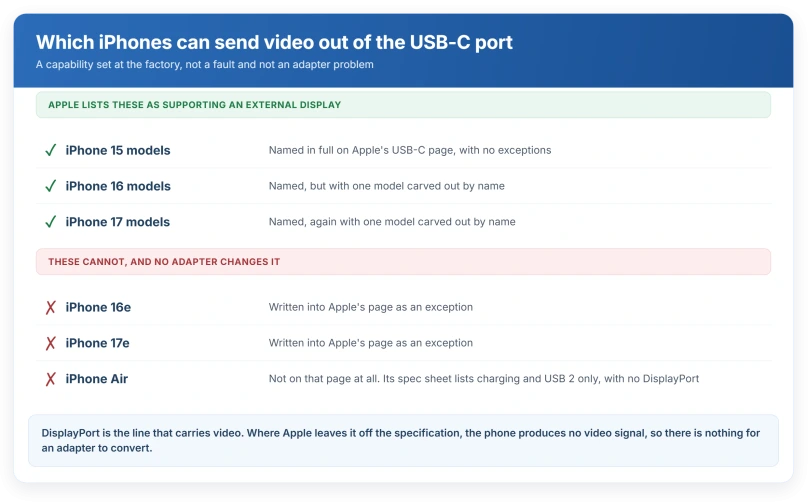
Vendor-documented. Apple's USB-C on iPhone page introduces the list like this: "These iPhone models support connecting to external displays using the USB-C connector, so that you can watch video, see photos, and more on a larger screen:"
Underneath it, Apple lists exactly three entries:
- iPhone 17 models (except iPhone 17e)
- iPhone 16 models (except iPhone 16e)
- iPhone 15 models
Read the exceptions twice. iPhone 16e and iPhone 17e are carved out by name.
Vendor-documented, from the spec pages. Apple lists what each connector supports, and the lists differ:
- iPhone 17 Pro: Charging, DisplayPort, USB 3 (up to 10Gb/s).
- iPhone 17: Charging, DisplayPort, USB 2 (up to 480Mb/s).
- iPhone Air: Charging, USB 2 (up to 480Mb/s). That is the whole list.
Ours: DisplayPort is the line that carries video. Where it is missing from the spec, no adapter puts it back, because the phone is not producing a signal for the adapter to convert.
Find your model in that list before you buy anything. I would hate you to spend money on an adapter for a phone that was never going to send video out at all.
The iPhone Air is the awkward one, and Apple never says so
Vendor-documented, by absence. The words "iPhone Air" do not appear anywhere on Apple's USB-C page. It is not in the supported list and it is not in the exceptions.
So an Air owner reading Apple's own page cannot work out why their monitor stays black. The answer is only on the spec sheet, in a list that quietly lacks one word.
User-reported. A MacRumors thread titled "iPhone Air USB-C no DisplayPort??" has owners working this out for themselves, and an Apple Community thread titled "hdmi out with iphone air" asks the same question.
We are claiming no volume here, because no reply count or confirmation was gathered.
Ours: if your phone is an Air and the screen never wakes, the port is fine. There is nothing to repair and nothing to reset.
If yours is an Air, I am sorry to be the one to tell you, but no cable or adapter is going to change that.
The cable in the box will not hit the speed on the box
This one catches iPhone 17 Pro owners who paid for the fast port.
Vendor-documented. Apple, on the same page: "The USB-C cable that comes with your iPhone supports charging and USB 2 speeds. If you want to use a USB 3 device, use a compliant USB 3 cable that supports 10Gbit/s."
USB 2 tops out at 480Mb/s. USB 3 on the Pro runs to 10Gb/s. That is roughly twenty times, and the cable in the box gives you the slower one.
Ours: a transfer that crawls is the expected result of the supplied cable, not a failing port. Only the Pro models do USB 3 at all, so on any other iPhone a faster cable changes nothing.
The wall charger works but the computer does nothing
This is the most fixable thing on the page, and the setting has moved since the Lightning era, so the route people remember is not the route any more.
Vendor-documented. The route is Settings, Privacy & Security, scroll down to Security, then Wired Accessories.
Apple, on its accessory permission page: "If you don't unlock your device, it won't communicate with the accessory and it might not charge. However, your device will charge as usual when connected to a USB power adapter, even if you don't unlock it."
That sentence explains the exact split people describe. The wall plug charges. The laptop, the car, the dock and the drive do nothing.
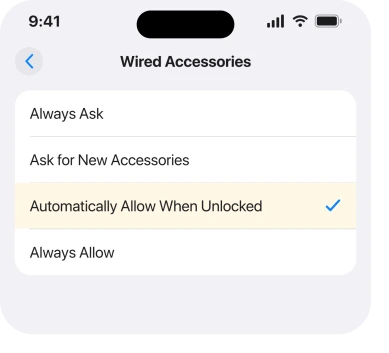
Vendor-documented. On a USB-C iPhone this is four choices, not a switch: Always Ask, Ask for New Accessories, Automatically Allow When Unlocked, and Always Allow.
Apple names Automatically Allow When Unlocked as the default.
Ours: the old location was Settings, Face ID & Passcode, USB Accessories. If an instruction sends you there on a USB-C phone, it was written for a Lightning one.
Dirty, damaged, or neither
Apple gives you one genuinely sharp test, and it takes no tools.
Vendor-documented. Apple's page on the accessory alert lists the causes: "This alert might appear when your accessory is damaged, isn't Apple-certified or supported by your device, or your device has a damaged or dirty port."
Then the useful part: "If this alert appears and you don't have any accessories connected, you might need service."
An alert with nothing plugged in is the one symptom Apple treats as hardware. Everything else on that page is about the accessory or the debris.
If your phone is showing a liquid warning rather than an accessory one, that is a separate question and our page on a liquid detected alert on a dry phone covers what it does and does not prove.
The cleaning step that Apple tells you not to do
Vendor-documented, and it is a flat prohibition. Apple's cleaning page says "Don't use compressed air." It then names it again inside a longer sentence: "Don't use window cleaners, household cleaners, compressed air, aerosol sprays, solvents, ammonia, or abrasives to clean your iPhone unless following the instructions for disinfecting your iPhone."
That last clause is about disinfecting wipes, not about blowing air into a port. The prohibition on compressed air has no exception attached to it.
Apple's own instruction for debris is gentler than that. From the accessory page: "check the connectors on the accessory and your device for damage or debris. If necessary, gently remove the debris and clean the connectors on your device."
Ours: gently is doing real work in that sentence, and Apple never names a tool for it.
The full method, including Apple's warranty warning about forcing a connector and what not to do on a phone showing a liquid alert, sits on our charging list, in the order to test things.
That is the right page for a port taking no power at all, and this one is for a port that powers the phone but will not do anything else.
What Apple does not publish about the port
Worth knowing before you book a repair, because the gaps are real.
Vendor-documented. Apple's Parts and Service History reports five things: Battery, Display, Logic Board, Front camera and Rear cameras.
The connector is not one of them. So a phone with a previously replaced port shows you nothing.
The parts it does report carry labels of their own, and those are widely misread.
Our page on what the Unknown battery label actually means sets out the four causes Apple documents for it, only one of which is a counterfeit.
Ours, and stated as a gap rather than a finding: we found no Apple page giving a test for a loose port, for bent pins, or for a cable that only charges at an angle, which is the thing people actually search for.
Any such test you meet is somebody's judgement, including ours.
Status: iOS 26.6, checked 15 August 2026. Apple's USB-C page still does not mention iPhone Air in either its supported list or its exceptions.
One version-specific fault, and it is already fixed
Vendor-documented. iOS 26.5.1 shipped on 1 June 2026, for iPhone 17 models and iPhone Air only.
Apple's release note: it "addresses an issue for a small number of users that may prevent wired charging on iPhone Air and iPhone 17 models when the battery is nearly drained".
If you are on 26.6 you already have that fix. It is the one documented software cause of a dead-looking port, and it is narrow: a nearly flat battery on those specific phones.
Why does my iPhone charge but not connect to my computer?
Most often the accessory permission, not the port. An iPhone that has not been unlocked since you plugged in will take power from a wall adapter and refuse to talk to a computer, which Apple states plainly. Unlock the phone with the cable already connected, then check Settings, Privacy & Security, Security, Wired Accessories.
Why will my iPhone not connect to a monitor?
Check the model before the cable. Apple lists external display support for iPhone 15 models, iPhone 16 models except the 16e, and iPhone 17 models except the 17e. The iPhone Air's specification does not include DisplayPort, so it cannot output video regardless of which adapter you buy.
Is my USB-C port broken or just dirty?
Apple's one clear signal is an accessory alert appearing when nothing is plugged in, which it says may mean service. Short of that, Apple's advice is to check both connectors for damage or debris and remove it gently. Apple publishes no test for a loose or bent port, so treat any such checklist as opinion.
The Short Version
- Three phones on sale cannot output video at all: iPhone Air, iPhone 16e and iPhone 17e. No adapter fixes that.
- Apple never mentions iPhone Air on its USB-C page, so the answer is only on the spec sheet.
- The cable in the box is USB 2 on every model, including the Pro, whose port can do twenty times that speed.
- Charges from the wall but dead on a computer is usually the Wired Accessories permission, and it moved in Settings.
- An accessory alert with nothing connected is the one symptom Apple ties to service.
- Apple bans compressed air on your iPhone, in print, twice.
- Parts and Service History never reports the connector, so a past port repair is invisible to you.
Where to Next
Check what your port was built to do before you spend anything. A phone that was never able to output video is not a phone with a broken port, and no cable or adapter changes that.
Then work through the permission and the cleaning, in that order, because one is free and instant and the other you can only do once carefully.
If your model should support what you are trying and it still does nothing, drop me a comment with the model and what you plugged in.

Isaac Smith is the founder and editor of PC Glance, a website that covers computers, laptops, and technology. He is a tech enthusiast and a computer geek who loves to share his insights and help his readers make smart choices when buying tech gadgets or laptops. He is always curious and updated about the latest tech trends.