
Call Forwarding is not in your Settings at all, and you have been through the Phone screen three times looking for it.
That is a genuinely confusing one, and I want to save you the next hour, because most of the causes are not on your phone.
Apple puts one condition on this feature that almost nobody quotes, and it decides whether the row can exist for you at all.
Six reasons. Quickest first.
1. Look in the right place, because the row moved
Start here. Older instructions send people to a screen that no longer exists.
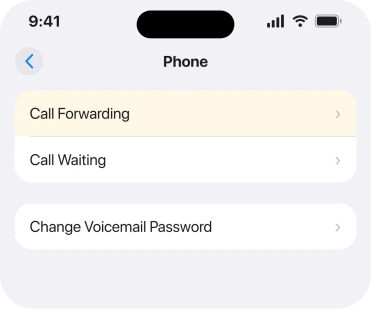
Apple, in Set up call forwarding on iPhone: "Go to the Settings app on your iPhone. Tap Apps, then tap Phone. Tap Call Forwarding, then turn on Call Forwarding."
Settings, Apps, Phone. Not Settings then Phone. That is where guides written before the app settings moved will send you.
Once it is on, Apple gives you the confirmation to look for: "The Call Forwarding icon appears in the status bar when call forwarding is on."
Row genuinely not on that screen? Then the rest of this page is for you.
2. Check whether your line is GSM or CDMA, because Apple limits this
This is the condition. It is the reason a lot of people never find the setting.
Apple, in the same page's opening line, says you can set up call forwarding "if you have cellular service through a GSM network".
Then, plainly: "If you have cellular service through a CDMA network, contact your carrier for information about setting up call forwarding."
Read that carefully. On a CDMA line, your phone is not where this gets set. Apple is sending you to the carrier instead.
That one sentence explains the whole shape of this problem. If your carrier runs on that side of the fence, the row is not hiding from you. It was never going to be there.
3. On a dual SIM iPhone, choose the line first
Quick. And it catches people who have the row but think it does nothing.
Apple: "On models with Dual SIM, choose a line."
Two numbers, two sets of carrier features. One of your lines may support forwarding while the other does not. Open the wrong one and you get an empty or unresponsive screen.
The line picker is on the Call Forwarding screen itself. Open Settings > Apps > Phone > Call Forwarding, choose the line by name there, then set the switch for that line.
4. Get on the cellular network before you set it, not Wi-Fi
Now the requirement that makes a correctly configured phone fail silently.
Apple: "You must be in range of the cellular network when you set iPhone to forward calls, or calls won't be forwarded."
So doing this at home over Wi-Fi with a weak signal can leave you with a setting that looks saved and does nothing. Same if your phone is leaning on Wi-Fi Calling.
Go somewhere with real bars. Check your status bar shows the network rather than Wi-Fi. Then set the forwarding, and test it by ringing yourself from another phone.
If calls are failing rather than forwarding, that is a different fault and iPhone Call Failed covers it.
5. Accept that the Phone settings belong to your carrier
The rung that saves people from resetting a phone that was never at fault.
Lawrence Finch, a Level 10 member with 238,088 points, said it three separate times on one thread carrying 416 Me Too votes.
His words: "Phone settings are set by the carrier, so if you are missing a setting you need to contact your carrier." He added that "Apple does not control the settings in the phone app related to carrier features", and that not all carriers allow forwarding to be configured from the handset at all.
He also warned about the shortcut people reach for: "*67 is not universal; not all carriers support it."
Two practical things came out of that. First, check for a carrier settings update at Settings > General > About. That is what refreshes the feature list your phone is allowed to show.
Second, if you ring them, ask for higher-level technical support rather than a retail store. The setting lives on their network provisioning.
6. If they say it is enabled and the row is still gone
The narrowest case. Also the one with no fix behind it.
On that thread, the original poster had carrier confirmation that forwarding was enabled on their account, and nobody posted a fix.
The thread ran from October 2023 into 2024 with other owners reporting the same thing and asking whether it was ever resolved. It was not.
So I am not going to invent a step for you. What is worth doing, in this order. Install any carrier settings update. Restart properly.
Then ring the carrier back and ask specifically whether conditional call forwarding is provisioned on your line, which Apple names as a carrier matter: "If your carrier supports conditional call forwarding when the line is busy or not in service, contact them for setup information."
Then ask them to set the forwarding from their end. On plenty of networks that is the only route, and it works whether or not your phone ever shows the row.
If your real problem is that calls are not reaching you at all, calls going straight to voicemail is a different page with different causes.
What does not help
- Resetting all settings. The row is drawn from carrier provisioning, not from your preferences.
- Erasing and restoring. Same reason, and it costs you a day.
- Dialling star codes and hoping. A Level 10 member points out those codes are not universal across carriers.
- Updating iOS. No release adds a carrier feature your account does not carry.
Status: iOS 26.6.1, checked 19 August 2026. The GSM condition, the dual SIM line and the cellular range requirement are Apple's own wording. No confirmed fix exists for a missing row on a provisioned account.
Why is Call Forwarding missing from my iPhone settings?
Usually because the feature is carrier-provisioned rather than an Apple setting. Apple documents it as available on GSM service and tells CDMA customers to contact their carrier instead, so on some lines the row is never shown.
Where is Call Forwarding on iOS 26?
Settings, then Apps, then Phone, then Call Forwarding. It is no longer directly under Settings then Phone, which is where older guides send people.
Why does call forwarding not stick on my iPhone?
Apple states you must be in range of the cellular network when you set it, or calls will not be forwarded. Setting it on Wi-Fi with little or no signal can leave you with a switch that looks on and does nothing.
Can my carrier set up call forwarding for me?
Yes, and on some networks that is the only way. Ask for higher-level technical support rather than a store, and ask specifically about conditional forwarding when the line is busy or unavailable.
The Short Version
- The route on iOS 26 is Settings, Apps, Phone, Call Forwarding.
- Apple documents the feature for GSM service and sends CDMA customers to their carrier.
- On dual SIM you have to pick the line first.
- You must be on the cellular network when you set it, not Wi-Fi.
- Phone settings are drawn from carrier provisioning, not from Apple.
- Nobody on the busiest thread fixed a missing row from the handset.
Where to Next
What makes this page different from the others on the subject is that it does not pretend there is a hidden toggle. Two of the six reasons are conditions rather than faults, and one of them is written into Apple's own first sentence.
So work through the route, the line and the signal. Five minutes. If the row is still absent after that, stop looking at your phone. Spend the time on the carrier instead.
Did your carrier manage to set the forwarding from their end?
And if a FaceTime call launches a different app, that is a default rather than a fault.
That is the outcome I most want to hear about, because the forum record has plenty of people asking and nobody reporting back, and a few real answers would tell readers whether that call is worth making.

Isaac Smith is the founder and editor of PC Glance, a website that covers computers, laptops, and technology. He is a tech enthusiast and a computer geek who loves to share his insights and help his readers make smart choices when buying tech gadgets or laptops. He is always curious and updated about the latest tech trends.