
Your games ran smoothly on your Pixel before Android 17. Now the frame rate stutters, taps land late, and the phone gets hot in your hand. That is frustrating on a phone you paid good money for, and there is good news: Google lists a fix.
I checked the notes Google shipped with its September update, its help pages on warm and slow Pixels, and three owner threads on its forum. Here I cover the fix, and what helps while you wait.
Smooth before, choppy after
A Pixel 10 Pro owner put it the way you might: "My pixel badly lagging especially in gaming". A volunteer suggested heat or too many open apps, and the owner replied that the lag started after the Android 17 update.
If your whole phone feels slow, not just games, you are not alone. A Pixel 9a owner saw it everywhere: "Typing is delayed, camera lags, zoom stutters, scrolling isn't smooth, and apps take longer to respond."
They had "already performed a factory reset" and tested safe mode. Nothing changed.
On a Pixel 9, it went further. After a short spell in a pocket, "the phone felt warm, and the display was completely black and unresponsive."
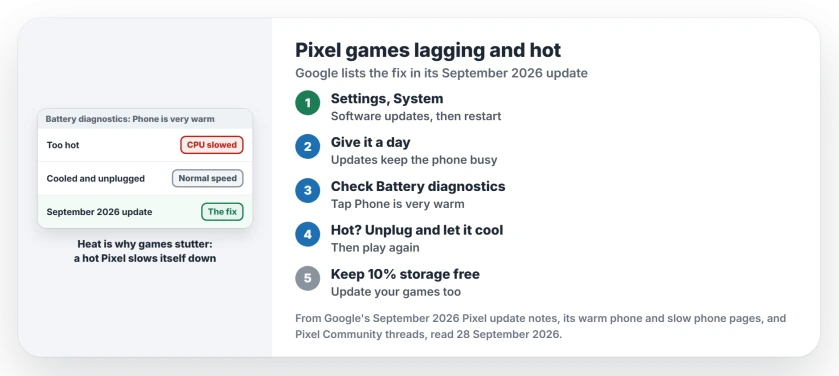
Status: checked on 28 September 2026. Game lag, choppy frame rates and heat in graphics-heavy tasks are on Google's fix list for the September 2026 Pixel update, for Pixel 6 and later.
1. Install the September update
Google's September 2026 update notes name the fault you are seeing, an issue "that causes game lag, choppy framerates, and increased device temperatures during graphics-intensive tasks".
The same notes fix a second cause of a sluggish phone. Android System Intelligence could make a Pixel unresponsive through slow database work. Both fixes apply to Pixel phones as old as the Pixel 6.
Your Pixel lists it in Settings, under System and then Software updates. Restart when it has installed. The new build takes over only after that restart.
2. Give it a day after any big update
Heat right after an update is expected. Google's update page says your battery "normally drains more than usual as the phone works to download, optimize, and set up the new software."
A forum volunteer gave the Pixel 9 owner the same reason. After a major update, "your phone does heavy background processing to re optimize apps and system files". So I would judge your games a day after updating, not an hour after.
3. Check the heat, and let it cool
On a Pixel 6 or later, open Settings, then Battery, then Battery diagnostics, and tap Phone is very warm. Documented by Google, that screen shows your phone's temperature and advice.
Heat is also why games stutter. Google's warm phone page says your phone "may start to limit some functions when it senses that it's too hot." The first item on its list: "Reduce CPU performance."
When it is hot, Google's advice is plain: unplug it, move it somewhere cooler, and leave it alone until it cools. Gaming while charging adds heat, so unplug for long sessions.
4. Update your games and free up space
Google's slow phone page warns: "Your phone can have issues when less than 10% of storage is available." Check Settings, then Storage.
Then update your apps in the Play Store, since a game built for Android 16 may run badly until its developer catches up. I would do this before you try anything bigger.
If the screen goes black and hot
In the Pixel 9 thread, an owner got out of it by holding Power and Volume Down. That fix is user-reported, not Google's. The phone showed a startup menu, they chose Start, and in their words it "has been fine" since.
If that happens to you, let the phone cool before you use it again. Then install the September update, since it targets this kind of heat.
Before you factory reset
A reset did not help the Pixel 9a owner, and it costs you setup time. I would update, wait a day and free up space first.
If your phone is hot even when you are not gaming, the overheating page covers what to do first. And if it is slow everywhere, the slow Android page explains storage against memory.
Why do my games lag on my Pixel after Android 17?
Google lists a fault that caused game lag, choppy frame rates and heat during graphics-heavy tasks. The September 2026 Pixel update carries the fix.
Why does my Pixel get hot when I play games?
Games work the processor hard. When your phone gets too hot, Google says it may reduce CPU performance, which makes games stutter.
Will a factory reset fix the lag?
It did not for a Pixel 9a owner who tried it. Install the September update first.
Should I play games while my Pixel is charging?
Better not for long sessions. Google lists heavy use while charging among the things that warm your phone.
The Short Version
- Some Pixels lagged in games after Android 17.
- They also ran hot in heavy apps.
- The September update has Google's fix.
- It covers Pixel 6 up to Pixel 10a.
- Give the phone a day after updating.
- Unplug and let it cool when hot.
- Keep 10 percent of storage free.
Where to Next
Install the September update, restart, and give your Pixel a day to settle. Then play the game that stuttered and see if it holds.
If it still lags, name your model and the game in a comment. Those reports show me where the fix fell short.

Isaac Smith is the founder and editor of PC Glance, a website that covers computers, laptops, and technology. He is a tech enthusiast and a computer geek who loves to share his insights and help his readers make smart choices when buying tech gadgets or laptops. He is always curious and updated about the latest tech trends.