
Your AirPods ran beta firmware all through the iOS 27 summer, and now they refuse to move to the public release. That is annoying after days of charging by your iPhone. I would find the beta switch before you book a repair.
Owners on MacRumors found the way out, and Apple's developer page explains why it works. There is a catch. The switch only shows on a device running beta software.
Why the AirPods stay on beta
Apple says: "Once installed on your AirPods, the beta software cannot be removed." That rule is the root of it. Apple adds: "Your device will continue to run this software until an updated non-beta software version is released."
Until then, Apple says, you keep getting beta updates "as long as you've enabled your AirPods to receive them".
The switch is tied to beta software. Apple says that to get the AirPods beta, "you'll need a device running a beta version of" iOS 27 or macOS 27, so it vanishes once your iPhone is back on the public release.
One owner hit exactly that. In their words: "I don't even have the option for beta software in the AirPods settings section anymore".
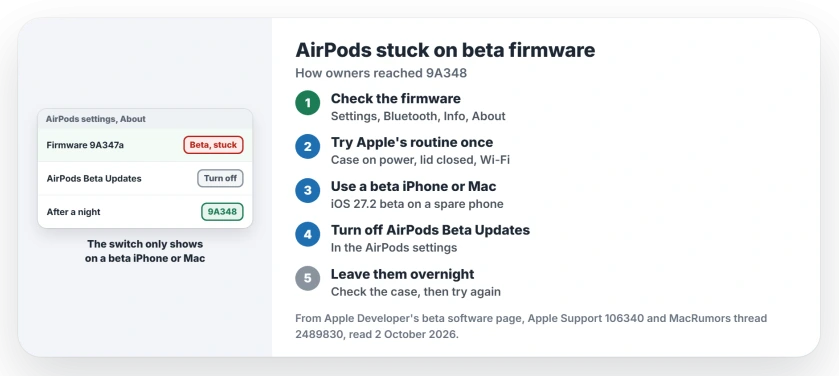
Status: checked 2 October 2026. Two MacRumors owners moved their AirPods from beta firmware 9A347a to 9A348 by turning off AirPods Beta Updates on a device running the iOS 27.2 beta.
1. Check the firmware number
Start in Settings, then Bluetooth. Tap the Info button for your AirPods and scroll to About. The owners who were stuck saw 9A347a there.
Apple's firmware list gives 9A348 as the current version for AirPods Max 2, AirPods Pro 3, AirPods Pro 2 and AirPods 4. If yours show it, you are done.
2. Try Apple's normal update routine once
Apple's routine is the case on power, the lid closed, and your iPhone nearby on Wi-Fi for 30 minutes or more. If that fails, it suggests a reset and another try.
Stuck owners had done all of that. One wrote that their AirPods "have been plugged in for 2 full days and did not update even after multiple resets".
3. Turn off AirPods Beta Updates on a beta device
Apple keeps the switch in AirPods settings. You reach it through Bluetooth and the Info button, and Apple says to repeat those steps to turn beta updates off. You need the iOS 27 or macOS 27 beta to see it.
That is what worked. One owner reported: "Ok so updating to 27.2 and turning off beta on the AirPods worked. Both my pro 3 and 4 are now on 348."
4. Borrow a spare device if you can
Your main iPhone does not need the beta. A second owner wrote that they would "install iOS 27.2 beta on my spare iPhone, link the AirPods to it, turn the firmware betas off and let them update".
It paid off. In their words: "my AirPods 4 have now updated". Apple lists a Mac on the macOS 27 beta as another way to reach the same switch.
5. Leave them overnight, then check the case
Give them a night in the case. The case itself can lag behind, and one owner found the earbuds updated but the case did not: "However the pro 3 case is on 347a."
A second try can finish the job, and owners report both parts updating in the end. The other owner said theirs updated "both the pods and the case", though only "on the second attempt".
If your iPhone is now on the beta and you want to leave it, the iOS 27 beta downgrade page explains what going back costs. And once your AirPods reach 9A348, the AirPods EQ page shows where the new equalizer lives.
Can I remove beta firmware from AirPods?
No. Apple says beta software on AirPods cannot be removed, and they keep running it until a newer non-beta version is released.
Why is AirPods Beta Updates missing from my settings?
Apple ties the AirPods beta to a device running beta iOS 27 or macOS 27. One owner on the public release found the switch gone from their AirPods settings.
Will my AirPods leave the beta on their own?
Apple says they run the beta until a newer non-beta version is released. Stuck owners waited days with no change.
The Short Version
- AirPods beta firmware cannot be removed.
- The beta switch only shows on a device running a beta.
- Owners stuck on 9A347a could not reach 9A348.
- Turning off AirPods Beta Updates on the iOS 27.2 beta fixed it.
- A spare iPhone keeps your main one off the beta.
- Leave them charging overnight near that device.
- Check the case too, and try again if it lags.
Where to Next
Check the firmware number now. If it still says 9A347a, line up a spare iPhone or Mac on the beta for tonight.
If your AirPods Max 2 stay stuck even after the switch is off, say so in a comment. That model had no result in the thread yet, and I want to fill that gap.

Isaac Smith is the founder and editor of PC Glance, a website that covers computers, laptops, and technology. He is a tech enthusiast and a computer geek who loves to share his insights and help his readers make smart choices when buying tech gadgets or laptops. He is always curious and updated about the latest tech trends.