
You open Publisher for the newsletter or card you make every year, and it has gone from Microsoft 365. Years of .pub files suddenly feel stuck. I would save each one as a PDF today, while any copy of Publisher still opens it.
Microsoft set the dates months ago, and they have now arrived. Its Q&A board holds more than 20 questions about it from this year alone, one from an owner with hundreds of files.
The two dates Microsoft set
Microsoft says: "In October 2026, Microsoft Publisher will reach its end of life". Two dates sit under that sentence, and which one applies depends on how you pay for Office.
For subscribers the date has passed. In Microsoft's words, "Microsoft 365 subscribers will not be able to access Publisher after October 1, 2026".
For a copy you bought once, the date is 13 October. Microsoft states that "Support for the perpetual version of Publisher will end on October 13, 2026, when Office LTSC 2021 and Consumer Office 2021 reach end of support".
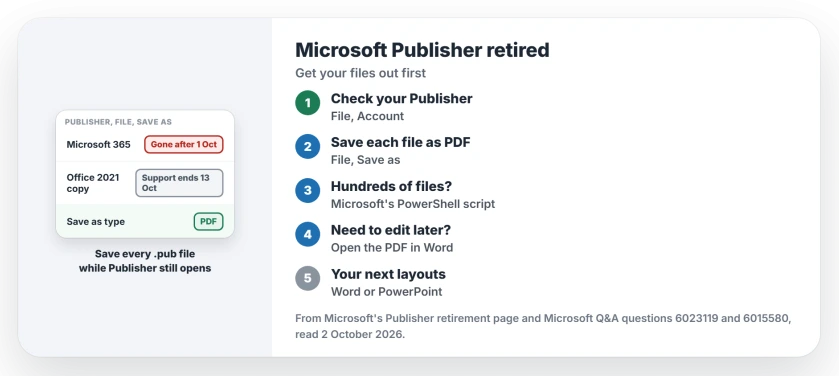
Status: checked 2 October 2026. Publisher left Microsoft 365 after 1 October 2026; one-time purchase copies keep running, with support ending 13 October 2026.
Which Publisher do you have?
Ours: open Publisher if it still starts, then File, Account. The product name there tells you whether it came with a Microsoft 365 subscription or a one-time purchase such as Office 2021.
A one-time copy keeps working. A Microsoft moderator told one owner with Office Professional 2021 that "you can continue using the application and accessing your existing Publisher files".
A subscription copy is on borrowed time. Treat any Publisher that still opens as a last chance to get your files out.
Save every file as a PDF while it still opens
On 1 October, one owner found that "I could still manually open existing .PUB files with Publisher 365 App". They saved files under new names that way. Do not count on that lasting.
Microsoft's own route: open the file, go to File, Save as, choose a folder, pick PDF as the file type and save. A PDF keeps the layout, which is what you want for a record.
Keep the .pub files as well. If you or a friend ever have a working copy of Publisher again, the originals are still the editable version.
Hundreds of files? Use Microsoft's script
Microsoft publishes a PowerShell script that converts a whole folder in one go. Its Publisher retirement page links to it, with examples for one file, a folder and every subfolder.
There is a catch. The page says: "Ensure you have a working and licensed version of Publisher installed on your computer". The script drives Publisher, so it stops once Publisher no longer opens.
One owner ran out of time with a script that Copilot wrote for them. It only looked in one folder, so files elsewhere missed the deadline, though "I had converted most of them".
Need to edit it later? Turn the PDF into Word
Microsoft's second route keeps your text editable. Save the file as a PDF first, then open Word, choose File, Open, and pick the PDF.
Word converts it. Microsoft warns that "its layout may vary from the original PDF", especially in pages with many graphics. Ours: expect to tidy a brochure, while a text-heavy letter fares better.
If you look further, third-party converters that read .pub files exist too. Microsoft's view of them is blunt: "These services vary in quality and capabilities, and Microsoft does not provide support for them".
Where your next flyer gets made
Microsoft points flyers, brochures, certificates and business cards to Word or PowerPoint. For banners, signs and posters it names PowerPoint alone.
If your Publisher work was flyers or cards, that covers it. One owner chose a different road and is moving to Affinity's free layout app instead.
If a PDF ever refuses to save from Windows itself, Microsoft Print to PDF problems have their own fix.
Office's other recent change, Office 2016 or 2019 going missing after an update, is a separate story.
Can I still open .pub files after October 2026?
With a one-time purchase copy of Publisher, yes. With Microsoft 365, Microsoft says subscribers cannot access Publisher after 1 October 2026, so save your files as PDFs while any copy still opens them.
Will Publisher 2021 keep working after support ends?
Yes. A Microsoft moderator confirmed that a one-time purchase copy keeps opening your files. It simply stops getting fixes and security updates after 13 October 2026.
How do I convert Publisher files to Word?
Save each file as a PDF in Publisher, then open the PDF in Word with File, Open. Word converts it, though pages with many pictures may lose their layout.
The Short Version
- Microsoft 365 lost Publisher after 1 October 2026.
- One-time copies keep working, unsupported after 13 October.
- Save every .pub file as a PDF while Publisher opens.
- One owner could still open files on 1 October.
- Microsoft's script converts whole folders.
- Open a PDF in Word to edit it again.
- Word and PowerPoint take over new layouts.
Where to Next
Search your PC, OneDrive and any USB sticks for .pub files today, because old newsletters hide in odd folders. Then open each one and save it as a PDF, starting with the ones you would hate to lose.
If your Microsoft 365 copy of Publisher still opens after this week, post the date in the comments. Other readers are counting the days.

Isaac Smith is the founder and editor of PC Glance, a website that covers computers, laptops, and technology. He is a tech enthusiast and a computer geek who loves to share his insights and help his readers make smart choices when buying tech gadgets or laptops. He is always curious and updated about the latest tech trends.