
Your internet keeps dropping while the Wi-Fi or Ethernet icon still says connected. You run the troubleshooter, it reports "The default gateway is not available. Fixed", and a few hours later you are back at square one.
I would reset the network stack and reinstall your adapter, rather than lean on the troubleshooter. That ended the drops for one owner whose PC was the only one on the network losing it.
On the biggest Microsoft Q&A thread about it, 500+ people report the same drop.
What the message means
An adviser on that thread puts it simply: "The default gateway is the technical term for that router." Your PC has lost contact with the router.
Check your other devices first. One asker noticed: "No other devices on my network have the issue, it's just my PC." Another wrote: "We have other Windows 10 PCs and laptops but none of them has this issue."
Owners report that pattern on both threads. Microsoft's own advice draws the same line: if another device connects fine, look at yours.
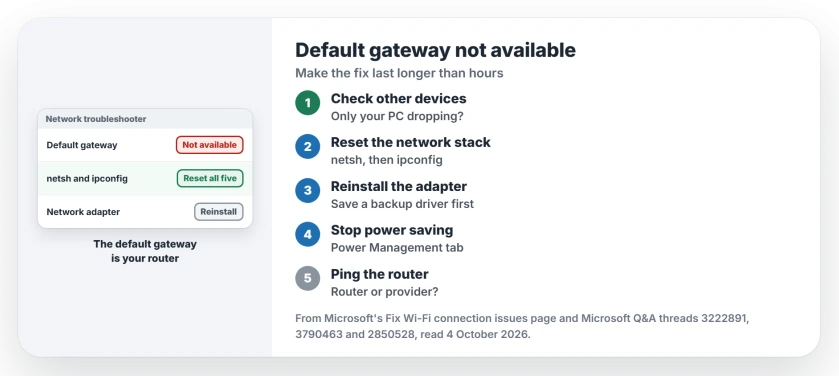
Status: checked 4 October 2026. An owner stopped the drops with the netsh and ipconfig resets plus an adapter reinstall; the troubleshooter's fix lasts only hours.
Why the troubleshooter fix fades
The 500+ asker described the cycle: the troubleshooter "does fix it, but after about two hours it disconnects again". A 10+ asker found the same: "Unfortunately, running the troubleshooter doesn't permanently fix the problem."
Ours: the troubleshooter restarts your adapter, which brings the connection back. Whatever knocked it off is still there, so it happens again.
Reset the network stack
Open Command Prompt as administrator. Start with netsh winsock reset, then netsh int ip reset. Those two put Windows networking back to its defaults.
Next, ipconfig /release and ipconfig /renew ask the router for a fresh address. Finish with ipconfig /flushdns, which clears the saved web addresses. Restart when they are done.
Microsoft's Wi-Fi help page lists the same five, in that order.
Skip netsh int reset all, which one advice list on the 10+ thread includes. The asker got this back: "The following command was not found: int reset all."
Reinstall the adapter
Microsoft says to keep a backup driver ready before you uninstall anything. Save a copy of your adapter's driver from your PC maker's site first.
In Device Manager, open the Network adapters group. Right-click yours, choose Uninstall device, tick the box to remove its driver, and restart. Windows puts the driver back by itself.
The 10+ asker did the commands and the reinstall. Two days later: "Good news, your initial suggestions seem to have fixed the issue!"
They added: "I haven't had any disconnects since I posted my comment from before." They wondered if it "just needed some time to take effect". So give it a day before you judge.
Stop Windows switching the adapter off
Power saving can cut the link too. One asker lost it after every sleep: "When the PC goes to sleep, it got disconnected and can't reconnect again".
The top answer on the 500+ thread has 50+ helpful votes. It says to "disable any option related to energy saving" on the adapter.
Its Properties window may have a Power Management tab. Clear the tick that allows the PC to power it down. Microsoft lists the same step.
Many newer laptops no longer show that tab. The setting has moved on those, and I would follow that page instead.
Ping the router to split the blame
Type ipconfig and note the number beside Default gateway. Then type ping followed by that number, such as ping 192.168.1.1.
Replies mean your PC reaches the router. In that case Microsoft points at the modem or your provider.
No replies mean the link to the router is failing. Ours: try a cable, or sit near the router, before blaming either.
Security software can be part of it
The 500+ asker tried their firewall next: "I just reset the firewall settings on Norton." It helped for two days, then they wrote: "I reset the firewall settings, but no luck."
Ours: if a third-party security suite manages your network, ask its maker's support about its network settings. Keep it running while you do.
Network reset comes last
Microsoft saves network reset for last. It removes every network adapter and its settings, then reinstalls them fresh.
You will need your Wi-Fi password again afterwards. Microsoft notes VPN software may need setting up again too. Our no internet page covers what else it costs.
What did not help
A first round of resets, for the 500+ asker before they posted: "I have uninstalled the adapter, reset the network settings, checked my firewall, but still won't work."
A full Windows reset, for the asker of a 40+ thread in 2024: "I just recently reset my computer (removed all my files), and during the setup, the computer connected, but I have no internet access."
What is the default gateway?
It is your router, seen from the PC. Everything your PC sends to the internet goes through that one address.
Why does only my PC lose the default gateway?
If other devices stay online, the cause sits on your PC. The threads point to the adapter's driver, its power setting or the network settings. The resets and the reinstall cover all three.
Is my router broken?
Ping it. If the router answers, Microsoft points at the modem or your provider instead. If it does not, test with a cable before replacing anything.
The Short Version
- The default gateway is your router.
- Other devices fine? Your PC's adapter is the suspect.
- Reset with netsh and ipconfig, then restart.
- Reinstall the adapter, with a backup driver saved first.
- Stop Windows switching the adapter off to save power.
- Network reset last, because it wipes every adapter.
Where to Next
Download your adapter's driver from your PC maker now, while the connection works. Then run the five commands and restart.
If the drops come back, note how long after a restart they start. That timing, posted in the comments, separates a power setting from a failing adapter.

Isaac Smith is the founder and editor of PC Glance, a website that covers computers, laptops, and technology. He is a tech enthusiast and a computer geek who loves to share his insights and help his readers make smart choices when buying tech gadgets or laptops. He is always curious and updated about the latest tech trends.