
You press F5 to refresh a page, and the screen dims instead. Your F1 to F12 keys only do their job when you hold Fn, or the volume and brightness keys suddenly need Fn.
I would press Fn and Esc together first. Each top key has two jobs, and one switch decides which you get without Fn.
A Lenovo owner's Super User question about it, asked in June 2017, now counts 180,448 views. An owner on Microsoft Q&A whose new keyboard wanted Fn for every F key drew 20+ matching reports.
One row of keys, two jobs
Your top row carries F1 to F12 and the printed icons for volume, brightness and the like. Laptops pick one set as the default and put the other behind Fn.
Most ship with the icons first. ASUS says of its own laptops, "Their default setting is Hotkeys".
Windows itself offers no switch for this. An independent adviser on Q&A told one owner the keys are "controlled by the PC manufacturer, not Windows", because each maker assigns its own actions.
Ours: this laptop is an ASUS TUF A17. Its Armoury Crate app has a Function key lock setting with two choices, Normal Fn key and Locked Fn key.
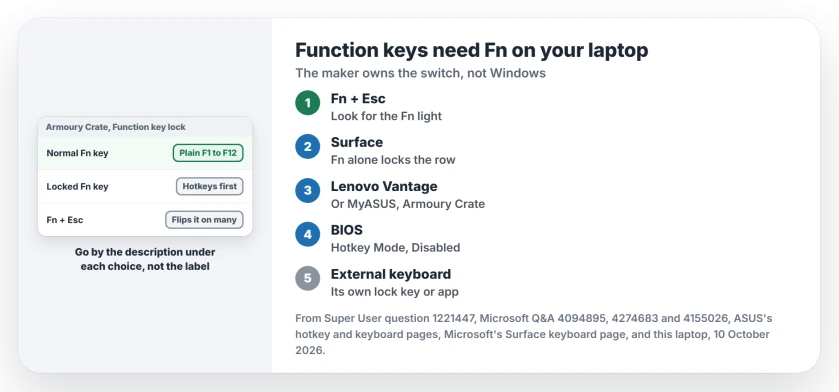
Status: checked on 10 October 2026 against ASUS's hotkey and keyboard pages, Microsoft's Surface keyboard page and Q&A owners. Fn and Esc or the maker's app flipped it.
1. Press Fn and Esc once
Many laptops print a small padlock on Esc. Hold Fn, tap Esc, then try F5 in your browser.
ASUS lists it plainly, "Fn + Esc To enable or disable the function keys feature", and adds that this switching "is not supported on all models".
The tell is a light. ASUS says a small LED at the upper right of the Fn key marks the models that support it.
Surface keyboards use Fn alone. Microsoft says on its Surface keyboard page, "Press the Fn key to lock the function keys", and a light on Fn shows the lock is on.
Fn and Esc did nothing for several owners, a Lenovo ThinkBook among them. That is no fault. It means your switch lives elsewhere.
2. Use the maker's app
Most makers copy the switch into an app. Lenovo's is Lenovo Vantage. ASUS uses MyASUS, Armoury Crate or ASUS Keyboard Hotkeys.
A Lenovo owner on Q&A had the problem in reverse, arrow keys changing brightness and volume after, they suspected, a child pressed some keys. They found the setting in Vantage, and wrote "it's back to normal".
On ASUS, the hotkey page explains the F1-F12 option: with it chosen, you get F1 to F12 straight away, and hotkeys come with Fn.
Ours: Armoury Crate words its two choices by what F1 to F12 do. One reads "Press F1-F12 to initiate the F1-F12 function defined by your system or a specific app". The other reads "Press F1-F12 to initiate the specified hotkey function".
So the names can mislead you. In the app's own file, the plain F keys description sits with Normal Fn key, and the hotkey one with Locked Fn key. I would read the description, not the label.
3. Change Hotkey Mode in the BIOS
Your laptop may keep the switch only in the firmware. The accepted Super User answer, quoting Lenovo, says to open the Configuration tab and set Hotkey Mode to Disabled.
To get there on that Lenovo, restart and press F2, or Fn and F2, at the Lenovo logo. Some models use a small Novo button instead.
The Lenovo user guide quoted in that thread is clear about the trade: with hotkey mode off, "press the Fn key and the appropriate hotkey to access the corresponding hotkey function".
One commenter warned that not every firmware has the option, since some models only offer it in the maker's app and one Lenovo tablet had none at all.
Change only that setting, then save. If you are unsure about the firmware, I would take the app route instead.
An external keyboard is different
A desktop keyboard follows its own design, not your PC's. The 20+ asker had moved from a Dell keyboard to one with no Fn Lock key at all.
No owner reported a fix for that. If your keyboard has no lock key, look in its manual or its maker's app.
When the keys do nothing at all
If brightness never changes, with or without Fn, the trouble is elsewhere. A desktop monitor has no brightness slider in Windows, as the brightness slider page explains.
The same goes for the light under your keys. The backlight key is often Fn with a top-row key, and the keyboard backlight page covers what Windows can and cannot change.
The Short Version
- Each top-row key has two jobs, and your laptop maker picks the default.
- Press Fn and Esc once; a light near Fn often shows the lock.
- Surface keyboards lock with Fn alone.
- No luck? Use Lenovo Vantage, MyASUS or Armoury Crate, or Hotkey Mode in the BIOS.
- On ASUS, go by the description under each choice, not its name.
Where to Next
Got your F keys back? Name your laptop and what flipped it in a comment, Fn and Esc, an app or the BIOS.

Isaac Smith is the founder and editor of PC Glance, a website that covers computers, laptops, and technology. He is a tech enthusiast and a computer geek who loves to share his insights and help his readers make smart choices when buying tech gadgets or laptops. He is always curious and updated about the latest tech trends.