
Your local web server will not start because port 80 is taken. You run netstat, find the PID, and Task Manager says it is 4, the System process, which you cannot end.
I would not try to fight System itself. PID 4 is a stand-in: some service handed port 80 to a Windows driver, and one command names that service.
On Microsoft Q&A, the WampServer question about this is marked 60+, and Super User's October 2011 question about it shows 306,677 views.
Why netstat says System
Windows has a web listener inside the kernel, the HTTP.sys driver. Programs can ask it to answer for them. Kernel work shows up under PID 4. So every port HTTP.sys holds looks like it belongs to System.
The asker's own accepted answer on Super User, written after a long search, calls HTTP.sys a driver "started on demand by another service". That service is the one you need to find.
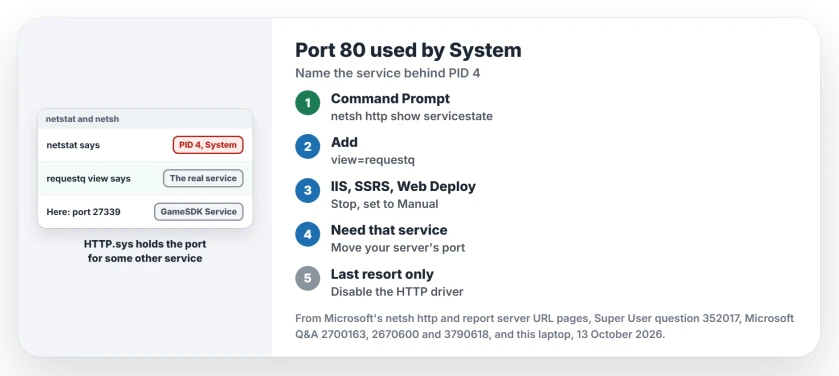
Status: netsh names the service behind PID 4, without admin rights, in Windows 11 25H2 as of 13 October 2026. Stop that service, or give your own server another port.
Ours: this laptop shows exactly that pattern. A port on 127.0.0.1 is listening with owning process 4.
Port 80 itself belongs to nginx, the web server inside a local WordPress tool I use. That is a normal program, so its own PID shows, as yours would.
1. Ask HTTP.sys whose port it is
Open Command Prompt or PowerShell and run this:
netsh http show servicestate view=requestqMicrosoft says in its netsh http reference that servicestate "Displays a current snapshot of the HTTP Service". The requestq view "Shows the state of the request queue".
Your output lists each request queue with the process ID and service attached to it. The web addresses it registered follow. Look for one with :80 in it.
Ours: I ran it without admin rights. The only queue on this laptop belongs to GameSDK Service, from ASUS. It registered an address on port 27339. Get-NetTCPConnection still shows that port as owned by process 4.
2. Stop the service you found
These are the names owners found when they fixed it:
- World Wide Web Publishing Service (W3SVC), which is IIS. One Q&A owner found IIS behind it and stopped it in services.msc, "and now XAMPP gives no error messages".
- SQL Server Reporting Services. The WampServer asker wrote "Microsoft SQL Server Reporting Service !!!!!", and then "Disabled it and apache installed successfully".
- Web Deployment Agent Service, which comes with Microsoft's web tools. A Super User commenter called it "Also the problem I was having (on Windows 10)".
Open Services, find the name, stop it and set its startup type to Manual. Then run netstat again, the same way as before, to check that your port 80 is free.
Reporting Services takes port 80 on purpose. Microsoft's report server URL page states: "Because the report server listens on port 80, you can omit the port number from the URL."
If you need it running, change its port in its own configuration tool.
3. Need that service? Move your own server
You may need IIS or Reporting Services. Then let your server use another port.
On Q&A, a XAMPP owner's port 80 belonged to NT Kernel and System, and they were told to change Listen 80 and ServerName localhost:80 in httpd.conf to 8012.
Confirmed by an owner in their reply: "I tried what you mentioned and it worked". Your local address then ends in :8012.
Should I disable the HTTP driver?
The asker did, by changing Start to 4 under the HTTP service key. It works for some. One commenter wrote: "The registry solution worked on Win8". Another found "this is the only one that worked" after trying many answers.
I would leave that until everything else has failed, because every service built on HTTP.sys stops with it.
On this laptop those are Windows Remote Management, Windows Media Player Network Sharing and Windows Event Collector. A later comment on that answer put it bluntly: "Disabling the HTTP.sys driver is not the right way".
That answer's Device Manager route is gone too. As a commenter noted: "The device manager approach isn't available from Windows 8 onwards".
If port 80 is free and your server still cannot bind, Windows may have reserved the range for Hyper-V. That case has its own check. And if your local site opens under the wrong name, look at the hosts file test.
The Short Version
- PID 4 on port 80 means HTTP.sys holds it for some service.
- netsh http show servicestate view=requestq names that service, no admin needed.
- Usual suspects: IIS (W3SVC), SQL Server Reporting Services, Web Deployment Agent Service.
- Stop it and set it to Manual, or move your server to another port.
- Disabling the HTTP driver also stops every service that depends on it.
Where to Next
Which service turned out to be sitting on your port 80? Name it in a comment. A game utility held a port on my own laptop, so odd answers help the next reader.

Isaac Smith is the founder and editor of PC Glance, a website that covers computers, laptops, and technology. He is a tech enthusiast and a computer geek who loves to share his insights and help his readers make smart choices when buying tech gadgets or laptops. He is always curious and updated about the latest tech trends.