

Your Mac's network or disk never rests, and Activity Monitor names idleassetsd as the cause. Force quit it and it simply starts again.
I would change the wallpaper and screen saver first, then decide whether its cache needs clearing. It is Apple's aerial downloader, not malware.
One owner's router showed more than 50 GB used in a single day, nearly all of it Apple traffic. The Ask Different question on it has 11,890 views.
What idleassetsd is downloading
Apple's manual page, quoted in one answer, says it "is used by the TVIdleServices framework for asset downloading and privileged operations". The assets are the aerial videos.
Apple's network list for businesses names the server, sylvan.apple.com, against "Aerial screen savers and wallpaper". Apple says an aerial marked with the download icon must be clicked "to download and use it".
Shuffle makes it worse. With a shuffle collection chosen, one answer found that "idleassetsd will download the wallpapers on-demand in the background as it's shuffling through them".
Ours: none. Nothing here ran on a Mac; Apple's pages explain the process, and owners supplied what made it stop.
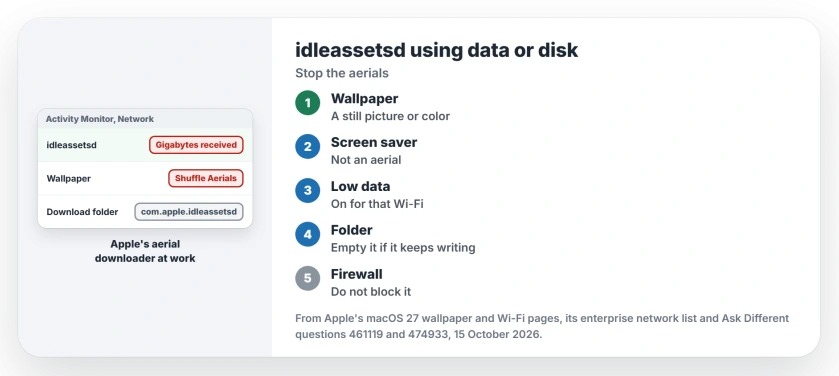
Status: Apple's macOS 27 wallpaper and Wi-Fi pages and its enterprise network list, with owner reports from Ventura to Sequoia; none from Tahoe or macOS 27 turned up. Assembled 15 October 2026.
1. Pick a still wallpaper and screen saver
Open System Settings and click Wallpaper. Choose a picture or a color instead of an aerial, and leave Shuffle Aerials off.
Then click Screen Saver and pick one that is not an aerial. Apple's wallpaper page notes that by default, "the aerial wallpaper you select is also used as your screen saver", so change both.
Switching works fast. The same answer saw that when you move to a wallpaper already on your Mac, "the download will be stopped immediately".
2. Turn on Low Data Mode for that network
Apple's Wi-Fi page says Low data mode will "Reduce your data usage over the Wi-Fi network". In System Settings, open Wi-Fi, choose Details beside the network you are on and switch it on.
The owner with the 50 GB day wrote that "applying the low data usage on the wifi settings also helped". On a phone hotspot or a capped plan, I would leave it on for good.
3. Clear its download folder
A still wallpaper does not always stop the disk writing. Owners report it carrying on regardless. One, with a picture wallpaper, saw idleassetsd "writing 100MB/s non stop for hours now", two terabytes in all.
What finally worked was emptying its folder in Library, Application Support. In their words, after the clean-out, "the problem is gone". Another owner called it the one fix that worked:
cd "/Library/Application Support/com.apple.idleassetsd" && sudo rm -rf ./*The owners ran the same delete as two separate commands, cd first and rm second. I joined them with && so nothing is deleted if the folder name is mistyped.
Expect two side effects. Any aerial you pick later downloads again. The answer's author also noted that "if you open the Settings app afterwards, it'll re-create Aerial.sqlite".
Apple does not document this folder. One owner on Sequoia found 46 GB of videos in it and called it "a rather complicated storage system".
The owners who cleared it emptied the whole folder rather than picking files. Your storage bar may show the space under System Data, and the System Data page explains what else lands there.
4. Do not block it with a firewall
Blocking its traffic made things worse. The 2024 asker found that blocking it "makes it spin with 120% CPU", and force quitting only restarts it.
Another reader who blocked it the same way said "my machine started getting very hot". It wants to finish a download. Take away the reason to download instead.
It is not the only Apple helper that runs away like this. mediaanalysisd does the same with Photos, for different reasons.
Does it ever stop by itself?
Sometimes. One owner said "it finally stopped after downloading about 43 GB of animated wallpapers". On a metered connection that is far too much to wait for.
Offline, it can do something stranger. A Sequoia 15.2 owner watched its memory climb past 21 GB with no network, and reported it to Apple. Going online made it level off until a restart.
The Short Version
- idleassetsd downloads Apple's aerial wallpapers and screen savers from sylvan.apple.com.
- Pick a still wallpaper, a screen saver that is not an aerial, and leave Shuffle Aerials off.
- Turn on Low data mode under Details for your Wi-Fi network.
- Still writing to disk? Owners emptied the com.apple.idleassetsd folder in Library, Application Support.
- Do not block it with a firewall; owners saw it spin and heat the Mac.
Where to Next
Which macOS are you on, and what finally quieted it? No Tahoe or macOS 27 owner has reported in yet, so your comment from either would fill a real gap for me.

Isaac Smith is the founder and editor of PC Glance, a website that covers computers, laptops, and technology. He is a tech enthusiast and a computer geek who loves to share his insights and help his readers make smart choices when buying tech gadgets or laptops. He is always curious and updated about the latest tech trends.