
You are halfway through a sentence on a Zoom or Slack call, and your Bluetooth headset mutes you as if you had pressed its button. You unmute, and soon it cuts you off again.
I would not buy new headphones over this. Two owners each bought a second pair, and the muting carried on, because the trigger was a call app setting on the Mac.
The Ask Different post from December 2021 has 7,092 views. Its answer was confirmed by the asker in their own words.
Why your headset thinks you pressed mute
The asker wore Sennheiser MB Pro 2 headphones on an M1 MacBook Pro running Monterey 12.0.1. In their words, "It mutes me as if I pressed the mute button on the headphones". The same headset never did it on Windows.
The accepted answer quotes an owner from Apple's forum with a different brand of headset. Their finding: "if you reduce the mic input level setting to zero then the Mac tells the headphones to mute".
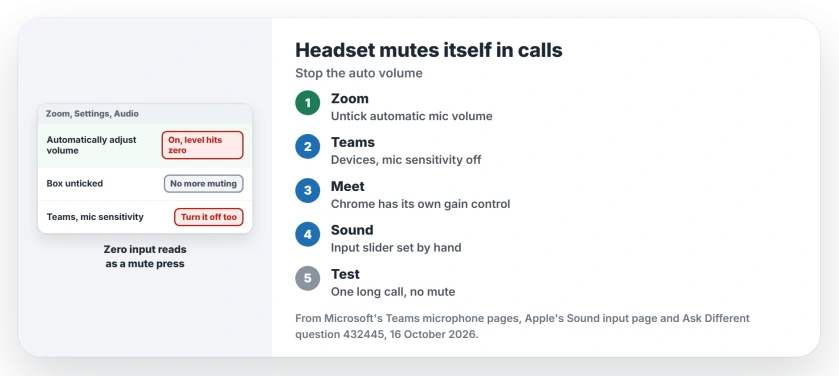
That is where automatic volume comes in. It drops your microphone level to zero when the app thinks you are quiet. Your headset reads that as a mute press.
Ours: none. I had no Mac and no headset with a mute button for this page, so it leans on Microsoft's Teams pages, Apple's Sound page and the thread.
Status: Microsoft's Teams device and microphone pages, checked 16 October 2026, back the Teams switch; the Zoom box is the asker's confirmed fix.
Turn off Zoom's automatic microphone volume
Open Zoom, click Settings, then Audio. Untick Automatically adjust microphone volume. Then drag the microphone slider to a fixed level that suits your voice.
The owner on Apple's forum had that box ticked, switched it off, and the constant muting stopped.
The asker tried the same and came back with "This was the cause of the issue." When another reader asked where the box lives, the asker gave that Settings, Audio path.
Teams has its own switch
The owner's answer warns that Teams does the same thing. Microsoft documents the switch on its Teams microphone page: open Settings, choose Devices, and turn Automatically adjust mic sensitivity off.
Microsoft's device page says the switch is there to keep you heard, but I would still turn it off for this fault. A level pushed to zero is exactly the signal your headset obeys as a mute.
Google Meet and Slack
Owners found no box like Zoom's for these two. One owner with Jabra earbuds saw the muting in Meet and Slack. A later reader said Meet still muted them after the Zoom change.
Another owner blames Chrome's own gain control. It has no switch in the browser settings.
Their fix was a Chrome extension called Disable Automatic Gain Control, which switches that control off. If you try it, take it from the Chrome Web Store. Remove it if the muting carries on.
Set the input level by hand
Apple's Sound input page puts the control under Sound in System Settings, on the Input tab. Pick your headset in the list and drag the input volume slider.
Keep it well clear of the left end. A slider parked near zero is the state the owner described, whichever app moved it there.
Did a macOS update fix it?
Not in every case. One reader heard that macOS 12.4 had fixed it. Another replied that Meet still muted them, while the other apps behaved once their settings changed.
I found no Apple note on it. Treat the app switches as the fix you control.
Why does it never happen on Windows?
The asker used the same headset with Zoom and Slack on Windows without a single mute. That points at how the Mac passes a zero level on, not at a faulty headset.
If your voice sounds faint rather than cut off, our page on a Mac microphone that sounds too quiet covers that fault. If the headset mutes with every call app closed, reset the headphones themselves next.
The Short Version
- The headset mutes when a call app drops your input level to zero.
- In Zoom, untick Automatically adjust microphone volume in Settings, Audio.
- In Teams, turn off Automatically adjust mic sensitivity under Settings, Devices.
- Meet in Chrome has its own gain control; one owner used an extension.
- Set the input slider in Sound settings by hand, away from zero.
Where to Next
Zoom, Teams or a browser call: which one was muting your headset? Name the headset in a comment. I am collecting models that do this.

Isaac Smith is the founder and editor of PC Glance, a website that covers computers, laptops, and technology. He is a tech enthusiast and a computer geek who loves to share his insights and help his readers make smart choices when buying tech gadgets or laptops. He is always curious and updated about the latest tech trends.