
You want to open WordPad in Windows 10, but searching for it gives you nothing useful. It's annoying when a familiar editor disappears.
I'll show you how to launch the installed app, check whether its optional feature is missing, and recognize the Windows version where Microsoft removed it entirely.
Search for WordPad, or launch it from Run
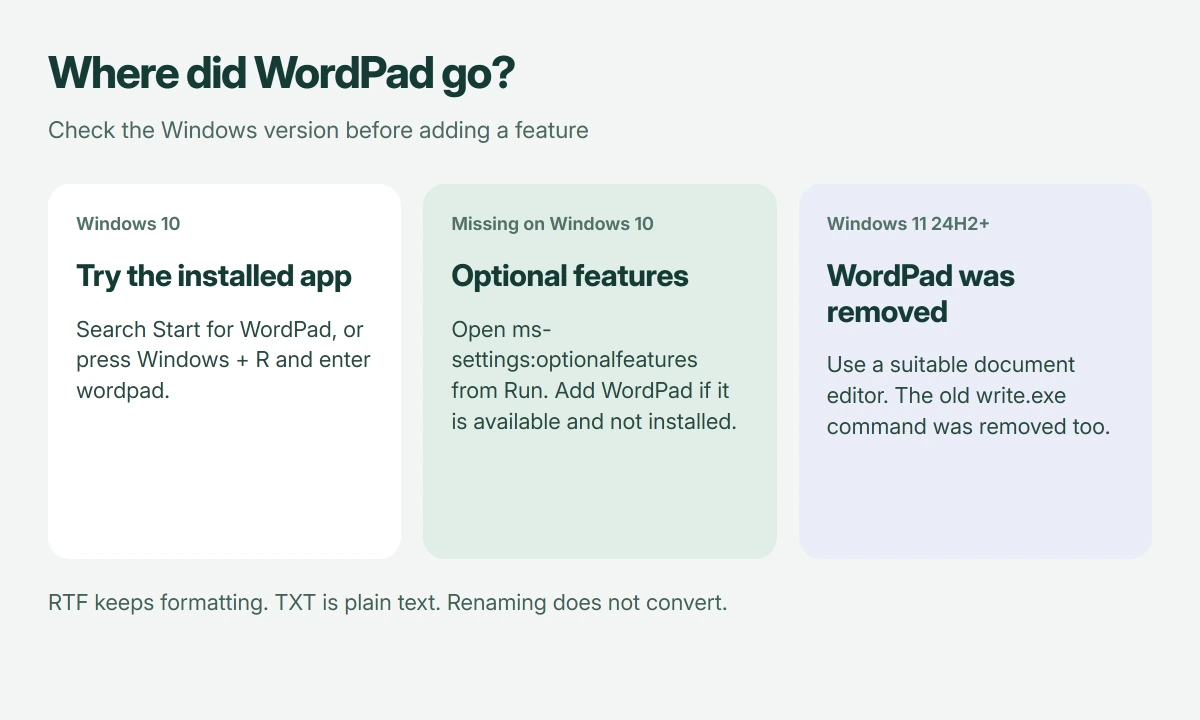
Search Start for WordPad and select it. If search doesn't find it, press Windows+R, enter wordpad, then press Enter to try launching the program directly.
In WordPad, choose File > Open. You haven't changed the default app for that file type, so other documents will keep opening as they did before.
Status: WordPad availability and Windows feature controls checked 18 October 2026. Current Windows 10 Settings differs from older screenshots. WordPad was not installed or opened here.
I would try Run before reinstalling anything. A missing search result and an absent program aren't necessarily the same problem, and this separates them without altering your files.
For plain text, our Windows Notepad guide may cover what you need. WordPad and Notepad are separate applications, so searching for one won't necessarily find the other.
Confirm that the computer still runs Windows 10
Open Settings > System > About and read Windows specifications. Microsoft documents that version-checking location, which matters if the PC was recently upgraded.
Microsoft states that WordPad was removed starting with Windows 11 version 24H2. Its removal also includes write.exe, so that older Run command doesn't restore it on those releases.
These reinstall steps only apply to Windows 10. On newer Windows 11 releases, WordPad is absent rather than hidden; use a suitable document editor instead.
The same Microsoft guidance recommends Word for rich text documents and Notepad for plain text. Keep that file-type distinction in mind before opening an RTF document in a basic text editor.
On Windows 10, check Optional features
Press Windows+R, enter ms-settings:optionalfeatures, and select OK. Microsoft gives this direct route in its optional-feature instructions, avoiding the menu differences between Windows builds.
On an updated Windows 10 22H2 system, Microsoft puts the page under Settings > System > Optional features. Older builds can place it under Apps > Apps & features, so an old screenshot may send you elsewhere.
Look for WordPad among installed features. If it is missing, select Add a feature, find WordPad, select it, and use the add or install control shown by your version of Settings.
Wait until Windows finishes adding it. Microsoft says optional features download through Windows Update, so the PC needs an internet connection for that step.
WordPad is listed in Microsoft's Feature on Demand catalog for Windows 10 version 2004 and later. Choose the Windows component, not a lookalike.
Search for WordPad again after installation completes. If Settings shows a failure instead, keep the error text; a failed feature download needs a different response from a missing Start shortcut.
Keep your document format intact
Microsoft's catalog describes WordPad as handling RTF, DOCX and TXT documents. The extension tells you what kind of file you're trying to open, and changing its name doesn't convert its contents.
I would preserve the original before conversion. TXT cannot preserve rich text formatting.
If WordPad opens but double-clicking an RTF launches something else, the file association is a separate setting. Our default-app guide explains that distinction; its menu walkthrough is for Windows 11.
On a managed computer, Optional features may be restricted by policy, as Microsoft documents. Ask your administrator about the missing component if the controls aren't available, rather than downloading replacement Windows files.
The Short Version
Search for WordPad or run wordpad first. On Windows 10, use Optional features to add the missing component. Windows 11 removed it in version 24H2, including write.exe; choose a suitable document app on newer releases.
Where to Next
Is WordPad missing from search only, or also from the installed-feature list? Include your Windows version and the file's extension: RTF, DOCX or TXT. That will help me distinguish an app problem from a file-association problem.

Isaac Smith is the founder and editor of PC Glance, a website that covers computers, laptops, and technology. He is a tech enthusiast and a computer geek who loves to share his insights and help his readers make smart choices when buying tech gadgets or laptops. He is always curious and updated about the latest tech trends.