
A read receipt in Outlook is requested before sending: open the message's Options tab and select Request a Read Receipt. The request asks the recipient's email app to report an opening; it cannot require a response.
The account matters as much as the Outlook version. Check support first if the option is missing, especially with a personal Outlook.com address or a mailbox from another provider.
Check whether the mailbox supports requests
Microsoft says receipt requests are unavailable for POP and IMAP accounts, including Gmail, Yahoo and iCloud. Its receipt instructions also require a Microsoft 365 subscription for Outlook.com accounts.
The personal Outlook.com website cannot request them. Use Outlook for Windows with an eligible account. The business Outlook on the web interface has its own request controls.
Status: Outlook receipt support and Windows/web controls checked October 30, 2026. Account eligibility and recipient choice can prevent a receipt. No email was sent.
Microsoft's feature comparison lists receipts in both new and classic Outlook. Switching apps alone does not remove the mailbox restrictions.
Add the request to the message being composed
In new Outlook or business Outlook on the web, open Options > Tracking and select Request a Read Receipt. When the ribbon hides that choice, check More Options at its right edge.
In a separate classic Outlook message window, use Options > Tracking > Request a Read Receipt. Microsoft documents the single-message checkbox in its delivery and read receipt guide.
Finish the email, review its recipients and send it. The request belongs to that outgoing message; selecting an already-sent email is not a way to add a request retroactively.
For a planned delivery time, configure the request while composing, then use the appropriate Outlook scheduling control. A scheduled draft has not reached its recipient yet.
Keep delivery, opening and agreement separate
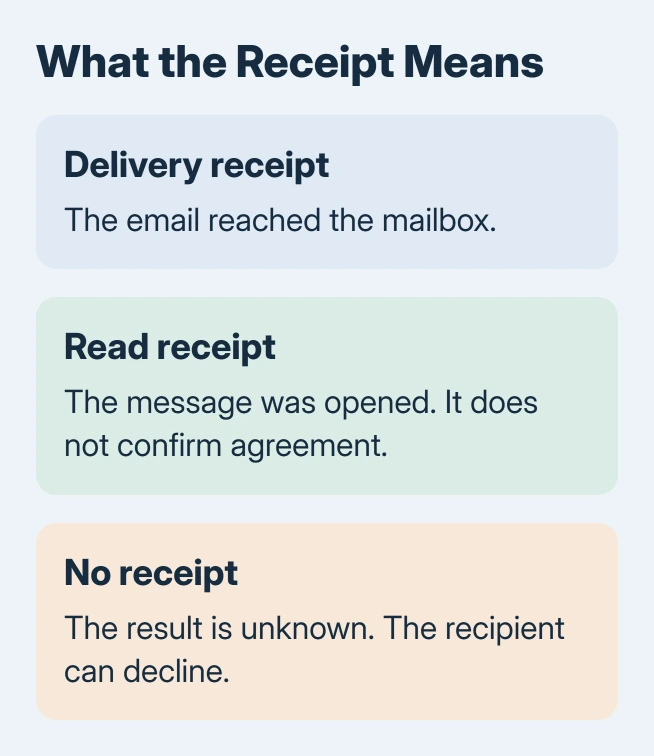
A delivery receipt concerns arrival at the mailbox. A read receipt reports an opening. Neither establishes that the recipient understood the contents or agreed to a request inside the email.
Recipients can decline a read receipt, and some email apps cannot send one. A missing response leaves the opening status uncertain. For a decision or deadline, ask for a direct reply stating what needs confirmation.
An email still in the Outbox needs Outlook sending checks. Repair that failure before treating the absence of a receipt as a separate problem.
Check the tracking options in classic Outlook
Open File > Options > Mail, then find Tracking. Microsoft states that Automatically update original sent item with receipt information updates the sent message as receipts arrive.
Its receipt-processing settings also contain the all-message request boxes. Leave those unchecked when only an occasional email needs tracking.
If an eligible work account lacks the command, give IT the account type and Outlook edition. For personal accounts, use Microsoft's support route with those details. Missing recipient cooperation cannot be repaired in the sender's settings.
The Short Version
Check account support, select Request a Read Receipt in the outgoing message, and send. A receipt concerns opening, not agreement. An absent receipt is inconclusive because recipients and their email apps control the response.

Isaac Smith is the founder and editor of PC Glance, a website that covers computers, laptops, and technology. He is a tech enthusiast and a computer geek who loves to share his insights and help his readers make smart choices when buying tech gadgets or laptops. He is always curious and updated about the latest tech trends.