
Your Mac asks whether an app should "accept incoming network connections", you click Allow, and it asks again on the app's next launch. Some apps raise it at every login.
I would not turn the firewall off to make it stop. The box repeats for a reason the firewall can tell you about, and owners have fixed that reason.
On Ask Different the question has 127,807 views since October 2010, and a Super User version from May 2015 adds 59,832 more.
Why Allow does not stick
Apple's firewall keeps a list of apps you have allowed. Apple says that for an app not on that list, "an alert message appears asking if you want to allow or deny the connection over the network or internet".
The list remembers an app by its signature. An older Apple article, quoted in the accepted Super User answer, said "If you choose Allow, OS X signs the application and automatically adds it to the firewall list".
That same article named the exception: "Some apps check their own integrity when they are opened without using code signing". For those, the box comes back every time.
It also said the box can repeat when "the signature of the application itself is broken".
Ours: Apple has since retired that article. Its old address, HT201642, now opens the guide page on blocking connections with a firewall, checked 10 October 2026, and the explanation of the repeat is gone.
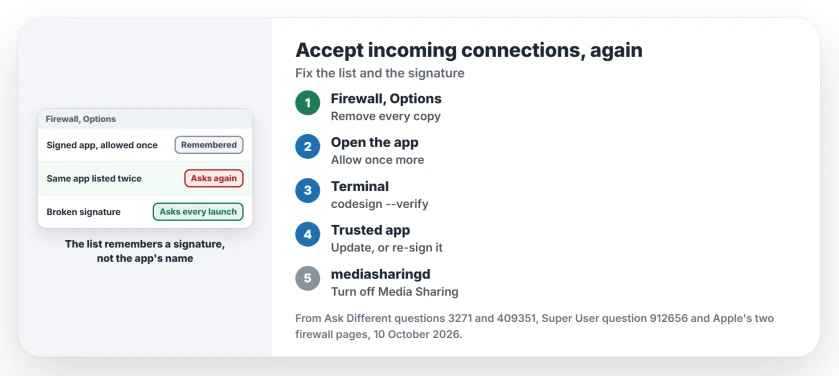
Status: Apple's two firewall pages set against the fixes owners posted on two forums, 10 October 2026. Removing duplicate entries and fixing the signature stopped the repeat for owners.
1. Remove every copy from the firewall list
Choose Apple menu, System Settings, then Network in the sidebar, then Firewall. Click Options. Apple's Firewall settings page describes the button for this list as "Remove an app or service from allowing incoming connections".
Look for your app more than once. The Super User asker found "syncthing was present multiple times inside the OS X Firewall settings".
They removed all of them and allowed the app once more. Later they wrote "After a few days I now had no more issues with this".
An owner on Ask Different had two copies of Eclipse installed. Only the first was in the list, so the second asked at every restart. They removed the entry with the minus button, and the next Allow was the final one.
So remove every entry for the app. Quit it, open it again and click Allow once.
2. Check the app's signature
If the box still returns, look at the signature. One owner on Ask Different summed it up: "If it's not signed, the preference won't be remembered".
Open Terminal and run this, with your app's name in place of AppName:
codesign --verify -vv /Applications/AppName.appAn unsigned app or a broken signature shows up here. Apple's old article had a simple answer for that case: "This can be avoided by upgrading to a version of the app that is signed by its developer". So update the app from its maker first.
3. Sign it yourself, if you trust it
When no signed version exists, owners give the app a local signature. The most voted Ask Different answer is one line:
sudo codesign --force --deep --sign - /Applications/AppName.appThe dash after --sign means ad-hoc signing, so you need no certificate. The same owner adds a step: "start the app, accept incoming connections one last time, then quit and start again to verify that the request is gone".
Owners report it working. One replied "This worked for me too". Another noted "After a system restart, I get asked again, but only once".
One owner still saw the box after signing. In their words, the cure was "after forcing the code signing process, removing that executable from the Firewall's list". So do step 1 again after signing.
This replaces the developer's signature on your copy, and the next update brings theirs back. I would only do it for an app you trust and use daily, never for Apple's own apps.
A system process asking: turn off the sharing service
Some boxes name a part of macOS, such as mediasharingd, at every login. That process belongs to media sharing, so the fix sits in Sharing, not in the firewall.
Apple says "you can prevent connections to these incoming services by turning off the service in Sharing settings". Go to System Settings, General, Sharing and turn off Media Sharing.
An owner who saw the mediasharingd box in 2023 wrote "It makes sense to figure out if home sharing and public sharing are enabled, and if so to disable them". They checked both with Terminal, then restarted.
Running your own server? Bind it to localhost
Developers see the box for every build, because each build counts as a new app. One owner explained that "Only binding to a local interface will avoid triggering the firewall".
If only your own Mac needs the server, start it on localhost rather than on every network interface. The box has nothing to ask about then.
Turning the firewall off is not the fix
Owners who switched the firewall off made the box go away and left every app open to the network. A reply under that answer said "Firewalls are there for good reason".
Our page on what a firewall actually does explains what you would lose. Leave Automatically allow downloaded signed software to receive incoming connections on, so signed apps pass without asking.
When macOS will not even launch the app, that is Gatekeeper, a different box, and the missing Open Anyway button covers it.
A box asking for your login keychain password is another repeat with its own cause, and it usually means the keychain still uses your old password.
The Short Version
- Firewall, Options: remove every copy.
- Allow the app once more.
- Check it with codesign --verify.
- Update it, or re-sign a trusted app.
- mediasharingd? Turn off Media Sharing.
Where to Next
Which app kept asking, and did it sit in the list twice? Name it in the comments. I keep a list of the apps readers report.

Isaac Smith is the founder and editor of PC Glance, a website that covers computers, laptops, and technology. He is a tech enthusiast and a computer geek who loves to share his insights and help his readers make smart choices when buying tech gadgets or laptops. He is always curious and updated about the latest tech trends.