
Your Up Next shows different shows on your iPhone, your Apple TV, and your Mac, and the reflex is to think your history got wiped or the whole thing needs a reset. Before either of those, let me show you two settings.
Before any of that: two of the most common cases are not faults at all, and one setting clears most of what is left.
There is one catch, and it is the part you cannot fix. Apple TV sync has been flaky for a lot of people since late 2024, and no setting on your end will change it.
So clear the easy causes first, then you will know whether you are chasing a fix or waiting on Apple.
First, the two that are not broken
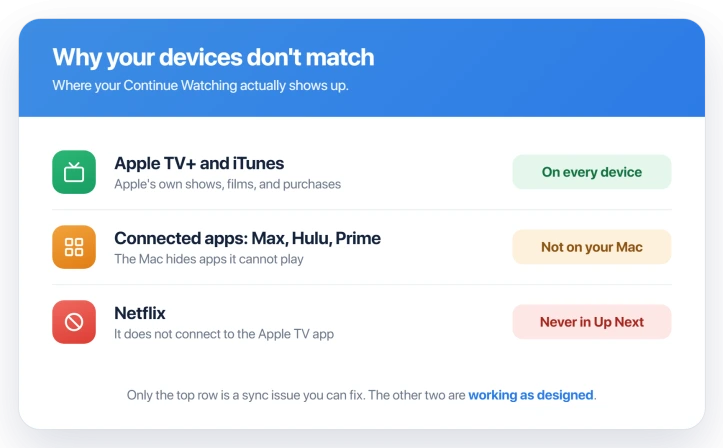
- Your Mac will always look different. On a Mac, the Apple TV app only lists content it can actually play, so anything from Max, Hulu, Prime Video, or Disney+ is filtered out of Up Next there, because those apps do not run on a Mac. Your iPhone and Apple TV show them; your Mac never will. That is by design.
- Netflix never appears. Netflix does not plug into the Apple TV app at all, so a show you are part way through on Netflix will never land in Up Next on any device. Also normal, and not something you can switch on.
The one setting that drives all of it: Play History
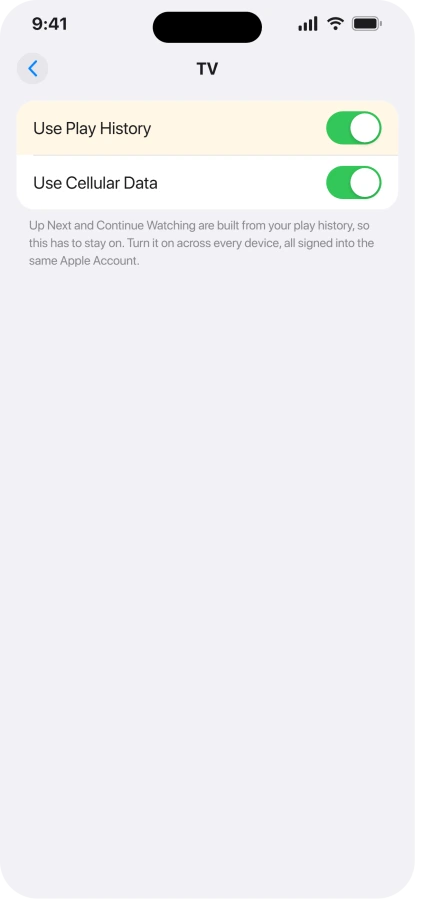
Up Next is built from your play history, and it only syncs when every device is allowed to use that history and they are all on one Apple Account.
Check the switch on each device:
- iPhone and iPad: open Settings, tap Apps, tap TV, and turn on Use Play History.
- Apple TV: open Settings, tap Apps, tap TV, and turn on Use Play History.
- Mac: open the Apple TV app, go to Settings, click Playback, and tick Use Viewing History. Apple gives it a different name on the Mac, but it is the same switch.
Then make sure all of them are signed into the same Apple Account. A second Apple ID on one device is the classic reason two lists never match.
Apple documents the switch for the Apple TV in Adjust Apple TV app settings, and on the Mac the same control is Use Viewing History, just under a different name.
If the lists still drift, reset in thirty seconds
On each device, turn Use Play History off, leave the settings screen for about thirty seconds, then turn it back on.
That clears a stuck sync state, and when a setting is the cause, it is usually what fixes it. On the Mac, do the same with Use Viewing History.
If that does nothing, sign out of your Apple Account on the stubborn device and sign back in. On an iPhone you can sign out of the TV app on its own. Signing back in pulls a fresh copy of the list from iCloud.
Make each streaming app feed the list
A service only adds to Up Next when its app is connected to the Apple TV app and signed in.
Open the Apple TV app, go to Watch Now, tap your profile, then Connected Apps, and connect each service you use.
Apple walks through it in Connect apps to the Apple TV app.
The app also has to be installed on whichever device you are checking, since the playback happens inside it.
When it really is Apple's bug
If your settings are right, every device is on one Apple Account, and both the thirty-second reset and the sign-out failed, you have most likely hit the sync bug itself.
People have reported it steadily since the late-2024 updates. It comes and goes on its own.
One service will suddenly start updating again with no change from you, and older Apple TV HD boxes get it worst. Apple has not acknowledged or fixed it.
Two things are worth a try, then stop fighting it:
- Restart the device that is out of step. On an Apple TV, pull the power for ten seconds.
- As a last resort, contact Apple Support, who can reset the sync from their side.
Do not clear your play history to force the issue. It wipes Continue Watching on every device, and the mismatch usually comes straight back.
What will not fix it, and what is not this bug
- Assuming your history is gone. Up Next lives in your Apple Account, not on the device, so signing out or resetting a device does not lose it.
- A very old Mac. The Apple TV app came with macOS Catalina, so a Mac from mid-2012 on can run it. Older than that, or still on Mojave, and you watch at tv.apple.com in a browser instead.
- Photos or Notes not syncing. That is iCloud pausing, a separate thing, covered in iCloud Photos stuck on Syncing Paused.
- Bookmarks or tabs out of step. If it is Safari rather than the TV app, see Safari bookmarks not syncing.
Status: Up Next runs on your play history, so turn on Use Play History on every device and keep them on one Apple Account. For some people it is an Apple-side bug that no setting fixes.
Why is my Up Next different on every device?
Because each device only syncs when Use Play History is on and it is signed into the same Apple Account. If one device has the switch off or a different Apple ID, its list drifts from the others.
The exception is your Mac, which always shows a shorter list because it hides streaming apps it cannot play.
Why doesn't Netflix show up in Continue Watching?
Netflix does not connect to the Apple TV app, so nothing you watch there feeds Up Next. That is Netflix's choice, and no setting changes it. Every other major service, Max, Hulu, Prime Video, Disney+, can be connected.
How do I get Continue Watching to sync again?
Sync hangs on one thing: every device using its play history under a single Apple Account. Confirm both of those first.
If a list is still stale, sign that device out of the TV app and back in to pull a fresh copy from iCloud. If even that holds out, you are on the Apple-side bug, and only Apple Support can force a reset.
The Short Version
- Two things people read as broken are normal: your Mac hides streaming apps it cannot play, and Netflix never feeds Up Next at all.
- Everything else runs on one switch, Use Play History (Use Viewing History on the Mac), plus every device being on the same Apple Account.
- The reliable reset is turning that switch off for thirty seconds and back on, on each device, then a sign-out and sign-in if needed.
- Each streaming service must be connected to the Apple TV app and installed to add to your list.
- For a lot of people this is a real Apple-side sync bug you cannot fix from your own devices. Restart, then let Apple Support reset it, and never clear your play history to force it.
Where to Next
And if it is stuck in a boot loop rather than failing to sync, the remote is the first thing to rule out.
- Photos stuck instead of syncing: iCloud Photos stuck on Syncing Paused
- Safari not carrying across devices: Safari bookmarks not syncing

Isaac Smith is the founder and editor of PC Glance, a website that covers computers, laptops, and technology. He is a tech enthusiast and a computer geek who loves to share his insights and help his readers make smart choices when buying tech gadgets or laptops. He is always curious and updated about the latest tech trends.