
Your Apple Watch will only speak your pace, splits, and heart rate out loud if it can reach a network or your iPhone.
On watchOS 26 that quietly became a requirement, and it is why the voice went silent on your solo runs.
Nothing is wrong with your data or your Watch. The wrist taps and the short beeps still fire, and the numbers still show on screen.
Only the spoken announcements went missing, and only when you run offline. Apple has now fixed it, in watchOS 26.5, and you can get the voice back on older releases too.
Let me show you exactly what it needs, because the requirement is new and Apple never announced it.
The quick fix: update to watchOS 26.5 or later
Apple names this one outright in the watchOS 26.5 release notes: it "fixes an issue where Workout app audio alerts could fail to play if the phone was not nearby Apple Watch". That is the fault exactly.
Runners had reported the spoken feedback returning a release earlier, on 26.4, so you may already have had it back. Apple documents the fix at 26.5, so that is the version to be sure of.
On your iPhone, open the Watch app, tap General, then Software Update, and install watchOS 26.5 or anything newer. Keep the Watch on its charger and close by while it updates.
After that, a GPS-only Apple Watch reads out your splits again with your iPhone left at home. If you run with AirPods, it lowers your music to speak over it.
Why the voice went quiet
On watchOS 26, Apple changed how spoken Voice Feedback is produced. It now leans on a connection, the Watch's own Wi-Fi or cellular signal, or a nearby iPhone.
Apple told one runner directly that voice feedback "was removed on Watch OS 26 for GPS models" and "now requires a network connection." So a Watch with a live signal keeps talking, and a GPS-only Watch run alone with no Wi-Fi goes quiet.
Runners found the picture is a little softer than Apple's wording. A nearby iPhone was enough even in Airplane Mode, so the Watch was borrowing its Bluetooth link, not the internet.
The pattern before the fix held up like this:
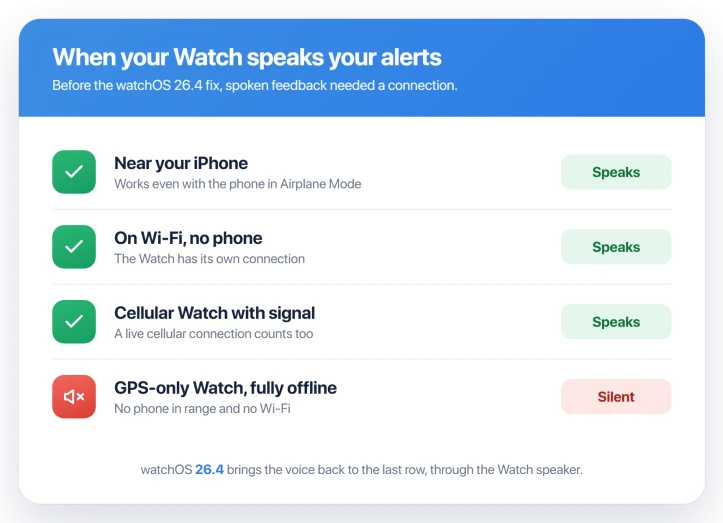
- Watch near your iPhone: speaks, even with the iPhone in Airplane Mode. It only has to be in range, not online.
- Watch on Wi-Fi with no phone: speaks, since it has its own link.
- Cellular Watch with signal: speaks. A cellular model with no plan or no service can still go quiet.
- GPS-only Watch, fully offline: silent. That is the exact case runners kept hitting.
Run offline and still hear it
If you are not on 26.5 yet, or you want it to work every time, give the Watch something to connect to.
- Bring your iPhone. It can sit in your pocket in Airplane Mode. The Watch only needs it in Bluetooth range, so you are not carrying a live phone or hunting for signal.
- Or join Wi-Fi before you set off, if your route stays in range of it.
- A cellular Apple Watch with an active plan mostly dodged this, since it always has a signal to lean on. If yours is GPS only, that is the model difference talking, not a fault.
Check Voice Feedback is actually on
If updating did not bring the voice back, make sure the setting itself is on. It can flip off after an update or a repair.
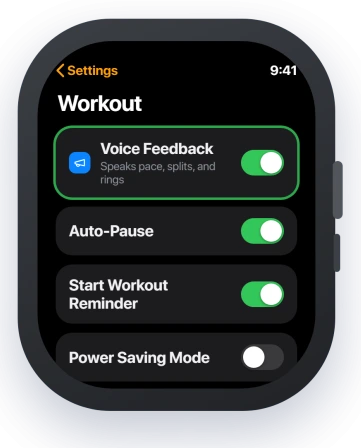
On the Watch, open Settings, tap Workout, then turn Voice Feedback on so it shows green. The same switch lives on your iPhone in the Watch app under Workout.
While you are there, set the alerts you want spoken. In the Workout app, start an Outdoor Run, tap the three dots on the run tile, and set a pace, distance, or heart rate alert, so the Watch has something to announce.
Apple spells out the exact toggle in Adjust Apple Watch during a workout.
Four things that mute a working Watch
A few things mute the voice even when the feature is working fine.
- Volume or Silent Mode. Raise the Watch volume, and turn Silent Mode off in Control Center. A muted Watch taps but will not talk.
- Your AirPods. Voice Feedback follows your headphones. If AirPods are connected, the announcement plays in them, not the Watch speaker, so put them in or disconnect them.
- A stuck setting. Turn Voice Feedback off, wait about thirty seconds, then turn it back on from the Watch app on your iPhone.
- A Workout Focus. If you built a Focus for workouts, check it is not silencing your alerts.
If none of that lands, restart the Watch, and only re-pair it as a last resort.
What will not fix it, and what is not this bug
- Turning off iPhone Mirroring. Some posts point to a mirroring switch in workout settings. No such setting exists, and iPhone Mirroring has nothing to do with workout audio. Skip that one.
- Waiting for a bigger update. Apple fixed this in 26.5, so update rather than hold out for something larger.
- Mixing it up with Workout Buddy. watchOS 26 also added Workout Buddy, a spoken coach that needs AirPods and Apple Intelligence. That is a separate feature, not your normal pace and split announcements.
- Lost workouts are a different bug. If a run vanishes or will not save after you end it, that is Apple Watch workouts not saving, a separate issue.
- Wrong distance is its own problem. If your miles read long or short, that is Apple Watch distance being wrong, not the silent voice.
Status: fixed. Apple's watchOS 26.5 notes name the Workout audio alerts failing without the phone nearby. Update to 26.5 or later, and turn Voice Feedback on if it is still silent.
Why did my Apple Watch stop announcing my pace?
watchOS 26 tied spoken Voice Feedback to a connection, so a GPS-only Watch running alone loses it while the taps and beeps carry on. Your speaker is not broken.
To prove that, play a song on the Watch. If you hear it, the hardware is fine and you are looking at the offline bug, not a fault.
Why does my friend's Watch still speak and mine doesn't?
Almost always the model. A Watch with a live cellular or Wi-Fi signal can still produce the voice, so a cellular model or one on Wi-Fi keeps announcing.
A GPS-only Watch with no phone nearby cannot, at least until you update to 26.4 or bring a connection along.
Do I need to carry my iPhone to hear alerts?
Not after watchOS 26.4. Once you are updated, a GPS-only Watch speaks through its own speaker with no phone nearby.
Before 26.4, effectively yes, but the iPhone could be in Airplane Mode. It only had to be in Bluetooth range, since the Watch was borrowing the link, not the internet.
The Short Version
- Your workout data, wrist taps, beeps, and on-screen numbers are all fine. Only the spoken voice went quiet, and only on solo, offline runs.
- It hits GPS-only Watches. A model with a live Wi-Fi or cellular signal keeps announcing.
- The nuance people miss: a nearby iPhone counts even in Airplane Mode, because the Watch borrows its Bluetooth link, not the internet.
- Runners say updating to watchOS 26.4 brings the voice back through the Watch speaker, phone or no phone.
- Stuck on an older version? Carry the phone or join Wi-Fi, and check Voice Feedback is on under Settings, Workout.
Where to Next
And if the audio itself keeps dropping mid-workout rather than the alerts going quiet, that is a separate fault worth reading.
- Workout won't save after you end it: Apple Watch workouts not saving
- Distance reads long or short: Apple Watch distance is wrong

Isaac Smith is the founder and editor of PC Glance, a website that covers computers, laptops, and technology. He is a tech enthusiast and a computer geek who loves to share his insights and help his readers make smart choices when buying tech gadgets or laptops. He is always curious and updated about the latest tech trends.