
On iPadOS 26 you swipe down from the top for the new Mac-style menu bar, and instead of File and Edit you get the lock screen, or nothing at all.
For most iPads the reason is simple. The menu bar only exists in Windowed Apps or Stage Manager mode, and yours is likely still in Full Screen Apps, where there is nothing to reveal.
Switching modes brings it back, and two quieter causes can keep it away. Let me show you which mode you are in first, because that is the whole answer for most people.
Switch on Windowed Apps
The menu bar is a feature of the new multitasking, so it does not exist in the old full-screen layout. If a swipe from the top does nothing at all, this is almost always why.
Open Settings, tap Multitasking and Gestures, and choose Windowed Apps. Stage Manager works too. If Full Screen Apps is selected, that is the setting with no menu bar.
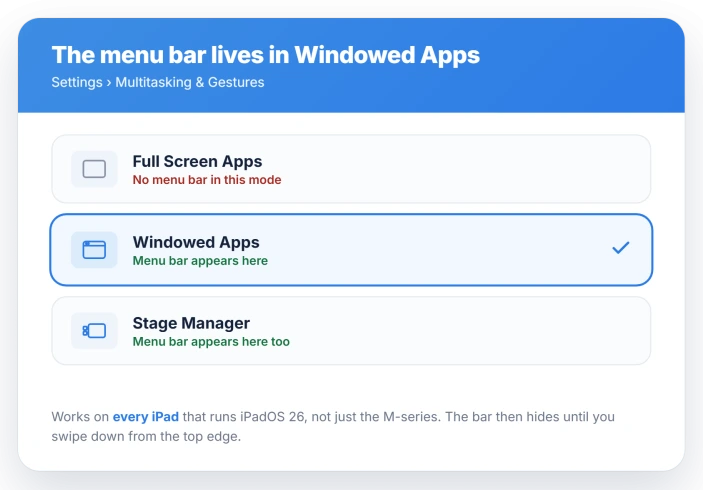
This is not limited to the pricey iPads. The menu bar works on every iPad that runs iPadOS 26, not just the M-series models.
Those only let you open more windows at once, which is a separate thing covered in iPad windows shrinking to a tiny box.
Swipe from the very top, and not too far
Once you are in Windowed Apps, the bar still hides itself and you summon it. The gesture is fussier than it looks, which is the second reason people think it is broken.
Swipe down a short way from the middle of the very top edge of the screen, not from the top of the app window.
A long swipe pulls Notification Center or the lock screen instead, which is exactly what most of the failed attempts are.
With a mouse or trackpad, slide the pointer to the top edge and the bar drops down. An Apple Pencil will not summon it, so use a finger or a pointer.
Apple lays out the gesture in Use the menu bar on iPad.
Do not mix this up with the upward swipe from the bottom that closes an app, which is a separate gesture covered in swipe up to close apps on iPadOS 26.
This one is a short pull down from the top.
The bar hides again the moment you tap into your work, which is normal, not a fault.
A nearby Mac steals your cursor
If you use a trackpad near a Mac and the pointer refuses to reach the iPad menu bar, Universal Control is the culprit, and it is the cause people rarely think to check.
When your Mac has the iPad placed below it in the display layout, pushing the pointer to the top of the iPad slides it straight onto the Mac instead. The cursor jumps away before the menu bar can appear.
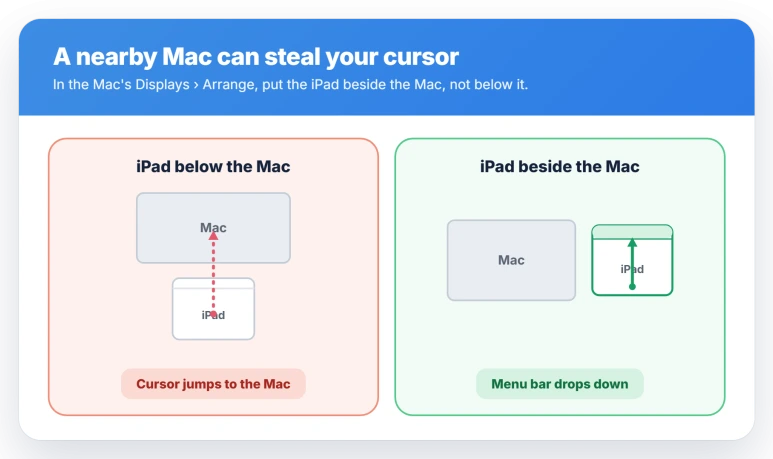
The fix is to move the iPad beside the Mac rather than below it. On the Mac, open System Settings, Displays, then Arrange, and drag the iPad tile to the left or right of the Mac.
If you would rather switch it off, on the iPad open Settings, General, then AirPlay and Continuity, and turn off Cursor and Keyboard. Touch swiping is never affected by this, only the pointer.
When the menu bar text is grayed out or invisible
A different complaint is that the bar appears but the text is faint or missing, worst when two windows share the screen. That is the Liquid Glass look letting the background show through the menus.
On iPadOS 26.1 and later, open Settings, Display and Brightness, then Liquid Glass, and choose Tinted instead of Clear. Tinted adds opacity so the text reads. The option only appears when Reduce Transparency is off.
For a stronger version, open Settings, Accessibility, Display and Text Size, and turn on Reduce Transparency or Increase Contrast. That puts a solid background behind the menus across the whole system.
Status: on iPadOS 26 the menu bar shows only in Windowed Apps or Stage Manager, not Full Screen. Swipe down from the top edge to reveal it; a nearby Mac's Universal Control can block it.
What will not fix it
A few common moves miss the real causes.
- An Apple Pencil. It cannot summon the menu bar at all, no matter how you tap or swipe. Use a finger or a pointer.
- Waiting for an M-series iPad. The feature is not gated to the Pro models. Every iPad on iPadOS 26 gets it once Windowed Apps is on.
- Turning on Stage Manager specifically. You do not need it. Windowed Apps gives you the same menu bar with less rearranging.
- A force restart or Reset All Settings. These do not touch the mode, the gesture, or the Universal Control cause, so they leave the bar just as missing.
- Blaming an app with empty menus. If the bar shows but one app only lists generic File and Edit items, that app has not added its own commands yet. The bar is working.
Why is there no menu bar on my iPad?
Most likely your iPad is in Full Screen Apps mode, where the menu bar does not exist. Open Settings, Multitasking and Gestures, and choose Windowed Apps or Stage Manager.
The bar also auto-hides, so you summon it by swiping down from the very top edge of the screen.
How do I show the menu bar on iPadOS 26?
Swipe down a short way from the middle of the top edge of the screen, the screen edge and not the app window. With a mouse or trackpad, push the pointer to the very top.
It hides again once you tap elsewhere, and an Apple Pencil will not trigger it.
Why is my iPad menu bar grayed out or invisible?
That is Liquid Glass letting the background show through the menu text, worst in split screen. On iPadOS 26.1 or later, open Settings, Display and Brightness, Liquid Glass, and pick Tinted.
Or open Settings, Accessibility, Display and Text Size, and turn on Reduce Transparency or Increase Contrast.
Why does my cursor jump away when I reach for the iPad menu bar?
Universal Control is sending your pointer to a nearby Mac. In the Mac's System Settings, Displays, Arrange, move the iPad tile beside the Mac rather than below it.
Or on the iPad, open Settings, General, AirPlay and Continuity, and turn off Cursor and Keyboard.
The Short Version
- The menu bar lives only in Windowed Apps or Stage Manager. In Full Screen Apps there is nothing to show. Switch modes in Settings, Multitasking and Gestures.
- It auto-hides. Swipe down a short way from the very top edge of the screen, not the app window, or move a pointer to the top. An Apple Pencil will not do it.
- If a pointer will not reach it near a Mac, Universal Control is stealing the cursor. Move the iPad beside the Mac in Displays, Arrange, or turn off Cursor and Keyboard.
- Faint or invisible menu text is Liquid Glass. Set it to Tinted in Display and Brightness, or turn on Reduce Transparency.
- Every iPad on iPadOS 26 gets the menu bar, not just the M-series models.
Where to Next
- Windows opening tiny or resizing wrong: iPad window shrinks to a tiny box on iPadOS 26
- The bottom swipe to close apps not working: Swipe up to close apps on iPadOS 26
- The iPad refusing to use an external display: iPad won't extend to an external display

Isaac Smith is the founder and editor of PC Glance, a website that covers computers, laptops, and technology. He is a tech enthusiast and a computer geek who loves to share his insights and help his readers make smart choices when buying tech gadgets or laptops. He is always curious and updated about the latest tech trends.