
Your iPhone keeps asking for your Outlook password, you keep typing it perfectly, and it keeps asking again. That loop is maddening, and it is not your fault.
Your password is almost certainly right. Nothing on the iPhone even checks it.
The phone hands it to Microsoft, Microsoft refuses the way it was sent rather than the password itself, and the prompt comes back. Which is why typing it again, however carefully, never ends it.
What is actually happening, in Apple's own words
Apple describes the mechanism plainly, although on a page written for the Mac rather than the iPhone.
Apple, on Mail asking for your password: "Mail asks for your password when it can connect successfully to your email provider, but can't connect to your email account because your email provider isn't accepting your email password."
The same page names the cause that fits nearly everybody landing here: "Your email provider changed its authentication method. In that case, you may need to remove your account, then add it back."
Microsoft is blunter about which change it means.
Microsoft: "If you use Apple Mail and you are seeing password prompts or connection errors, this is most likely happening because your account got configured as basic authentication."
The old sign-in method is gone and cannot be brought back by anybody. Microsoft: "Now no one (you or Microsoft support) can re-enable Basic authentication in your tenant."
So there is no setting on your iPhone that fixes this, because the refusal is not happening on your iPhone.
Worth ruling out one lookalike first.
If the box asking you for a password says Apple Account rather than naming your email address, that is a different problem entirely and the Apple Account sign-in loop is the page for it.
First, which kind of Microsoft account is it
This one question decides everything below, and it is the thing nothing else on this subject asks.
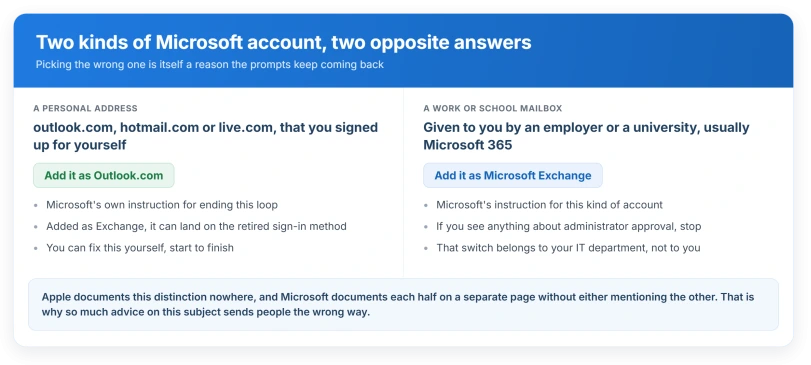
A personal address ending outlook.com, hotmail.com or live.com, that you signed up for yourself.
A work or school mailbox, given to you by an employer or a university, usually on Microsoft 365.
They need opposite answers, and Microsoft documents each half on a separate page without either mentioning the other.
If it is a personal Outlook.com address
Microsoft's instruction is specific and it is the fix most people need.
Microsoft: "Apple Mail supports Modern Authentication by default when you setup the account as Outlook.com. If you use Apple Mail and you are seeing password prompts or connection errors, this is most likely happening because your account got configured as basic authentication. To mitigate the issue, remove the account and add it back as Outlook.com".
So the account type matters more than the password. Added as Microsoft Exchange, a personal address can land on the retired sign-in method. Added as Outlook.com, it uses the current one.
Apple's route to remove it: Settings, then Apps, then Mail, then Mail Accounts, tap the account, then Sign Out or Delete Account.
To add it back, the same screen has Add Account, and the provider list is where you choose Outlook.com rather than Exchange.
If that alone does not do it, Microsoft gives one more step, and the Safari part is not a typo. Microsoft: "Remove the account again. Go to Settings > Safari, then tap Clear History and Website Data. Reboot your iPhone. Add the account back and proceed through the Outlook.com account sign in flow."
If it is a work or school mailbox
Here Microsoft says the opposite: choose Microsoft Exchange, not Outlook.com.
And there is a trap that no amount of retyping will clear, because the block is on your employer's side.
Apple, in its deployment guide: "if an Microsoft Entra ID administrator hasn't enabled Apple Internet Accounts (previously named iOS Accounts), the user is shown a message stating that administrator approval is required for configuration."
If you see anything about administrator approval, stop. That is your IT department's switch, not yours. Send them that sentence.
A second employer-side cause produces constant prompting on a working account.
Microsoft warns its own administrators: "Using sign-in frequency to require reauthentication every time, without multifactor authentication might result in sign-in looping for your users."
Worth knowing so you can tell your IT team it is not normal: Microsoft: "The Microsoft Entra ID default configuration for user sign-in frequency is a rolling window of 90 days." A phone asking daily is a phone that has been configured to.
Before you delete anything, know what goes with it
Apple's warning here is thinner than it should be, and the gap is worth naming.
Apple: "You can remove an email account from the Mail app and from all the apps that use it on your iPhone."
Ours, because Apple never spells it out: for an Exchange account, "all the apps that use it" means Contacts, Calendars, Reminders and Notes as well.
Those come back when the account is re-added, but if you keep anything in there that lives only on the phone, get it out first.
Apple does warn about the mail itself.
Apple: "If you delete or change your email account settings, previously downloaded emails might be removed from your device." Its advice is to check your email is on the provider's website before you start.
The app password dead end
This is the most common wrong turn, and it is wrong only for Microsoft.
Microsoft: "App passwords don't work for accounts that are required to use modern authentication."
So generating one for a work mailbox achieves nothing. The confusion is understandable, because Apple recommends exactly that for a different provider.
Apple: "if you're using Google's two-step verification, your Gmail account in Mail requires the appropriate app-specific password."
Correct for Gmail. Dead end for Microsoft. If you have been sent to create an app password for an Outlook account, that advice was written for the old world.
Status: iOS 26.6, checked 15 August 2026. Nothing in the iOS 26 release notes touches Exchange authentication, and the behaviour here has been the same since iOS 14.
When it is neither, and it is just broken today
Microsoft outages produce this exact symptom, and they have a tell: the Outlook app keeps working while Apple Mail loops.
A university IT department logged a two week run of it in March 2025, titled around Apple Mail interruptions on iOS devices, and recorded that the Outlook app was unaffected and that the cause was a Microsoft service update.
In April 2026 a run of reports on Microsoft's own forum described sign-in loops on personal accounts, with several people escalating into "You've tried to sign in too many times".
A Microsoft advisor replied that it was a widespread connectivity problem.
If mail is arriving normally and the only thing wrong is that you are not being told about it, this is not your problem either, and Mail notifications not working covers that.
So before you delete an account, try the Outlook app once. If mail arrives there and Apple Mail still loops, wait rather than rebuild.
Nothing you delete will help, and repeated attempts can get the account temporarily locked.
What does not help
- Typing the password again. It is not the password being refused.
- Switching the account to IMAP. For a personal Microsoft address the plain-password route closed in September 2024. This is the most commonly published fix for this problem and it now guarantees the failure you arrived with.
- Resetting network settings, or resetting all settings. Neither touches how your account signs in.
- Waiting for an iOS update. Apple's release notes do not mention this and the mechanism has not changed since iOS 14.
Why does my iPhone keep asking for my Outlook password when the password is right?
Because the password is not what is being rejected. Apple's Mail passes it to Microsoft, and Microsoft refuses accounts still set up with the old sign-in method that was retired for business accounts in 2022 and for personal ones in September 2024. Removing the account and adding it back with the correct provider type is what changes the method.
Should I add my Outlook account as Exchange or as Outlook.com?
Personal outlook.com, hotmail.com or live.com addresses: choose Outlook.com, which is Microsoft's own instruction for fixing this loop. Work or school mailboxes: choose Microsoft Exchange. Picking the wrong one for your account is itself a cause of the prompting, and Apple documents this distinction nowhere.
Will an app password stop the prompts?
Not for a Microsoft account. Microsoft states that app passwords do not work for accounts required to use modern authentication, which now includes Microsoft 365. App passwords are still the right answer for a Gmail account with two-step verification, which is where the advice comes from.
The Short Version
- The password is not the problem. Nothing on the phone checks it.
- Microsoft refuses the sign-in method, and the old one cannot be re-enabled by anyone.
- Work out which account you have first. Personal and work need opposite answers.
- Personal outlook.com: remove it and add it back as Outlook.com, which is Microsoft's own fix.
- Work or school: add it back as Microsoft Exchange, and if you see anything about administrator approval, it is your IT department's switch.
- Deleting an Exchange account takes its Contacts, Calendars, Reminders and Notes with it.
- App passwords do nothing here. That advice belongs to Gmail.
- If the Outlook app works and Apple Mail does not, it is probably an outage. Wait rather than rebuild.
Where to Next
Stop retyping the password. It was never the problem, and the phone is not the thing refusing it.
Take it to whoever runs the mailbox, whether that is your IT team or your own Microsoft account settings, because the change has to happen at their end.
If you are on a personal account with nobody to ask, leave a comment describing the prompt and I will tell you which of the causes it points at.

Isaac Smith is the founder and editor of PC Glance, a website that covers computers, laptops, and technology. He is a tech enthusiast and a computer geek who loves to share his insights and help his readers make smart choices when buying tech gadgets or laptops. He is always curious and updated about the latest tech trends.