
Your iPhone says it is charging, you come back an hour later, and the number has not moved. Before you go out and buy a cable, look at one thing with me.
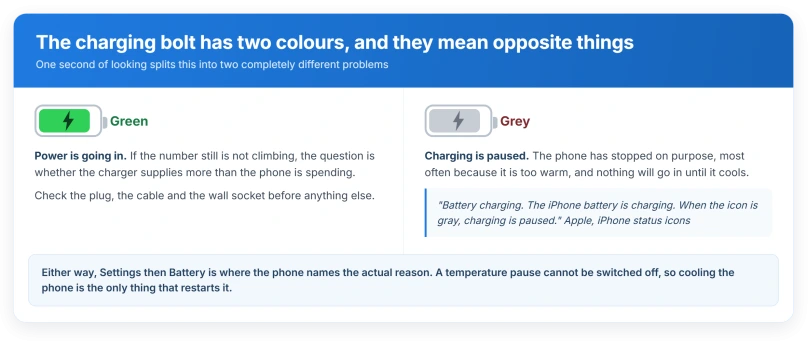
The charging bolt in your status bar has two colours. Green means power is going in. Grey means charging is paused.
Apple documents that plainly, and it is the whole difference between a phone that is charging slowly and a phone that is not charging at all.
Apple's sentence, and what it settles
Apple, on the meaning of iPhone status icons: "Battery charging. The iPhone battery is charging. When the icon is gray, charging is paused."
So the bolt appearing proves only that a power source is attached. It does not prove anything is reaching the battery.
That single sentence resolves the whole question. If your bolt is grey, the phone has stopped charging on purpose and is telling you so.
If it is green and the number still is not moving, that is a different problem and the sections further down cover it.
Apple gives you a second place to look, which names the reason rather than just the state. Open Settings, then Battery. Apple's own instruction is that you can see there whether charging was put on hold.
The commonest reason it pauses, and it is not a fault
Heat. And Apple builds this in deliberately.
Apple: "If your iPhone gets too warm, charging may slow or stop until the temperature lowers." The same page adds that these protections "work automatically and can't be turned off".
There are three separate things you might see, and treating them as one is where most advice goes wrong.
- The grey bolt, quiet and easy to miss.
- A Lock Screen line. Apple's wording: "Charging On Hold. Charging will resume when iPhone returns to normal temperature."
- A full temperature warning screen, which is a more serious and separate state where the phone is barely usable.
The reader with an apparently normal phone that gains nothing is almost always in the first two. The phone looks fine, works fine, and is simply not taking charge.
Apple's own advice if this keeps happening: charge between 0 and 35 degrees Celsius, and "Remove your case if your iPhone tends to heat up while charging."
Cold does it too, and hardly anybody mentions it. Apple: "If your iOS or iPadOS device gets too cold, it might not charge or could stop charging."
Stuck at exactly 80 percent? Three different causes land there
This number confuses everybody because Apple documents three separate routes to it, and the phone does not tell you which one you are in.
- Optimized Battery Charging. Apple: "iPhone pauses charging at 80%, then finishes charging closer to when you usually unplug your iPhone." To override, Apple's route is Settings, Battery, then Resume Charging, or touch and hold the Lock Screen notification and tap Charge Now.
- Charge Limit, on iPhone 15 and later. A setting you may have chosen months ago. Apple: "When Charge Limit is on, iPhone stops charging when it reaches your selected percentage." Apple's temporary override is Allow Until Tomorrow, which resets at 6:00 a.m.
- Heat. Apple: "Software might limit charging above 80 percent when the recommended battery temperatures are exceeded."
Ours, because Apple never joins these up for the reader: the number alone cannot tell you which.
The grey bolt plus the Battery screen is the only way to separate them, and that is worth doing before you change any setting.
Sitting at 100, then slipping to 96 and staying there
That is correct behaviour, documented, and not a fault.
Apple: "iPhone automatically stops charging when the battery is fully charged, so it's safe to keep your iPhone connected to a charger overnight. Charging resumes automatically if your battery level drops below 95 percent."
So a phone left plugged in overnight is meant to drift down a few points and sit there. Nothing is wrong.
The slow crawl near the top is deliberate too. Apple: "To reduce the effect of heat and prevent overheating, iPhone gradually reduces the charging current as the battery approaches full charge."
When the bolt is green and the number still will not move
Now the question becomes whether the charger is supplying more than the phone is spending.
One case Apple documents outright: "if iPhone is connected to a computer that's turned off, the battery may drain instead of charge." Apple then tells you to look for the charging symbol to check.
Beyond that, Apple documents the ingredients but never the sum. It says charging "might take longer than you expect" on a wired charger providing 7.5W or less.
It says power drops when "you use graphics-intensive or processor-intensive apps, games, or features, including camera apps" or "stream high-quality video, especially with the display at full brightness".
It says a multi-port charger, a USB hub or a car port may deliver less. It says a USB-A charger caps iPhone 15 and later at 7.5W.
And it says connecting wired headphones while charging wirelessly limits the phone to 7.5W by regulation.
Ours, and it is arithmetic on Apple's own numbers rather than an Apple claim: a phone navigating with the screen bright, warm in a car cradle, on a 7.5W supply, can spend as fast as it receives.
The percentage stalls or falls while everything looks correct.
Two more that catch people, both Apple-documented:
- Wireless charging stops if the phone shifts. Apple: "If your iPhone vibrates, when it gets a notification, for example, your iPhone might shift position. This can cause the charging mat to stop providing power to your iPhone."
- A cable beats a wireless pad. Apple: "Your iPhone won't charge wirelessly when connected to USB." So a phone on a stand with a cable also plugged into a dead port takes the cable path and gains nothing.
If it is speed rather than a stall that bothers you, our page on the Slow Charger message covers what actually trips that warning.
If that sounds like your situation, I would change the plug and the wall socket before I changed anything else.
Two things iOS will tell you if you let it
iOS has added messages for exactly this, and both appear in Settings, Battery.
Apple: "With iOS 26, if iOS detects a charger that's connected but isn't charging, you'll see an Incompatible Charger message when you open Settings and tap Battery."
And for the weaker case: "With iOS 18 and later, if a higher-wattage charger could improve your charging experience, iOS will display a Slow Charger message on the Lock Screen." Apple adds, usefully, that this "doesn't mean that there's anything wrong with your iPhone or charger."
Status: iOS 26.6, checked 15 August 2026. The grey-bolt wording is on Apple's status icon page in the iOS 26 edition, and the Incompatible Charger message is new in iOS 26.
What is not the cause
- A worn battery. Every Battery Health message Apple documents describes discharge-side symptoms: slower app launches, dimmer backlight, quieter speaker. None of them describes a battery that will not take charge. Apple also drops that language entirely for iPhone 11 and later, so do not go hunting for it on a modern phone.
- Low Power Mode. It does not restrict charging, and it switches itself off: Apple: "When you charge the device to 80% or higher, Low Power Mode turns off." It also turns the battery icon yellow, which is a different signal from the grey bolt and should not be confused with it.
- Adaptive Power. Everything Apple documents about it is discharge-side. Nothing about charging.
- Background apps. Apple names app activity only as something that reduces charging speed, never as something that blocks it.
- A warm phone with no warning on screen. Apple: "If your device doesn't display a temperature warning, you can keep using your device."
- Liquid detection. This one announces itself loudly with a Charging Not Available or Liquid Detected alert. No alert means this is not it. If you do see one, Apple notes that a wireless charger still works.
If the phone genuinely takes no charge at all from anything, that is a different article, and an iPhone that will not charge works through it in order.
Why does my iPhone say charging when the battery is going down?
Look at the colour of the bolt. Grey means the phone has paused charging, most often because it is too warm, and the number will not move until it cools. Green means power is arriving, so the question becomes whether the charger supplies more than the phone is using. Apple documents one clear case of connected-and-draining: a computer that is switched off.
Is it bad to leave my iPhone charging overnight?
Apple says no. Its wording is that the phone "automatically stops charging when the battery is fully charged, so it's safe to keep your iPhone connected to a charger overnight". It also documents that charging restarts on its own once the level drops below 95 percent, which is why a phone left plugged in reads 96 or 97 rather than 100.
Does a bad battery stop an iPhone charging?
Not according to anything Apple documents. Its Battery Health messages all describe performance while running on battery, not a failure to accept charge. A badly worn battery fills quickly and empties quickly because there is less capacity to fill, which can feel like a charging fault and is not one.
The Short Version
- The bolt has two colours. Grey means charging is paused, and that is Apple's own wording.
- Settings, then Battery, is where the phone names the reason.
- Heat is the commonest cause, it is deliberate, and it cannot be switched off.
- A phone stuck at exactly 80 has three possible causes and the number alone cannot tell you which.
- Sitting at 96 overnight is correct behaviour, not a fault. Charging restarts below 95.
- A green bolt with no gain is a supply-versus-demand question, not a broken phone.
- A worn battery is not a documented cause of this. Low Power Mode is not either.
Where to Next
The one thing to carry away is the colour of the bolt. It costs a second, it is on Apple's own page, and it splits this into two completely different questions.
Grey means stop troubleshooting and cool the phone down. Green means you are looking at a charger question rather than a phone question, and the fastest test is a different plug in a different socket.
If yours is green, in a cool room, on a good charger and still not moving, tell me what wattage the charger is and I will help you work out whether it is enough.

Isaac Smith is the founder and editor of PC Glance, a website that covers computers, laptops, and technology. He is a tech enthusiast and a computer geek who loves to share his insights and help his readers make smart choices when buying tech gadgets or laptops. He is always curious and updated about the latest tech trends.