
You click into a text box and a small blue dot sits on top of your cursor, in Google Docs, in email, wherever you type. It is distracting when you never asked for it. I would switch off one setting on Edge's Languages page.
That switch removed it for the owner of a Google Docs Help Community question with 143 upvotes, and a second owner confirmed it worked.
What the blue dot is
The question describes it well. The dot "pops up every time I start writing in a google doc's page", and it offers a microphone for speech-to-text or "an AI mini chatbot that allows you to ask for anything".
The asker also wrote: "the blue dot is extremely distracting, and I never made the choice to have it there".
Another owner found the cause by switching browser. In their words: "I opened Google docs in Brave and no longer see it".
A volunteer drew the line: "If you saw the same blue dot when typing here in the forum then it's not a Google Docs issue".
On a second forum, one owner clicked the dot, and it said "Ask Edge to help me write". So it belongs to Edge, not to the page you are typing in.
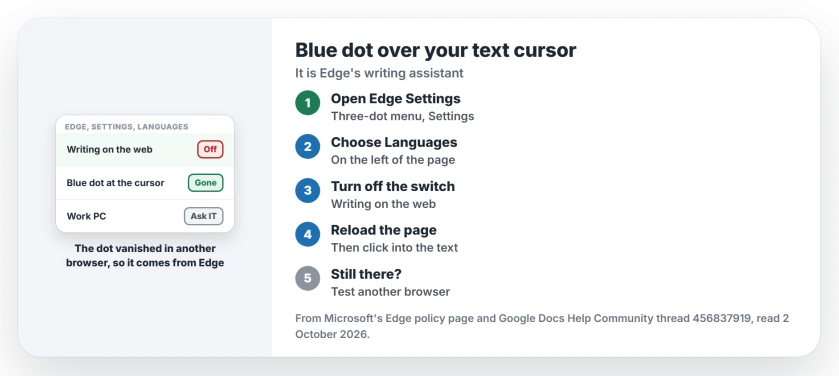
Status: checked 2 October 2026. The dot is Edge's writing assistant. Turning off one switch on Edge's Languages page removed it for two owners. Google Docs is not the cause.
1. Turn off the writing assistant in Edge
Open the three-dot menu at the top right of Edge, choose Settings, then select Languages on the left.
The owner who fixed it followed a guide and wrote that it "took off the blue dot for my google docs, specifically the step under the languages tab". That step turns off a switch called "Use Writing Assistant for writing on the web".
A second owner replied about two weeks later: "This worked for me too".
Ours: the wording can change between Edge versions, so look for the switch on that page that mentions writing on the web.
2. Reload the page you were typing in
Ours: after you flip the switch, reload Google Docs or the email page so it loads without the helper. Then click into the text again and check the dot has gone.
3. Test in another browser if it stays
This is how the second owner proved it was Edge. Open the same page in Chrome, Firefox or Brave, and if the dot is missing there, the Edge setting is the place to look.
If the dot shows in every browser, the cause sits somewhere else on your computer. The asker had already checked extensions, so start there.
4. On a work PC, it may be locked
Microsoft says its ComposeInlineEnabled policy, documented on its Edge policy page, "controls whether users can use writing support features in Microsoft Edge for Business, such as Rewrite".
So on a computer your employer manages, the IT department can switch the feature on or off for you. If the switch is missing or will not move, ask them.
5. Want it back later? Same switch
Nothing is deleted when you turn it off. Flip the same switch on the Languages page back on if you ever want Edge's writing help again.
Edge has changed other things this year too. Its Collections were retired, and an update tinted some pages yellow.
If Read aloud stalls on loading instead, the Read aloud page shows the voice switch that got Edge reading again.
What did not help
Before the fix, the asker spent an hour on the wrong places: "checking the extensions section to see if I had any options selected, looked in my google doc's settings", and reopened Google Docs.
None of that touches Edge's writing assistant, which is why the dot stayed on your screen too. Both fixes here are user-reported, from owners on Google's board.
What is the blue dot over my cursor?
It is Edge's AI writing helper. One owner who clicked it got "Ask Edge to help me write", and it disappears when the same page is opened in another browser.
How do I remove the blue dot in Google Docs?
Turn off the writing assistant switch in Edge's Settings, under Languages. Your Google Docs settings have nothing for it, because the dot comes from the browser.
Does the blue dot appear in Chrome?
Not in these reports. The owners who saw it were using Edge, and one owner found the dot gone in Brave.
Chrome adds its own AI line to the right-click menu, Ask Gemini, and a Google policy removes it.
The Short Version
- The blue dot is Edge's writing assistant.
- Google Docs is not the cause.
- Edge Settings, then Languages.
- Turn off the writing on the web switch.
- Reload the page you were typing in.
- Work PC? The IT department may control it.
- The same switch brings it back.
Where to Next
Open Edge's Settings, choose Languages, and turn off the writing assistant switch. Then reload the page and click into a text box.
If the dot stays, tell me which Edge version you have and where you see it. I will add that to this page.

Isaac Smith is the founder and editor of PC Glance, a website that covers computers, laptops, and technology. He is a tech enthusiast and a computer geek who loves to share his insights and help his readers make smart choices when buying tech gadgets or laptops. He is always curious and updated about the latest tech trends.