
You right-click a word in Chrome and Ask Gemini is sitting near the top of the menu, where you used to reach for search. Chrome's settings have no switch for it.
I would use Google's own policy for it: one registry value that turns Gemini in Chrome off. A flag does the same for now, but owners call it temporary.
Both are easy to undo.
The Google help thread asking how to remove it has 348 upvotes.
Why Chrome has no switch for it
Ask Gemini comes with Gemini in Chrome, which Google says it is "gradually releasing" to users. One reader on the thread put the complaint plainly: "they put it where the search google button is supposed to be".
A long-time helper on Google's forum confirmed the gap in September 2026: "Chrome does not currently offer a separate consumer setting that removes only that context-menu item".
So you either hide the rest of Gemini or switch Gemini in Chrome off.
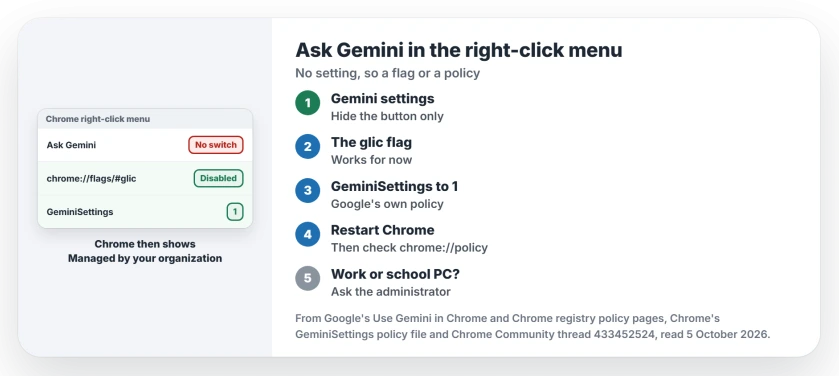
Status: checked 5 October 2026. Owners removed it with a chrome://flags switch, which one called temporary, and one through the registry, where Google's GeminiSettings policy lives.
What Chrome's own settings hide
Google's help page lists the switches under Settings, AI innovations, Gemini in Chrome, Preferences. One is "Show Gemini at the top of the browser", and another hides Gemini from the Windows system tray.
Turn those off to hide the button. Ours: they leave the right-click line alone, which matches what the helper said.
1. The flag, for now
Type chrome://flags/#glic in the address bar, set it to Disabled and relaunch Chrome. I would try this first, since one click undoes it.
The owner who posted it in May 2026 added: "This is only temporary, but it works for the moment as of 26/05/2026".
Others thanked them. One wrote: "Praise be to you". Ours: flags come and go between Chrome versions, so if yours has no glic entry, go straight to the policy. Edge owners fixed a PDF bug with a flag the same way.
A trial can also break a menu outright: when Ctrl+J and Downloads went dead on Chrome 154, one launch switch brought them back.
2. The lasting way: Google's GeminiSettings policy
Google publishes a policy for this. Its description in Chrome's own policy files: "1 = Gemini integration will not be available for users". It applies to Chrome on Windows from version 137.
Start Command Prompt as administrator, paste this line and press Enter, then restart Chrome:
reg add "HKLM\SOFTWARE\Policies\Google\Chrome" /v GeminiSettings /t REG_DWORD /d 1 /fGoogle's registry page puts Chrome policies in that same key, and warns: "Modifying the registry can damage computers". Check that it took by opening chrome://policy.
An owner on the thread reported turning Gemini off through the Registry Editor: "I have done it to much success". To undo it, delete the GeminiSettings value and restart Chrome.
Chrome's on-device AI is a separate piece, and its 4 GB model file has its own switch.
Chrome will say it is managed
Ours: once any policy is set, Chrome's menu shows Managed by your organization, even on your own PC. Google's page on managed browsers explains that line, and chrome://policy lists the value you added.
That is the cost of this route. If it bothers you, delete the value and use the flag instead.
Policies work the same way for PDFs: if the PDF documents choice is grayed out in Chrome, a policy is making PDFs download.
Edge goes further: once it counts itself as managed, it also grays out secure DNS.
If a school or employer runs your Chrome
If chrome://management shows the browser is managed, the choice is your administrator's. Google's admin page says "Gemini in Chrome is configured via the Gemini app setting and Chrome's GeminiSettings policy".
Ask them before you touch the registry on a PC you do not own.
What did not help
Looking for a Gemini extension to remove. A reader suggested deleting one, but Gemini in Chrome is built into the browser, not an add-on.
Switching browser is not a full escape either.
A Firefox user asked: "But when I'm on a Google page, like Google Drive or something, it's added to the context menu?" Ours: a website can add its own menu items, and no Chrome setting reaches those.
Does the policy turn off Gemini everywhere?
No. It turns off Gemini in Chrome, which is what Google's description covers. The Gemini website and app still work if you open them. Phones swapped Assistant for Gemini too, with their own options.
Will the flag stop working after an update?
It can. The owner who shared it called it temporary, and the helper on the thread said flags can reset after updates. The policy is the route that stays.
Is the registry change safe?
It adds one documented value. Google still warns that registry changes can do damage, so type the line exactly, or use the flag if you would rather not.
The Short Version
- Chrome has no switch for the Ask Gemini line itself.
- Gemini settings hide the button, not the menu line.
- chrome://flags/#glic set to Disabled works for now.
- GeminiSettings set to 1 turns Gemini in Chrome off.
- Chrome then says Managed by your organization.
- Work or school PC? Ask your administrator.
Where to Next
Open chrome://flags/#glic now and see whether your Chrome still has it. If it does not, use the one-line policy and check chrome://policy afterwards.
Did the flag or the policy clear it for you? Tell us your Chrome version in the comments, because flags change between versions.

Isaac Smith is the founder and editor of PC Glance, a website that covers computers, laptops, and technology. He is a tech enthusiast and a computer geek who loves to share his insights and help his readers make smart choices when buying tech gadgets or laptops. He is always curious and updated about the latest tech trends.