
Your iPhone is showing a temperature warning and the phone is cool in your hand. You can feel that it is cool, which is what makes this so worrying, and I understand why you want an explanation rather than a lecture about direct sunlight.
The short answer: if the phone is genuinely not warm, cooling advice is not going to help you, because heat is not what is on the screen.
That points somewhere else. Work down these six, and the last one tells you what the repair trade has already tried.
If it started after iOS 27
If your warnings began right after the iOS 27 update, you are not alone, and it looks like more than heat.
Owners report full-screen temperature warnings on a cold iPhone 15 Pro and 15 Pro Max since the update.
One wrote that "the device frequently triggers the full-screen thermal lockout warning", and added: "This issue never occurred on iOS 26."
Another owner said the screen drops to a low refresh rate for about ten seconds and locks before the warning shows. For them, "The only solutions are either a force restart or simply waiting anywhere from 10 seconds to a minute".
Apple does say a major update can run a phone warm for a while. Its software update page warns of "a temporary impact on battery life and thermal performance" right after one.
Give it the first week. If a cold phone still shows the warning after that, work through the fixes below and report it to Apple as well. There is no Apple fix yet.
A second thread, with 9 Me too clicks, adds more owners. One wrote: "This temperature warning started immediately I updated from IOS 26 to IOS 27." They said iPhone 14 models seem to be affected as well as the 15.
A force restart did not help them: "I have done this countless times but the problem persisted." Another owner went back to iOS 26 during the beta, and the phone was completely fine there.
That points at the software rather than the battery. The reading is ours.
Fix 1: Turn it off for fifteen minutes, and time it properly
Even when the phone feels cool, run this once and run it properly. Then you can rule heat out honestly.
Apple gives three steps for getting back to a usable phone as fast as possible.
Apple, on an iPhone that gets too hot or too cold: "Turn off your device." Then move it somewhere cooler and, in Apple's words, "Allow your device to cool down."
Off, not asleep. Give it a genuine fifteen minutes in a cool room. Then turn it back on.
If the screen comes back and stays away, it was heat after all. Something was warming it that you could not feel from outside. A case, a wireless charger, a hard-working app.
If it returns within minutes on a phone that is still cool, you have learned something useful. The next sections are yours.
Your phone has not died, and one line proves it
Before anything else, know that the phone is not bricked while that screen is up.
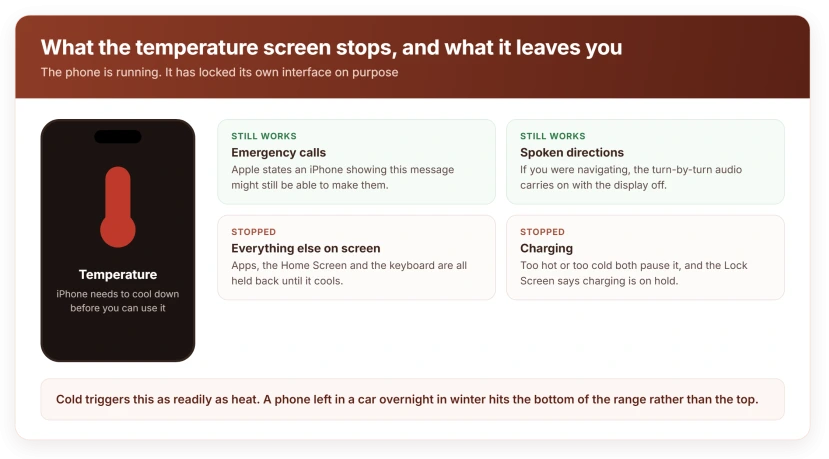
Apple: "An iPhone showing this message might still be able to make emergency calls."
So the phone is running. It has locked its own interface to protect itself, and it has left the one function that matters most.
That is a designed state, not a crash. Which means force restarting it over and over achieves nothing, because nothing has frozen.
Fix 2: If you were navigating, the screen is meant to do that
This is the case people misread most often, and it catches drivers constantly.
Apple says that while you are navigating, the phone might show this alert and turn off the display. Then comes the part that matters. Apple: "Navigation still provides audible turn-by-turn directions."
A phone in a windscreen mount, in sunlight, screen at full brightness, GPS running. That is the phone doing exactly what it was designed to do.
And the directions keep coming. The screen going dark mid-journey feels like a failure and it is not one.
Move the mount out of direct sun and off the demister vent, and take the case off while it is charging in the car.
Fix 3: Rule out cold, because it triggers this just as readily
That screen gets read as too hot every time. Apple's page covers both directions.
Apple: "Using an iOS or iPadOS device in very cold conditions outside of its operating range might temporarily shorten battery life and could cause your device to turn off."
And on charging specifically. Apple: "If your iOS or iPadOS device gets too cold, it might not charge or could stop charging."
A phone left in a car overnight in winter hits the bottom of the range, not the top. It feels cold to you because it is cold.
Bring it indoors and let it come up to room temperature on its own. Not on a radiator, and not in front of a heater. That swings it straight to the other problem.
Fix 4: Lower the trigger with four things that cost nothing
None of these fixes a sensor. All of them lower the chance of hitting the threshold.
- Take the case off and leave it off, particularly any case with a magnet or a battery in it.
- Stop wireless charging and use a cable, since wireless charging generates heat at the back panel where the sensors sit.
- Drop the brightness and turn off Always On Display if your model has it.
- Keep it out of the car, which is the single hottest and coldest place most phones ever go.
Our page on an iPhone that runs hot after an update covers the software side properly, and it is the right read if the phone genuinely is warm.
Fix 5: Book it in, and mention the battery when you do
Now we are past anything a setting can fix. I would rather tell you that than pad this out.
Apple's page assumes throughout that the device is hot or cold. It offers no path at all for a phone at normal temperature showing this screen, which I checked by reading it end to end.
Ours, and stated as reasoning rather than as a diagnosis: a phone reports its own temperature from internal sensors.
If those readings are wrong, the protection triggers on a number rather than on real heat, and no amount of cooling changes a wrong number.
That is a hardware question. It belongs with a technician rather than a settings menu.
Two things make it a booking rather than a wait. It repeats, and it happens on a phone that is cool to the touch.
Mention the battery when you go. A recent battery replacement or a swollen one sits right next to those sensors, and our page on what the Unknown battery label actually means covers how to check what has been changed in your phone.
Fix 6: Know what the repair trade has already tried on this
This last rung goes here, so you go into a repair with your eyes open rather than hopeful. iFixit's long thread on this exact symptom has seven answers, and the highest-voted one points where you would expect.
The suggestion is that "this can happen with a wrong or bad battery", and to change the battery again, either back to the original or to another new one.
Then the part nobody quotes. The person who asked reported that swapping the battery held it away for about thirty-six hours, and then it came back.
Others on the thread suggest cleaning the battery contacts with isopropyl alcohol, taping over contact points, and adding thermal tape to components on the board. The original poster tried the cleaning and it did not work.
Across all seven answers, nobody reports a permanent fix. Several people describe the same problem on different models, and none of them comes back to say it was solved.
I am telling you that for two reasons. A battery swap is a reasonable thing for a technician to try and it may not hold, so agree in advance what happens if it comes back.
And if a shop tells you a new battery will definitely cure it, that is more confidence than the evidence supports.
What does not work
- Putting it in the fridge or freezer. Condensation inside a phone is a far worse problem than the one you started with, and rapid cooling is its own risk.
- Force restarting over and over. Nothing is frozen. The screen is a protection state, not a crash.
- Resetting all settings. The threshold is not a setting.
- Updating iOS. Do it anyway for other reasons, but it does not change what a sensor reports.
- Waiting longer. If fifteen minutes off in a cool room did not hold it away, more hours will not either.
Status: iOS 27.0, checked 24 September 2026. Owners of iPhone 15 Pro models report the warning on a cold phone since iOS 27, and Apple has not addressed it. Apple documents this screen only for a device that is genuinely too hot or too cold, and publishes no guidance for one that appears at normal temperature.
Why does my iPhone say it needs to cool down when it is not hot?
Because the phone acts on what its internal sensors report rather than on how it feels in your hand. If the screen returns quickly on a phone at room temperature, that points at the sensing rather than at real heat, which is a hardware matter rather than anything you can change in Settings.
Can I still use my iPhone with the temperature warning on screen?
Not normally, but Apple states an iPhone showing this message might still be able to make emergency calls. The phone has not crashed. It has locked its own interface deliberately and left the most important function working.
Is it safe to put a hot iPhone in the fridge?
No. Rapid cooling causes condensation inside the device, and moisture is a worse and less recoverable problem than heat. Turn it off and move it somewhere cool and shaded instead, which is what Apple asks for.
The Short Version
- Turn it off for fifteen minutes in a cool room first, so you can rule heat out honestly.
- Apple states the phone might still make emergency calls, so it has not crashed.
- If you were navigating, the screen is meant to go dark and the audio directions continue.
- Cold triggers it too, and a phone left in a car overnight in winter is the usual case.
- Apple's page has no path for a phone at normal temperature, which points at the sensors.
- Case off, cable instead of wireless charging, and lower brightness all reduce the trigger.
- Never use a fridge or freezer, because condensation is the worse problem.
Where to Next
There is a particular frustration in being told to let something cool down when you can feel that it already is, and every page you find tells you the same thing again.
Do the fifteen minutes once so you know. If it comes straight back on a cool phone, stop troubleshooting and get it looked at, because you have already found the answer.
If you do book it in, tell me what they say about the battery, since that is the part of this I would most like to know more about.
And if the screen goes dark on iOS 27 with no warning at all, that is a brightness bug with its own fix.
On a new iPhone 17e that simply runs warm, the 17e heat page separates normal warmth from real overheating.

Isaac Smith is the founder and editor of PC Glance, a website that covers computers, laptops, and technology. He is a tech enthusiast and a computer geek who loves to share his insights and help his readers make smart choices when buying tech gadgets or laptops. He is always curious and updated about the latest tech trends.