
You got a new iPhone 17e, and it turns warm fast, even while you browse or set it up. On the charger it gets hot, which your old iPhone never did.
You are far from alone, since 228 people have pressed Me too on the forum thread. I read it against Apple's own temperature guide, and the owner who started it found some relief.
What the owner described
The first post was clear, in their words: "During normal usage (such as browsing or setting up the device), the phone becomes warm very quickly".
Others pushed back on calling that normal. One owner wrote that "they should not heat that quickly", and a few described heat that was painful to hold.
A Level 10 volunteer's answer to that was blunt: "Do not keep holding something in your hand that is hot enough to burn it".
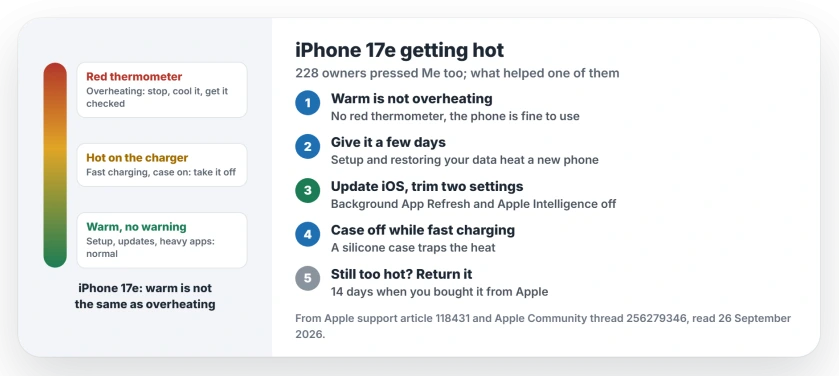
Status: iPhone 17e, checked 26 September 2026. Warmth during setup, updates and charging is normal, Apple says. One owner felt it improve after an iOS update and two settings changes.
1. Warm is not the same as overheating
A Level 10 volunteer drew the line: "The phone is not overheating unless a red thermometer appears on the screen".
Apple's temperature guide agrees that with no temperature warning on screen, the phone is fine to use. It lists setting up the device the first time, a major update and wireless charging among the normal warm moments.
2. Give a new phone a few days
Setup is one of the hot times. Apple says that in these cases "Your device will cool when the process is complete or when you finish your activity".
So judge the phone after the first few days, once it has finished setting up and restoring your data; that timing is ours.
3. Try what helped the owner
The owner changed three things: "I've updated to iOS 26.4.1 and turned off Background App Refresh and Apple Intelligence".
The result was modest but real: "It seems a bit better now, so I'll keep monitoring it". If you want the same switches, the Apple Intelligence page shows where they are on iOS 27.
4. Watch fast charging and your case
Charging is the other hot spot, as another Level 10 volunteer noted: "However, if you fast charge your device it may get very warm, and may pause charging at 80%".
A case holds that heat in, and a third Level 10 volunteer said "A silicone case will have an insulating effect that effectively traps the heat". Take it off while you charge.
5. Keep the room in mind
Your phone cannot beat the air around it. One volunteer put it simply: "The phone cannot be cooler than the air around it".
Apple rates iPhones for use from 0 up to 35 degrees Celsius. It also warns that very hot conditions can shorten battery life for good.
6. Use the return window if it still feels wrong
If yours is new and still too hot to hold, act while you can. A Level 10 volunteer reminded the owner: "You had 14 days when you purchase a phone from Apple to evaluate it and determine if the phone meets your expectations".
A red thermometer warning, or heat that hurts, is reason enough to take it back or have it checked. That advice is ours.
Other iPhone heat problems
If a different iPhone started running hot after an update, the overheating page goes through the settings behind it. And for heat on the biggest new model, the iPhone 18 Pro Max page covers what owners found.
Is it normal for the iPhone 17e to get warm?
Warm is normal, yes: Apple says setup, updates, wireless charging and heavy apps can all warm a phone, and it is fine to keep using it without a temperature warning.
Why does my iPhone 17e get hot when charging?
Fast charging can make it very warm, a volunteer explained, and a silicone case traps that heat. Charge it without the case.
What should I turn off to stop my iPhone 17e overheating?
The owner behind the thread updated iOS and turned off Background App Refresh and Apple Intelligence, and found it a bit better.
Should I return my iPhone 17e for overheating?
If it shows the red thermometer or feels too hot to hold, yes. Bought from Apple, you have 14 days to return it.
The Short Version
- Warm is normal; a red thermometer is not.
- Setup and updates heat a new phone.
- Update iOS and trim background features.
- Take the case off while fast charging.
- Hot rooms make it worse.
- Too hot to hold? Use the return window.
Where to Next
Note when your 17e gets hottest over the next two days: charging, gaming or just browsing. That pattern tells you which step to try first.
Has your 17e calmed down after a few days? Tell me what changed in the comments. I will list the fixes that stick.

Isaac Smith is the founder and editor of PC Glance, a website that covers computers, laptops, and technology. He is a tech enthusiast and a computer geek who loves to share his insights and help his readers make smart choices when buying tech gadgets or laptops. He is always curious and updated about the latest tech trends.