

The message "The printer software is not compatible with this device" after the macOS 27 update almost never means the printer has died. Its driver was written for Intel Macs and needs Apple's Rosetta translator.
Rosetta went missing on many Macs during the upgrade, and one Terminal command puts it back. Many Brother printers now have a macOS 27 driver of their own, and AirPrint skips the driver question completely.
In this guide
Why the printer stopped after the update
Every Mac that runs macOS 27 has an Apple chip, M1 or newer. Plenty of printer drivers were written years ago for Intel Macs and never rebuilt.
Those drivers only ever worked through Rosetta, the background translator Apple supplies for Intel software.
After the upgrade, Rosetta wasn't there on a lot of Macs. The Rosetta page doesn't say the update removes it, but owners on Apple's forums and a software company's support team report exactly that.
An app asks you to install Rosetta when it needs it. A printer driver doesn't ask, so the only sign is that compatibility message in the print queue.
1. Install Rosetta again with one command
This fixes most cases and takes about a minute. Make sure the Mac is online, open Terminal from Applications > Utilities, paste this line and press Return:
softwareupdate --install-rosettaIt's the command Apple gives on its Rosetta page. When it asks you to agree to the license, type A and press Return. Nothing opens afterwards, because Rosetta runs in the background.
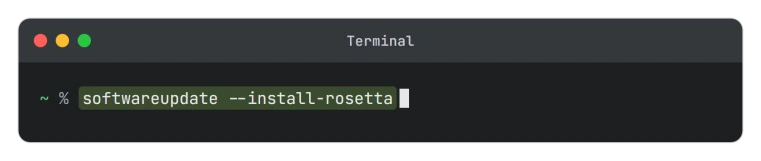
Clear any stuck jobs from the print queue and print a test page. Owners with Brother lasers, including an HL-2240 and an HL-L2300D, and an HP Color LaserJet were printing again straight after this step.
Still seeing the error? Set the printer up from scratch, as in fix 3, so macOS installs it fresh with Rosetta in place.
Command line tools fail more bluntly without Rosetta, with a CPU type error in Terminal, and the Terminal side of Rosetta has its own page.
2. Check whether your printer now has a macOS 27 driver
Printer makers have caught up since the update. On Brother's US support site, 117 laser models and 52 inkjet models now have a macOS 27 download, from the HL-L2300D and HL-L2350DW to the MFC-L2700DW and MFC-J1010DW.
A model missing from those lists won't get one: the same pages state there are no plans to support it on macOS 27. The HL-2240, HL-4150CDN and DCP-7065DN that owners struggled with aren't listed.
Search for your exact printer on its maker's website. When a macOS 27 driver exists, install it and you no longer depend on Rosetta. When it doesn't, fixes 3 to 5 work without one. Canon and Epson have published macOS 27 support pages too.
3. Set the printer up again and choose AirPrint
AirPrint needs no driver on the Mac, so Rosetta doesn't matter to it. macOS uses AirPrint by default when you add a printer, and it's the same system an iPhone uses to print.
Open the new Print Center app in Applications > Utilities, select your printer, then choose Printer > Remove Printer. Bring it back with Printer > Add Printer.
The same controls sit in System Settings > Printers & Scanners, under Add Printer, Scanner, or Fax.
While adding it, open the Use menu. If it offers AirPrint, take it. It's the same choice Brother recommends for printing and scanning on macOS 27.
One owner with a Brother DCP-7065DN fixed theirs just by deleting and re-adding it, because macOS installed fresh printing software on the way back in.
A network printer that doesn't appear in the Add window at all can still be added by its address. Click IP, type the printer's IP address, and choose AirPrint or IPP as the protocol.
The address is on the printer's network settings screen or its printed configuration page.
4. No AirPrint? Try the generic PostScript or PCL driver
Many older laser printers speak a printer language that macOS already understands. Apple's printer guide suggests generic PostScript or PCL printer software in the Use menu, depending on the printer.
Delete it from the list, set it up once more, and pick Generic PostScript Printer in the Use menu, or the PCL option for a PCL model. An owner with a USB HP Color LaserJet CP2025, a model HP stopped supporting, got it printing this way.
Print a test page before you rely on it. Cheaper inkjets often speak neither language, and a generic driver can miss extras such as paper trays or two-sided printing.
For double-sided Mac output, the printer itself has to support automatic duplex.
5. A Brother network printer? Change how it connects
On Brother network lasers, three owners got printing again by changing the connection. Two switched the printer to its Ethernet setup with Brother's BRAdmin Light utility, and one set an HL-L2395DW to Wi-Fi printing.
It didn't work instantly for the first of them. The printer only came back after both the Mac and the printer had been switched off overnight, so give it time before you decide it failed.
I think the new connection let the Mac reach the printer over AirPrint or IPP, which need no Mac driver. That part is my own reading of the reports.
6. Plan ahead for macOS 28
If Rosetta was your fix, it's a temporary one. Apple says Rosetta stays available through macOS 27, then from macOS 28 only for certain older, unmaintained games. An Intel-only printer driver stops working again with that update.
Three ways out: a printer that supports AirPrint, a newer driver from the maker, or one Mac kept on macOS 27 for an old printer you love.
Some people put a small print server, such as a Raspberry Pi, between the Mac and an old printer.
What doesn't help
A reset of the whole printing system wipes all your printers, and it doesn't bring Rosetta back. If you still want one, the Tahoe printing guide covers the reset and when it helps.
Before resetting for a Filter failed message, compare a simple document with the troublesome PDF.
Owners have posted fix scripts on GitHub that change files inside macOS without saying what they do. I wouldn't run them. The Rosetta command comes from Apple.
Printer admin through the localhost:631 pages in a browser stays switched off on macOS 27. The CUPS page lists what still works in Terminal.
Office print systems such as PaperCut Mobility Print get their print queues from your school's or company's server. Ask whoever runs it whether their version supports macOS 27 first, because the fix may be on their side.
If nothing works
Contact the printer maker's support with your exact model and the full error message. If your printer is on the maker's macOS 27 list and still won't print with the new driver, Apple Support can check the Mac side.
A printer that isn't on the list and won't work through AirPrint or a generic driver is finished on current macOS. An AirPrint printer is the replacement that won't go through this again.
Other macOS 27 problems on the same Mac
If the update itself seemed to stall, reading the update progress bar properly tells you whether it's really stuck. A Windows PC that shares the same printer and also stopped needs what changed with Windows printer drivers this year.
Shared folders on an older Mac that won't open have the macOS 27 file sharing page. If the battery now empties overnight, the macOS 27 battery drain page starts with the same Intel apps Rosetta runs.
A bank PDF that comes out locked after you mark it up in Preview is a different problem, and the Preview password page shows the print route that frees a copy.
What does "printer software is not compatible" mean on a Mac?
The printer's driver was built for Intel Macs and can't run on an Apple chip without Rosetta. Installing Rosetta in Terminal, or moving the printer to AirPrint or a macOS 27 driver from the maker, clears it.
Does Brother have a macOS 27 driver for my printer?
For many models, yes: 117 laser and 52 inkjet models on Brother's US site have a macOS 27 download. A model that isn't listed won't get one, so use AirPrint, a generic driver or Rosetta.
Will my old printer work on macOS 28?
Not through Rosetta. From macOS 28, Rosetta only remains for certain older games. AirPrint, a generic PostScript or PCL driver, or a newer driver from the maker don't depend on it.
Do I need a new printer after updating to macOS 27?
Usually not. Install Rosetta, check the maker's macOS 27 list, then try AirPrint or a generic driver. Replace the printer only if none of those work.
The Short Version
- The macOS 27 message means an Intel-era printer driver can't run, usually because Rosetta is missing.
- Run
softwareupdate --install-rosettain Terminal and type A to agree. - Check your maker's macOS 27 page. Brother now lists macOS 27 drivers for many models.
- Remove the printer, add it back, and choose AirPrint in the Use menu if it's offered.
- No AirPrint? Try Generic PostScript or PCL.
- Rosetta ends with macOS 28 except for some games, so plan for AirPrint or a newer driver.
Checked November 8, 2026.
 If you have any business, I can build it online




Bingo!
Many thanks pal. Worked just fine.
HP 7640 stopped working with IOS 27. OK with rosetta fix. Thanks
Yes! Rosetta fixed my problem on Brother MFC. Thanks a lot.
great !!! it works. thanks
Installing Rosetta fixed the problem with my Brothers HL-L2320D. Thank you. I installed using the TERMINAL command line as provided.