
You close the lid on a full battery, and by morning it is nearly flat. The Mac runs warm when you are not even using it. If this started with macOS 27, look at the old apps still on your Mac.
The main thread has 24 Me too votes. Its first poster has now fixed theirs, and I set that fix beside Apple's new list of apps that stop working after macOS 27.
A full battery gone by morning
The owner bought a MacBook Pro in May 2026. "Before the macOS 27 upgrade, battery life was excellent and I had no overheating issues." After it, the Mac lost charge while it was supposed to be asleep.
Their test was blunt. The Mac went from "100% battery to 1% over roughly 16 hours", asleep and unplugged. The logs showed 225 sleep and wake events since the last restart, and 7 dark wakes in a single sleep.
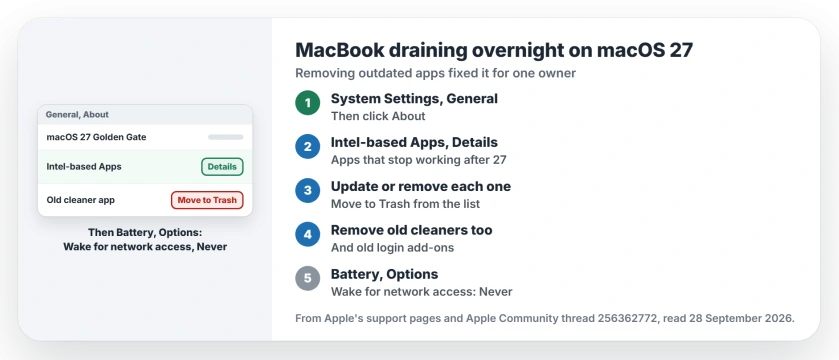
Status: macOS 27, checked 28 September 2026. Uninstalling outdated apps stopped the drain for the MacBook Pro owner behind the main thread. Apple now lists Intel-based apps under General, About.
1. Find the outdated apps
Five days later the owner posted the answer. "The solution was very simple, I had to uninstall some applications that were deprecated for this macOS version".
They removed a second group as well, "other that will be deprecated for the next macOS release". Then: "the Mac returns to normal." The owner's fix is user-reported. Which apps, they never said.
Apple now gives you a list of that second kind. It warns that an Intel-based app "will not work with a future release of macOS (macOS 28)", and shows where to see them all.
Choose Apple menu, then System Settings, General and About. Then Apple says: "In the macOS section, click the Details button next to Intel-based Apps." Matching the owner's words to this list is ours.
2. Update them, or move them to the Trash
Apple's Intel-based apps page says to replace each one with a Universal or Apple silicon version where one exists. Check the App Store, or the developer's site.
If an app has no update and you no longer use it, the same list can remove it. Point at its name, click More Info, then "choose Show App in Finder or Move to Trash".
Apple also warns that apps can bring "extensions or updaters, that need to be updated separately". I would check those too, since the owner's fix covered whole apps.
3. Clear out old cleaners and add-ons
Two Level 9 volunteers pointed the same way before the owner found it. One wrote: "Cleaners and protectors cause compatibility issues, often after macOS updates."
The other agreed once the fix was in: "Third party apps tend to be a very common problem especially after a major OS upgrade." So an old cleaner, antivirus or login add-on belongs on your list.
An old app can also leave a kernel extension that macOS keeps refusing. If syspolicyd heads Activity Monitor, reinstalling that app and approving it calmed the CPU for one owner.
A Cisco VPN can keep the fans busy with the tunnel closed; our socket filter page tells that filter apart from the VPN app.
4. Stop network wake-ups at night
Another owner lost 20 percent overnight, and a log showed "countless wake requests". Apple documents one common source: "Other users may be waking your Mac remotely to use its shared resources."
On a laptop, open System Settings, then Battery, then Options, and set Wake for network access to Never. Apple lists that exact step on its page about unexpected wakes. Then test it overnight.
5. Read the sleep log yourself
A Level 9 volunteer shared a Terminal command that shows only sleeps and wakes. Type it exactly, with the spaces inside the quotes: pmset -g log | grep -E 'Sleep |Wake '
Run it the morning after a bad night.
They added that "macOS can wake up every few minutes for a few seconds." So look for long runs of wakes, and note the times, before and after you remove each app.
Right after the update, allow a few days. Apple says: "If Spotlight is indexing your hard disk, your Mac won't go to sleep." A Level 10 volunteer suggested leaving it on the charger meanwhile.
Update, 29 September 2026: one more overnight cause turned up. On some Macs, dasd and appstoreagent loop from midnight because an App Store date is stuck in the past, and owners saw the battery run down faster. The dasd page has the Terminal check and the one week fix.
More macOS 27 trouble on a Mac
If an Intel printer driver stopped working in the same update, the printer page starts with Rosetta. And if your Mac will not wake at all, the sleep page covers that opposite fault.
Slow uploads are another macOS 27 change, and the ECN page has the Terminal fix owners measured.
And if Storage shows System Data eating your disk since the update, the System Data page starts with quitting Safari.
Why is my MacBook battery draining overnight after macOS 27?
In the main thread, outdated apps did it. Removing them brought the owner's battery life back to normal.
How do I find Intel-based apps on macOS 27?
Choose Apple menu, System Settings, General, About, then click Details next to Intel-based Apps.
Will Intel apps stop working?
Apple says Rosetta keeps working on Apple silicon Macs through macOS 27. From macOS 28, it stays only for certain older games.
Is some drain normal right after the update?
For a while, yes. Spotlight indexing keeps a Mac awake, and Apple says indexing "can take several hours, depending on the number of files on your Mac."
The Short Version
- Overnight drain started with macOS 27.
- Outdated apps caused it in the main thread.
- General, About lists Intel-based apps.
- Update them, or move them to the Trash.
- Remove old cleaners and add-ons too.
- Set Wake for network access to Never.
Where to Next
Tonight, before you close the lid, check General, then About, and click Details next to Intel-based Apps. Update or remove what you find, then let it sleep overnight.
If it still drains with that list empty, post your Mac model and the wake log as a comment, and I will check them against the owners' reports.

Isaac Smith is the founder and editor of PC Glance, a website that covers computers, laptops, and technology. He is a tech enthusiast and a computer geek who loves to share his insights and help his readers make smart choices when buying tech gadgets or laptops. He is always curious and updated about the latest tech trends.