
Your Mac's fan runs while you do nothing, and Activity Monitor puts syspolicyd at the top, at 20 to 40 percent CPU. The battery drops while it sits idle.
syspolicyd is part of Gatekeeper, the check macOS runs on software from outside the App Store. I read a steady high number as Gatekeeper stuck on one item, checking it again and again. The fix is to find that item.
The Ask Different question about syspolicyd draining a MacBook battery has 20,939 views. An older one about it reading terabytes from the disk has 14,322.
What syspolicyd is checking
Apple says, on its page about opening apps safely, that Gatekeeper is "designed to ensure that only trusted software runs on your Mac".
For apps, plug-ins and installers from outside the App Store, macOS checks the developer's signature and Apple's notarization.
Apple ties that check to the first launch. A busy syspolicyd for hours means something keeps asking again: an extension it cannot load, or tools launched in a loop.
Ours: none. I built this page from Apple's Gatekeeper pages and four Ask Different threads, with no Mac on my desk.
Status: checked on 16 October 2026 against Apple's Gatekeeper and system extension pages, current for macOS 27, with Ask Different reports from 2020 to 2025.
Find the blocked item in Console
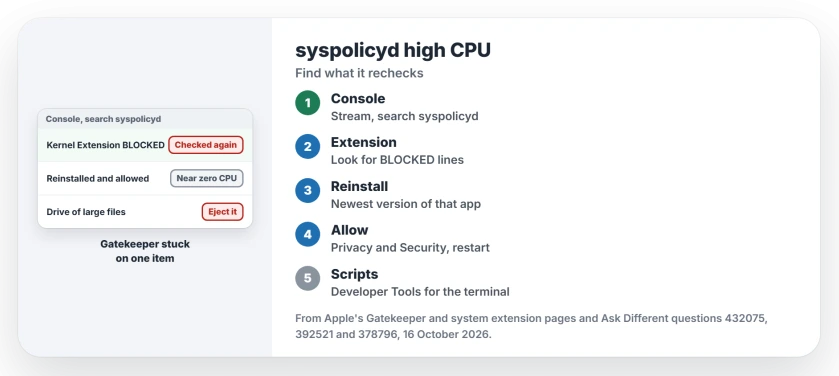
Open Console from Applications, then Utilities. Click your Mac under Devices, click Start Streaming, and type syspolicyd in the search field.
The 2021 asker found the cause there, and you may too. Lines marked with a yellow dot named a kernel extension, in their words "Kernel Extension BLOCKED", from Malwarebytes and from Karabiner.
One commenter could not find that list. The asker's advice was to stream the main list and search, not to pick a report.
Reinstall the app and allow it
The accepted fix was short: download the newest version of the app that owns the extension and reinstall it over your copy. The reinstall brought back the request to allow the extension in Privacy & Security.
Once they allowed it, the asker wrote, "syspolicyd will drop to zero % CPU usage". Their reading was that macOS kept trying to load an extension that was never approved.
Apple's system extension guide gives you the same path. A new kernel extension needs approval, then a restart started from the warning in System Settings, Privacy & Security. No longer use the app? Uninstall it instead.
Work VPN clients bring extensions too; the Cisco acsockext page shows which part of Cisco's client can go on a personal Mac.
Tools launched in a loop? Try Developer Tools
If your script starts a command-line tool thousands of times, that can keep syspolicyd busy too. In 2023 an owner saw 30 to 40 percent while a script fed files to a binary they had compiled. That question has no answer yet.
One 2021 answer suggested adding your terminal app to Privacy & Security, Developer Tools, so Gatekeeper skips those checks. A commenter confirmed "Enabling DevTools for iTerm did the trick for me", while another tested it with no effect.
I would try this only for the terminal app your scripts run in. It tells macOS to trust whatever that app launches.
A drive full of large files
In 2025 an owner with the same reads found a USB disk left connected with very large files on it. Once they ejected it, the problem stopped. If syspolicyd calms down when your external drive is out, that drive holds what it keeps checking.
Do not switch Gatekeeper off
One answer suggested turning off System Integrity Protection and running spctl --master-disable. The asker turned SIP off and still saw about 100 GB read in an hour.
spctl --master-disable also turns Gatekeeper off for everything. If your fan has been loud since a macOS update rather than since an install, our page on Macs draining overnight after macOS 27 looks at old apps first.
Is syspolicyd a virus?
No. It is Apple's own process in /usr/libexec, and the 2020 asker found that killing it did not help. A steady 30 percent points to something it cannot finish checking, not to malware. Another Apple process with the same pattern, apfsd, gets a First Aid run instead.
Why does it read so much from the disk?
Because it reads the files it checks. One owner traced it with fs_usage and saw it scanning the same dozen game apps in their Steam folder again and again. Big app bundles mean big reads.
The Short Version
- syspolicyd is Gatekeeper; steady high CPU means it keeps checking one thing.
- Stream Console, search syspolicyd, and look for a blocked kernel extension.
- Reinstall that app, then allow it in Privacy & Security and restart.
- Scripts running tools in a loop? Developer Tools for that terminal app helped one owner.
- Leave Gatekeeper and SIP switched on.
Where to Next
Which app's extension was it on yours? Leave the name in a comment; it helps me list the usual suspects for the next reader.

Isaac Smith is the founder and editor of PC Glance, a website that covers computers, laptops, and technology. He is a tech enthusiast and a computer geek who loves to share his insights and help his readers make smart choices when buying tech gadgets or laptops. He is always curious and updated about the latest tech trends.