

Your Mac's fans spin up, and Activity Monitor shows com.cisco.anyconnect.macos.acsockext near the top. The Cisco VPN is not even connected, and the process comes straight back each time you quit it.
That process is the socket filter Cisco AnyConnect installs next to its VPN; the app is called Cisco Secure Client now. I treat the two as separate pieces. On a personal Mac that only needs the VPN, the filter can go.
Its Ask Different question, opened in May 2021, now shows 70,657 views, and six owners confirmed one answer in the comments.
What acsockext does
A University of Illinois IT page explains it. The client "uses a network system extension on macOS, bundled into an application named Cisco AnyConnect Socket Filter".
The same page lists three parts: a DNS proxy, an app or transparent proxy, and a content filter.
Cisco's own October 2025 guide for managed Macs ties com.cisco.anyconnect.macos.acsockext to the content filter in its Umbrella security module.
Ours: none. No Mac or Cisco account here, so this page rests on Apple's release notes, Cisco's guide, that university page and the owners in the question.
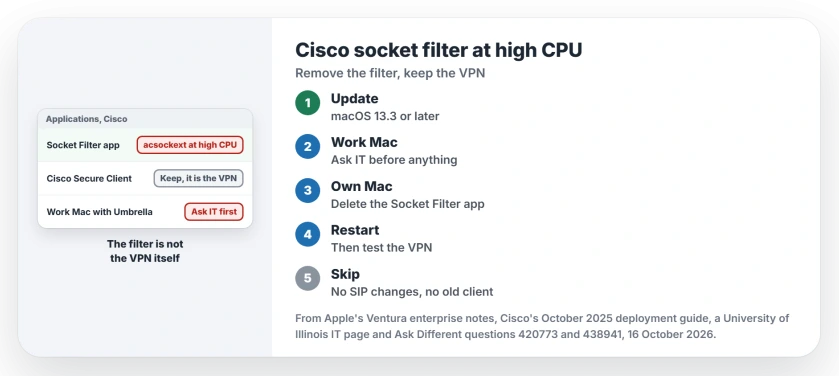
Status: Apple's Ventura 13.3 enterprise note and Cisco's October 2025 deployment guide checked 16 October 2026; removing the filter app has the most owner confirmations.
Update macOS first
Apple fixed one cause in macOS Ventura 13.3. Apple says so in its enterprise release notes: "Resolves an issue where using Cisco AnyConnect could cause high CPU usage".
Update before you remove anything. It did not end the problem for every owner, though, since one still needed the fix that follows on Ventura 13.5.2.
Work Mac or your own?
On a Mac your employer manages, leave the filter alone and talk to IT. In Cisco's guide, the management system switches the content filter on, and it turns itself back on if you switch it off.
The university page shows the other side. For its own campus VPN, the filter "is used for advanced security functions not used by the Urbana campus".
Your own Mac, VPN only: delete the Socket Filter app
Your best-confirmed fix dates from September 2021. Open the Cisco folder in Applications and delete the Cisco Socket Filter app, "but NOT the Anyconnect client".
The asker replied, "This solution worked for me". Others added "Simple and effective" and "The only one that worked", and in 2023 one more wrote, "Just confirmed this is working on Ventura 13.5.2".
The university recommends the same step. On your Mac it may be Cisco AnyConnect Socket Filter, or Cisco Secure Client - Socket Filter on newer versions; restart once it is gone.
Only switching it off in Network settings
The accepted answer took a softer route. When Cisco asks to filter network content, you click Don't Allow, then remove each Cisco entry from Network settings with the minus button.
It held for the asker, but for another owner it did not last; in their words, "It works, but happens again when I restart my computer". For a third, the prompt kept coming back.
Skip SIP and old installers
One answer removes the extension with systemextensionsctl, and notes that this needs System Integrity Protection turned off. I would not lower SIP for that. Our syspolicyd page shows how your Mac approves extensions with SIP left on.
Another answer rolled the client back to version 4.9. A later commenter could no longer find the old installer, and an outdated VPN client is a poor trade for a quieter fan.
Will the VPN still work without the filter?
For VPN-only use, owners report that it does. One wrote in 2022, "I keep refusing the request and the VPN works anyway". Another said the client "still works without a problem".
There is one warning. After removing the Cisco entries from Network settings, one commenter could no longer reach a server their Cisco setup was meant for. If that happens to you, reinstall Secure Client and ask IT.
Fan still loud after the filter is gone?
Then look at your other background apps; our macOS 27 overnight drain page checks outdated apps and add-ons first.
The Short Version
- acsockext is Cisco's socket filter, a separate piece from the VPN.
- Update macOS; Apple fixed an AnyConnect CPU issue in Ventura 13.3.
- Work Mac: ask IT, since a managed filter turns itself back on.
- Own Mac: delete the Socket Filter app in Applications, Cisco, then restart.
- Leave SIP on and skip old installers.
Where to Next
Did removing the filter app change anything about your VPN? Tell me in a comment, with your Secure Client version. I track which client versions misbehave on which macOS.

Isaac Smith is the founder and editor of PC Glance, a website that covers computers, laptops, and technology. He is a tech enthusiast and a computer geek who loves to share his insights and help his readers make smart choices when buying tech gadgets or laptops. He is always curious and updated about the latest tech trends.