

Your Mac warns that it is running low on memory, and Activity Monitor shows qemu-system-aarch64 holding 3 GB or more. You never opened anything by that name.
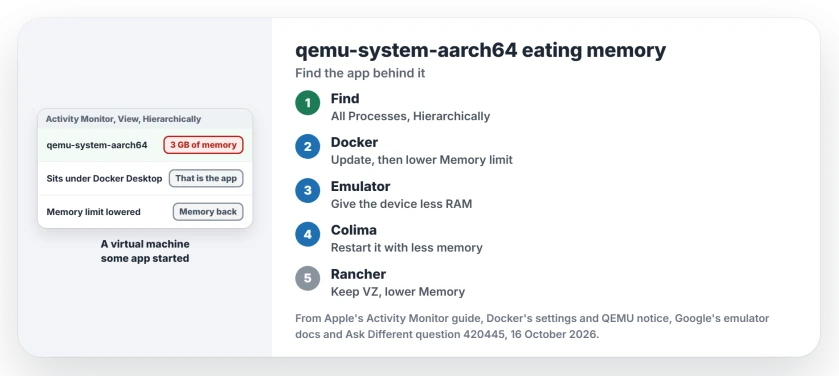
qemu-system-aarch64 is QEMU, a program that runs a whole second computer inside your Mac. I treat it as a passenger, not the driver. Some app you installed started it, and that app decides how much memory it gets.
That process name has 156,696 views on one Ask Different question from May 2021. Its accepted answer has 248 votes.
What the process is running
The accepted answer is a single line: "This process belongs to an application you've installed yourself". The memory you see is the RAM that app handed to its virtual machine.
Answers and comments there name four apps that start it: Docker Desktop, the Android Studio emulator, Colima and Rancher Desktop.
Google's emulator guide says the emulator runs on QEMU, and Rancher Desktop offers QEMU as one of its two machine types.
Ours: none. With no Mac here to test on, this page leans on those apps' own manuals, Apple's Activity Monitor guide and the people in that question.
Status: Docker's settings and virtual machine pages, Google's emulator guides and Apple's Activity Monitor guide checked 16 October 2026.
Ask Activity Monitor which app started it
Open Activity Monitor and choose View, then All Processes, Hierarchically. Apple's Activity Monitor guide says this view "Shows processes that belong to other processes, so you can see the parent/child relationship between them".
Find qemu-system-aarch64 in the tree; the process it sits under is your answer.
You can also select the process, then double-click it, as Apple's guide puts it. The accepted answer says the window that opens names the process which started it at the top, with the program's own path on the Open Files and Ports tab.
Docker Desktop: update it, then lower the limit
One answer, with 164 votes, opens "It was Docker for Mac". A commenter agreed: "Yes, indeed it was docker". In their words, "Stopping Docker releases the resources".
Docker has since dropped QEMU on Macs. Its April 2025 notice said "QEMU will be fully deprecated 90 days from today, on July 14, 2025".
Releases after 1 July 2025 move users to Apple's Virtualization Framework instead, so a current Docker Desktop should no longer run its machine through QEMU.
If Docker is the parent on your Mac, I would update it first.
Then cap it. Open Docker Desktop's Settings, then Resources, then Advanced, and lower Memory limit. Docker says the limit "Defaults to 50% of your host's memory", which on a 16 GB Mac means up to 8 GB.
The same Resources section has Resource Saver. Docker's settings page says it switches the Linux machine off while Docker Desktop is idle.
Android Studio's emulator: give the device less RAM
In 2021 an owner wrote, "Indeed, on my machine it was also coming from the Android emulator". Here the process is the virtual phone itself. Close the emulator and it goes.
To keep it smaller, edit the virtual device in Device Manager and find RAM among its advanced settings. Google's guide says that field can "Override the amount of RAM on the device set by the hardware manufacturer".
It also warns: "Increasing the size uses more resources on your computer but supports faster emulator operation".
Do you start the emulator from Terminal? Its -memory option "Specifies the physical RAM size, from 1536 to 8192 MBs". Google adds, "This value overrides the AVD setting".
Colima and Rancher Desktop
Colima came up too: "In my case it was colima", one commenter wrote. Its manual says "The default VM created by Colima has 2 CPUs, 2GiB memory and 100GiB storage". If you raised that, stop it and start it with a smaller number of GiB:
colima stop
colima start --memory 4
Rancher Desktop offers two machine types. Its manual says "The VZ option is enabled by default and uses the native macOS Virtualization.Framework for running a guest machine".
A commenter added that Apple's framework "uses less memory". If yours was switched to QEMU, switch it back under Preferences, Virtual Machine, Emulation. Memory sits under Hardware in that same section.
Can I just force quit it?
You can, and the memory returns. I would not make a habit of it. Force quit ends that virtual machine with no shutdown, much like pulling the power cord on a running PC. Stop it from its own app instead.
Windows has the same story under another name. Our Vmmem page shuts down WSL and caps its memory in much the same spirit.
Is qemu-system-aarch64 a virus?
No. QEMU is free, open source emulation software, and developer tools build on it. Still, check the path it runs from, on the Open Files and Ports tab. It should sit inside an app you recognize.
If memory looks fine and your Mac still crawls, our slow Mac page walks through the five causes Apple names.
The Short Version
- qemu-system-aarch64 is a virtual machine that an installed app started.
- In Activity Monitor, View, All Processes, Hierarchically shows that app.
- Docker Desktop: update it, then lower Memory limit under Resources, Advanced.
- Android emulator: close it, or give the virtual device less RAM.
- Colima and Rancher Desktop: set less memory; keep Rancher on VZ.
Where to Next
Which app sat on top of it in your Activity Monitor tree? Tell me in a comment. If it was not Docker, the emulator, Colima or Rancher, I want that name for this page.

Isaac Smith is the founder and editor of PC Glance, a website that covers computers, laptops, and technology. He is a tech enthusiast and a computer geek who loves to share his insights and help his readers make smart choices when buying tech gadgets or laptops. He is always curious and updated about the latest tech trends.