

You open your Photos library from an external drive on a new Mac, and Photos starts Updating Library. The bar crawls, then stops. After a relaunch it sits at zero.
I would leave Photos' own repair tool until later. For the owner in this story it fixed the wrong library, while a check of the drive got the update moving again.
Asked in December 2021, the Ask Different post on this stall has 23,435 views. An older one asking what Photos does while it says Updating has 23,902.
Why the update stalls
An owner kept a large library on an external drive, made on an older laptop running Mojave or Catalina. On a new Mac with Monterey, they Option-clicked Photos to open it. The update began, as it should for a library from an older macOS.
"This proceeded slowly until it got to 79% and then got stuck." Hours later, with no movement, they quit Photos. On the next launch, "This time it is stuck immediately, on 0%".
The repair tool did not help. In their words, "it just repairs the (empty) local library, not the external one that has all my photos". With Photos busy, they could not reach Preferences to switch libraries either.
If that matches your screen, the drive is where I would look. Ours: none. There was no Mac or external library to test with, so this page works from Apple's Photos and Disk Utility pages and the asker's result.
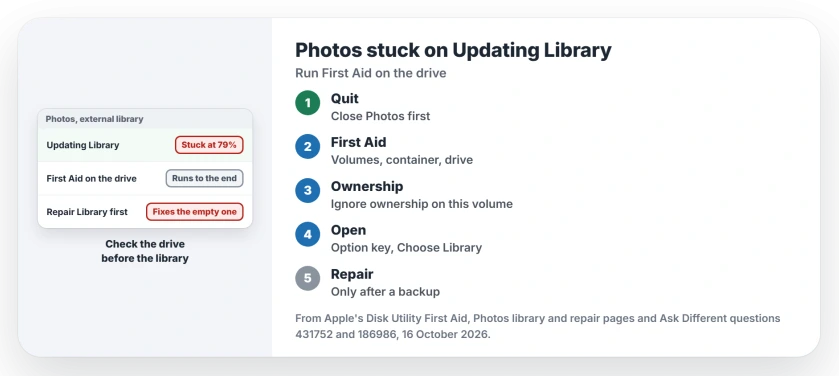
Status: Apple's Photos library and Disk Utility First Aid pages checked 16 October 2026; First Aid on the external drive is the asker's confirmed fix.
Quit Photos, then run First Aid on the external drive
Quit Photos first, from the Photos menu. Then open Disk Utility and turn on Show All Devices from the View menu. The external drive itself should appear, not just its volume.
Apple's First Aid page is specific about the order: "you need to run First Aid on each volume and container on the storage device in turn, then run it on the storage device itself". Select each one, click First Aid, then Run.
The asker's summary: running First Aid "on the external disk where my library was stored seemed to fix the problem". They opened Photos again. This time "the library update process was able to run to completion".
Once the library opens normally, organize it with albums and folders inside Photos rather than rearranging its package files.
Once your pictures are available, choose one for the Mac screen saver using a dedicated folder or album.
Check Ignore ownership on the drive
Files written on another Mac can keep that Mac's account as their owner. Select the external drive in the Finder, choose File, then Get Info, and open Sharing & Permissions.
Apple's page on libraries kept on external drives says to make sure Ignore ownership on this volume is selected. You may need to click the lock first.
No box at all? Apple says that means the drive is not formatted for Mac. Or it once held Time Machine backups and was never erased.
Why the repair tool fixed the wrong library
Apple explains it on that same page. "If Photos can't find the device, it stops using the Photos library stored there and will create a new empty library at the default location".
That empty library is what the repair tool can end up rebuilding.
So open the right one first. Hold the Option key while you open Photos, select the external library, then click Choose Library.
Only then press Option-Command while opening Photos and click Repair. Apple asks you to back up the library before any repair. I agree.
With iCloud Photos on, the status can then sit on Restoring from iCloud; the page on that message explains what iCloud is checking.
Is the drive the right kind?
Apple wants the drive "formatted for Mac", either Mac OS Extended (Journaled) or APFS. It also says "You can't store your library on a storage device used for Time Machine backups."
Apple also warns off SD cards, USB flash drives, network drives and cloud folders for a library. If your drive will not show up at all, our page on an external drive that will not mount comes first.
How long should Updating Library take?
Longer than you would like, on a big library. The 2015 asker's Mac was "almost unresponsive for several hours" with only 7,600 photos and 325 videos.
I would give it a night, as long as the number keeps rising. A number frozen for hours is the sign to stop. That is when the 2021 asker quit, and First Aid on the drive later cleared it.
Will I lose my photos?
The asker feared the library was ruined. It was not; First Aid brought it back. Still, back up before any repair. If Photos refuses to launch after a macOS update, our Photos and Passwords page has a rebuild section for that case.
The Short Version
- A stuck Updating Library on an external drive can be a disk fault.
- Quit Photos and run First Aid on each volume, container, then the drive.
- Tick Ignore ownership on this volume in the drive's Get Info.
- Open the external library with the Option key before any repair.
- Use an APFS or Mac OS Extended drive that never held Time Machine backups.
Where to Next
At what percentage did your update freeze? Leave the number in a comment. I want to see whether 79 turns up again.

Isaac Smith is the founder and editor of PC Glance, a website that covers computers, laptops, and technology. He is a tech enthusiast and a computer geek who loves to share his insights and help his readers make smart choices when buying tech gadgets or laptops. He is always curious and updated about the latest tech trends.