
Task Manager shows Vmmem, or VmmemWSL, holding gigabytes of memory while you are not running anything Linux, and the fan keeps spinning up.
I would not try to end that process. Windows guards it. The memory belongs to a virtual machine, so you shut down the machine behind it, then cap it.
Asked in April 2021, the Super User question about stopping it has 138,331 views.
What Vmmem actually is
Vmmem is a virtual machine's memory process. Microsoft's GPU paravirtualization page lists it among the processes Windows creates "When you launch a VM or container".
Often that machine is WSL 2, started by Docker Desktop. The asker in the Super User question had just installed Docker, and their "computer fan has been turning on every 5 seconds".
Microsoft keeps its advice short. A vmmem.exe entry is a sign of "a virtual machine consuming the memory", so "shut down the virtual machine to make the memory available".
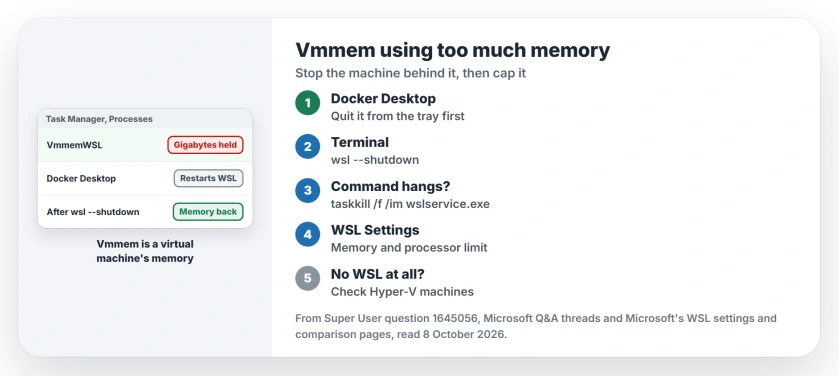
Status: checked 8 October 2026. Vmmem is the memory of a WSL or Hyper-V virtual machine. Quit Docker, run wsl --shutdown, then cap the memory so it cannot grow back.
Ours: this laptop has 15.2 GB of RAM and no .wslconfig file, so Microsoft's default lets WSL take about 7.6 GB. The WSL Service was running with no distribution open, and no Vmmem entry was in the list.
1. Quit Docker Desktop, then run wsl --shutdown
Quit Docker Desktop from its tray icon first. One commenter put the order plainly: "you will need to quit Docker first. OW it will restart wsl".
Then open a terminal and run:
wsl --shutdownMicrosoft says it "is a fast path to restarting WSL 2 distributions, but it will shut down all running distributions, so use wisely". Save your Linux work before you run it.
One owner said it "worked fine for me (without admin)". Another had to repeat it, writing "running wsl --shutdown 2 times worked for me".
Stopping can take a minute. Vmmem then drops out of Task Manager.
2. If wsl --shutdown hangs, end the WSL service
Sometimes the command never returns. WSL itself is stuck. The top answer covers that case: "You can't kill Vmmem, but you can kill the WSL service and let it restart".
If that is you, run this in an administrator terminal:
taskkill /f /im wslservice.exeA commenter called it exactly what they needed, since "Other answers that suggest using wsl.exe don't work when wsl isn't responding".
Another owner saw the shutdown command hang "until I ran taskkill /f /im wslservice.exe in a different window".
Ours: wslservice.exe was running here, and Services lists it as WSL Service, set to Automatic. On older WSL builds the name can differ, and one commenter found no wslservice.exe at all. If you have none either, restart Windows.
3. Cap the memory so it cannot grow back
By default WSL 2 may take "50% of total memory on Windows" from your PC, according to Microsoft's WSL settings page. On a 16 GB laptop, a busy Docker setup can claim 8 GB of it.
Microsoft says to change it in WSL Settings, which you open from the Start menu. The limit sits on the Memory and processor page. You can also put it in a text file:
[wsl2]
memory=4GB
That file is called .wslconfig and goes in your user folder. Microsoft documents that "The .wslconfig file does not exist by default". Name it with the dot at the front and no .txt at the end.
One owner wrote that "it seems that the program does not see .wslconfig". Microsoft's 8 second rule can explain that, since a change only applies after WSL has fully stopped.
In Microsoft's words, WSL needs "about 8 seconds after closing ALL instances of the distribution shell". Run wsl --shutdown once more after you save. The new limit applies on the next start.
No WSL on this PC? Look for another virtual machine
Vmmem also appears for Hyper-V virtual machines. Several Microsoft Q&A askers saw it with no WSL installed, and one while BlueStacks, an Android emulator, was running.
One owner stopped it from Services instead: "The one that did it for me was Hyper-V virtual machine management". A commenter added that the Hyper-V Host Compute Service, vmcompute, has to stop as well.
Ours: vmcompute was running here, set to start manually, even with no distribution installed. Something on the PC had asked for it. A restart is the gentle way to let it go.
If memory stays high once every virtual machine is closed, the cause is elsewhere. Our high memory usage page goes through the other usual suspects.
Macs show the same pattern under another name, qemu-system-aarch64; the Mac page on that process finds the app that launched its machine.
Leave the process itself alone
Ending Vmmem in Task Manager fails by design. One owner wrote "You will get access denied if you try and stop the process".
Forcing the VM worker process, vmwp.exe, is worse. A commenter who force-ended it got a blue screen, so I would stick to wsl --shutdown and the WSL service.
Why does Vmmem hold memory after Linux is closed?
Microsoft's comparison page says WSL 2 "does not yet release cached pages in memory back to Windows until the WSL instance is shut down". Newer WSL releases reclaim that cache by themselves, which the Auto memory reclaim setting in WSL Settings controls.
If WSL will not start again after a shutdown, the fix for a WSL window that vanishes on launch is the next stop.
The same virtual machine networking can also fence off ports on your PC. When a container cannot bind to one, check the excluded port ranges first.
The Short Version
- Vmmem is the memory of a WSL 2 or Hyper-V virtual machine, not a stray app.
- Quit Docker Desktop first, or it restarts WSL.
wsl --shutdownstops the machine. Run it twice if it needs it.- If it hangs,
taskkill /f /im wslservice.exefrom an admin terminal. - Cap the memory in WSL Settings or a .wslconfig file, then shut down WSL once.
Where to Next
Start with Docker and wsl --shutdown, then set the cap so the same thing does not happen next week.
Still seeing Vmmem with nothing running? List your open apps in the comments, so we can find what else holds the memory.

Isaac Smith is the founder and editor of PC Glance, a website that covers computers, laptops, and technology. He is a tech enthusiast and a computer geek who loves to share his insights and help his readers make smart choices when buying tech gadgets or laptops. He is always curious and updated about the latest tech trends.