
Your Mac runs warm and slow, and Activity Monitor shows a process called apfsd near the top. That is worrying when you never asked it to do anything.
Owners on macOS 15.8 and macOS 27 compared notes on MacRumors, and I read their thread alongside Apple's pages on Activity Monitor and Disk Utility. One owner cleared it for good. Others got relief until the next restart.
What apfsd does
One member quoted the manual page for it: "apfsd is the APFS volume management daemon, it controls volume encryption and decryption, automatic file defragmentation and performs other housekeeping duties as necessary."
So it looks after your Mac's drive in the background. Normally it sits near zero. That member wrote that on their Mac "apfsd is at 0.0% CPU" on macOS 15.8.1.
What owners saw
The opening post came from a 2019 iMac with an internal hard drive. Another owner on macOS 15.8 saw apfsd "spiking to 98% most of the time after updating."
A Mac mini owner hit it on macOS 27.0 and 27.0.1. In their words: "Only one core, not all cores." So the fan and the heat come from one busy core.
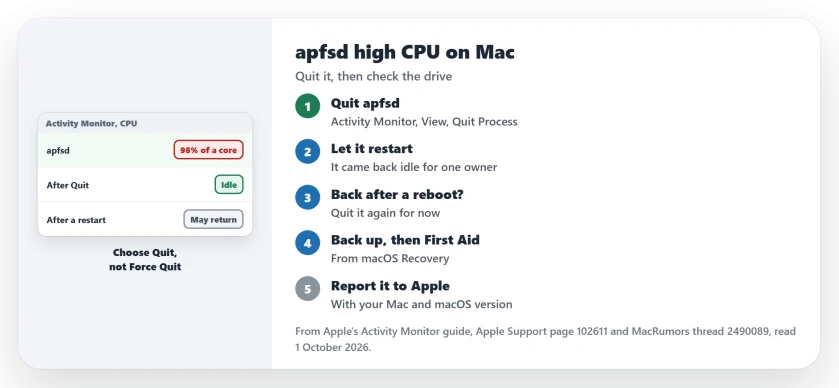
Status: checked 1 October 2026. Quitting apfsd in Activity Monitor cleared it for good for one owner. For two others it came back after a restart, and First Aid found nothing on one Mac.
1. Quit apfsd in Activity Monitor
The fix that held came from the opening post. In their words: "I opened Activity Monitor and highlighted process apfsd. Then on the View menu, I click Quit Process. I did that twice. That stopped all the busy-ness."
The process came back on its own, as it should, and they added: "Soon the process restarted in a normal way, idle most of the time."
Apple's Activity Monitor guide backs this up: "You can use Activity Monitor to quit a process, even if it's in a loop or not responding." Choose Quit, not Force Quit. Apple says Quit stops it "when it's safe to do so."
Your Mac may ask for your password. Apple notes that "If you attempt to quit a process you don't own, you may be required to authenticate as an administrator."
2. Expect it may come back after a restart
For one owner the fix did not last. They wrote that stopping it "fixes the issue for me until I reboot". After a restart it climbed back to 98 or 99 percent.
The Mac mini owner said quitting it "does fix it for a while". So treat a quit as relief, and keep going if it returns.
3. Back up, then run First Aid
A member suggested checking the drive from Recovery. Apple's First Aid page says "Disk Utility can find and repair errors related to the formatting and directory structure of a Mac storage device."
Back up first. Apple says: "Make sure that you have a current backup of your data". For the startup disk, Apple says to start up from macOS Recovery and open Disk Utility there.
Then follow Apple's order. In Disk Utility, choose View, then Show All Devices. Start with the last volume, click First Aid, then Run, and work up the list.
First Aid may find nothing, as one owner learned when it "didn't find any issues" on their iMac. Still, it rules the drive in or out.
4. Check FileVault and snapshots
The manual page mentions encryption, so a member asked whether the affected owners had FileVault on. Two owners did not. One had never used it, and the other had it off.
The Mac mini owner had another suspect. They wrote: "I am suspicious it is related to snapshot activity." That is a guess. It has not been tested.
5. Note your Mac when you report it
It is not one kind of Mac. Owners report it on a 2019 iMac with a hard drive, another 2019 iMac on macOS 15.8, and a new Mac mini on macOS 27.
That spread suggests software rather than a failing part. I would report it to Apple, naming your model and macOS version.
If other background processes chew through your battery at night, the dasd page covers two more. And for Spotlight's own indexing load, see the Spotlight progress page.
If mediaanalysisd is the process heating your idle Mac instead, it can be looping on one folder, and Spotlight's privacy list stops it.
And when replayd tops the list after a video call, whichever app shared your screen is keeping it busy.
If distnoted leads the CPU list instead, it is relaying for another app, most often Finder or OneDrive.
When syspolicyd sits at the top instead, Console can name the blocked extension it keeps rechecking.
ApplicationsStorageExtension at the top means the Storage pane is still counting your apps, and closing it ends the load.
What is apfsd on a Mac?
It is the APFS volume management daemon. It handles drive encryption, defragmentation and other housekeeping in the background.
Is it safe to quit apfsd?
Apple says Activity Monitor's Quit stops a process only when it is safe. macOS restarts apfsd by itself, as one owner saw.
Why does apfsd use so much CPU?
It has not been pinned down yet. One owner suspects snapshot activity, and the fault shows up on both older and new Macs.
The Short Version
- apfsd looks after your Mac's drive in the background.
- Owners saw it stuck near 98 percent of one core.
- Quit it in Activity Monitor, with Quit, not Force Quit.
- It restarts by itself, normally idle.
- If it returns after a reboot, quit it again.
- Back up, then run First Aid from Recovery.
- Report your Mac model and macOS version to Apple.
Where to Next
Select apfsd in Activity Monitor now and quit it once. Then watch whether it settles.
If it keeps coming back after every restart, post your Mac model and macOS version as a comment. Each confirmed cause goes onto this page.

Isaac Smith is the founder and editor of PC Glance, a website that covers computers, laptops, and technology. He is a tech enthusiast and a computer geek who loves to share his insights and help his readers make smart choices when buying tech gadgets or laptops. He is always curious and updated about the latest tech trends.