
Your fan gets loud, you open Activity Monitor, and ApplicationsStorageExtension is one of the busiest names in the % CPU column. You did not start anything called that.
I would not force quit it or go hunting for malware first. In most of the reports I read, a Storage window had been left open.
The Ask Different question that names the process has 22,825 views since April 2021, and its top answer has 49 votes.
What the process is counting
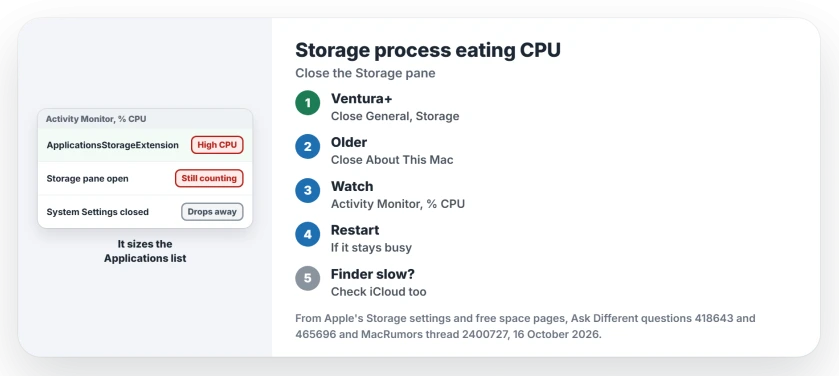
It belongs to the storage overview. The 2021 asker answered their own question: "I think ApplicationsStorageExtension calculates how much storage your Mac is using."
Apple describes that overview in its Storage settings. "The chart shows the amount of storage used by different apps and file types, and lists the amount of free storage available for use."
One of its categories is Applications, which Apple says "Contains all the apps installed on your Mac (excluding system applications)". Adding those up takes work, and the process does it.
Ours: none. With no Mac in front of me, I relied on Apple's storage pages and on owners who watched the process drop.
Status: owners on Big Sur and Ventura confirm the fix; Apple's Storage settings and free space pages checked 16 October 2026.
Close the Storage pane
The answer's question is the whole diagnosis: "Did you leave About This Mac open with Storage selected?"
On macOS Ventura and later, that pane lives in System Settings, General, Storage. Close it, or quit System Settings with Command-Q. On Big Sur and Monterey, close the About This Mac window.
One reader replied, "This solution worked for me instantly." Then watch Activity Monitor; the process should fall away.
Why it keeps going in the background
The pane does not stop counting just because you looked away. Apple notes on its free up storage space page that the storage information "updates automatically" as you clear files.
If the drive also needs room, choose files to remove from the Mac before leaving the overview open to recalculate.
A commenter on the 2021 answer put the complaint well: "you'd think perhaps it would back down a bit or stop calculating if not in focus".
In 2023 an M1 Pro owner on Ventura 13.5.2 first blamed the update for the high CPU. They then corrected themselves: "Storage usage in settings was left open", which kept it recalculating.
Still busy with nothing open?
Restart the Mac. That ends anything left over from a pane you closed.
A 2023 owner on Sonoma had ApplicationsStorageExtension and Finder both spiking over 50% CPU, and Finder took seconds to respond. Relaunching Finder did nothing. Neither did restarting.
AppleCare told them a new macOS can be slow "for a day or so while indexing happens". In the end, "just turning off icloud fixed my slowness" for that owner, followed by a restart.
If your whole Mac drags, not only this process, our slow Mac page starts with the causes Apple lists.
Is it malware?
Not by itself. The reports I found tie it to Apple's own storage overview, opened from About This Mac or System Settings, and it settles once that closes.
The asker listed two other threads about it eating memory as well as CPU. They describe the same process, so the same first step applies.
Another process at the top instead?
Then the cause is different. If it is apfsd, our apfsd page covers that one, which owners stopped by quitting it and running First Aid.
The Short Version
- ApplicationsStorageExtension sizes the Applications category in Storage.
- It runs while the Storage pane is open and keeps recalculating.
- Ventura and later: close System Settings, General, Storage.
- Big Sur or Monterey: close the About This Mac window.
- Still busy? Restart, and check iCloud if Finder is slow too.
Where to Next
Was the Storage pane open on your Mac when the fan started? Tell me in the comments. If closing it did not help, I want to hear what did.

Isaac Smith is the founder and editor of PC Glance, a website that covers computers, laptops, and technology. He is a tech enthusiast and a computer geek who loves to share his insights and help his readers make smart choices when buying tech gadgets or laptops. He is always curious and updated about the latest tech trends.