
You updated to macOS 27, and now your Mac feels busy, runs warm and finds files slowly. You suspect Spotlight is still indexing, but System Settings shows no progress anywhere.
That is worrying when your battery drops faster too. I read Apple's page on Spotlight indexing, a MacRumors how-to thread and one owner's disk measurements. You can see where it stands.
Where the progress bar went
On an iPhone, iOS says search is being optimized in Settings. The MacRumors how-to thread spells out the difference: "Apple has decided not to show a persistent indexing indicator in the System Settings sidebar."
That does not mean the Mac hides it everywhere. Apple's indexing page, updated in August, says a progress indicator can show up in the window that opens when you press Command and Space.
One owner in the thread had the usual reason to care: "my battery has been bad" since upgrading, and they wanted to know what was running.
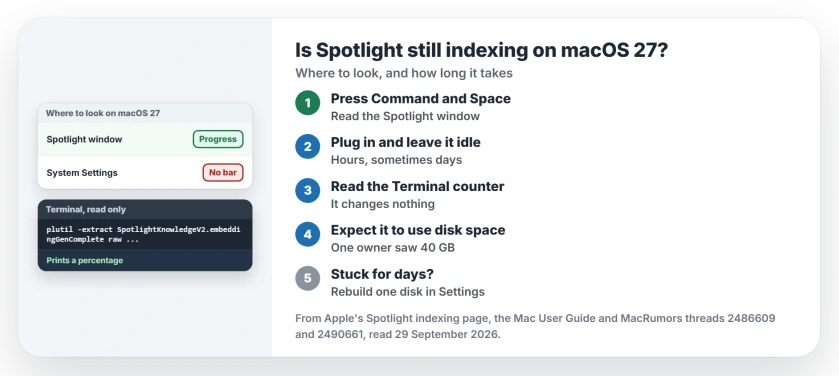
Status: macOS 27.0.1, checked 29 September 2026. Apple says indexing after an upgrade can run for hours or days, and a progress indicator can show in the Spotlight window.
1. Press Command-Space and read the window
Apple's Mac guide says it plainly: "Open Spotlight to see if it's indexing." Press Command and Space, then read the window before you type anything.
If an indicator shows, indexing is still running. If none shows, the work you feel may be the separate job in step 3.
2. Give it power, time and quiet
Apple's page is honest about the wait. Depending on how much you store, it says indexing can run for hours, or even for days.
It also lists what speeds it up. Indexing finishes faster when the Mac is not in use, is on power, and has Wi-Fi or Ethernet for mail and other data.
The how-to thread agrees: "leave your Mac plugged in overnight." Its author adds that "Any input interaction marks the Mac as active", which pauses the heavy work.
3. Read the Apple Intelligence counter in Terminal
macOS 27 also prepares your data for Siri's personal context, as a separate background job. This part is user-reported: the thread's author shared a line that reads its progress from a settings file. It changes nothing:
plutil -extract SpotlightKnowledgeV2.embeddingGenComplete raw ~/Library/Preferences/com.apple.spotlightknowledge.plist | awk '{printf "%.1f%%\n", $1 * 100}'It prints a percentage. Do not expect it to climb smoothly. The author warns that "Spotlight can ask apps to redonate some or all of their searchable items", so a long night may barely move your number.
The same post has a longer readout, but it needs a logging profile installed first. I would skip that one.
4. Expect it to use disk space while it runs
One owner watched their disk during a rebuild. In their words: "During spotlight reindex 40GB was consumed next to its database living at a stable 8Gb on disk."
At rest, their index folder sat at 8.7 GB. If your Storage pane shows a big System Data number right after the update, our System Data page covers what shrinks on its own.
5. If it never finishes, rebuild one disk
If yours never finishes, Apple gives a gentle rebuild. Open System Settings, click Spotlight, then the Search Privacy button, and add the disk to the list.
Wait a few seconds, remove it again, and click Done. Apple says Spotlight then indexes that disk again. That restarts the wait, so try it only after a few days.
If search stays broken after that, our Spotlight repair page goes further.
And if Activity Monitor blames apfsd rather than Spotlight, the apfsd page has what owners tried.
How long does Spotlight indexing take on macOS 27?
Apple's answer is hours, sometimes days, depending on how much data you have. Leaving the Mac idle on power overnight helps it finish.
Why can't I see Spotlight indexing progress on macOS 27?
System Settings shows no indicator on macOS 27. Apple says one can show in the Spotlight window instead.
Does Spotlight indexing stop my Mac from sleeping?
Yes. Apple's Mac guide says a Mac that is still indexing its disk stays awake.
The Short Version
- Press Command and Space and read the window.
- Indexing can run for hours, sometimes days.
- Keep the Mac on power and leave it alone.
- Read the Apple Intelligence counter in Terminal.
- The index can take tens of gigabytes while it runs.
- Rebuild one disk only if it never finishes.
Where to Next
Press Command and Space now and read the window before typing. Then plug the Mac in and leave it idle tonight.
If the Terminal counter sits still for days, leave a comment with the number it shows. I will add what owners find here.

Isaac Smith is the founder and editor of PC Glance, a website that covers computers, laptops, and technology. He is a tech enthusiast and a computer geek who loves to share his insights and help his readers make smart choices when buying tech gadgets or laptops. He is always curious and updated about the latest tech trends.