

You open Activity Monitor and find distnoted near the top of the CPU list, sometimes at 100% or more. The fans spin up, and you never opened anything called distnoted. It is not malware, though.
I would leave distnoted itself alone at first and look for the app keeping it busy. On Ask Different, the oldest thread about a runaway distnoted has 116,479 views. The fixes owners confirmed there all came from quitting a different app.
What distnoted does
It is part of macOS, and launchd starts it from /usr/sbin. It passes notifications between apps and system services, so an app that posts a flood of them makes distnoted do the work.
So it rarely goes wild alone. One answer on Super User puts it this way: "Often Distnoted will go wild when another process crashes".
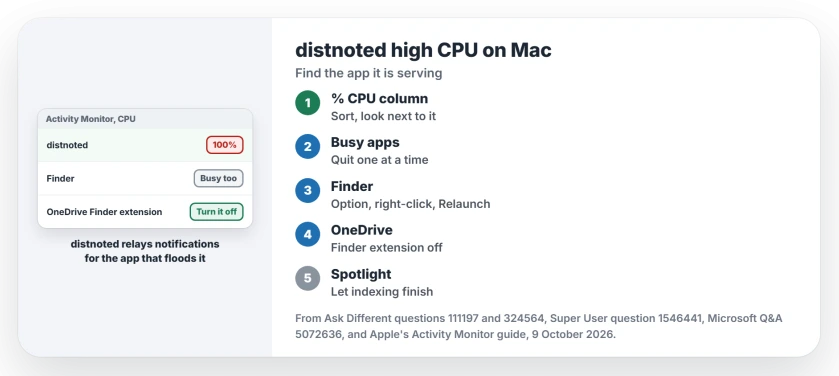
Status: no Apple fix to wait for; owners on Ask Different and Super User calmed it by quitting Emacs, OneDrive or Finder. Apple's Activity Monitor guide, checked 9 October 2026.
Ours: distnoted's own parent in Activity Monitor is launchd, so the process tree will not point at the app. The app to look for is the one busy at the same moment.
1. Sort by CPU and quit the neighbour
Open Activity Monitor, click the CPU tab, then the % CPU column to sort. Apple's Activity Monitor guide shows how to sort and how to open a process's details with the Info button.
Look at what sits next to distnoted, then quit those apps one at a time, waiting half a minute after each. When distnoted drops, you have the app.
Owners report Emacs, OneDrive and Finder most often. On Ask Different, one wrote that distnoted "calms down within seconds after I quit out of Emacs", and another replied: "Never imagined it was caused by Emacs".
2. Relaunch Finder
Finder came up again and again next to distnoted. Hold Option and right-click Finder in your Dock. Pick Relaunch. Your windows close and reopen.
On a related Ask Different thread with 31,660 views, an owner wrote that "Relaunching the Finder helped" them. A commenter on Mojave answered "Yes, it did".
Another owner traced the same load to Preview holding images open from a shared folder, so check your open Preview windows too.
3. Using OneDrive? Turn off its Finder extension
OneDrive shows its sync icons in your Finder windows through an extension, and owners caught it pushing Finder and distnoted together. One saw Finder near 150% and distnoted near 100%. Quitting OneDrive and Finder calmed both.
A commenter there wrote that "Unchecking the Onedrive Finder extension" fixed it for them. Another only had to quit OneDrive and start it again.
On current macOS, type Extensions into the System Settings search field and look for OneDrive's Finder entry there. If you cannot find it, quitting OneDrive gives you the same test.
On Microsoft Q&A, an owner with 80+ Same question votes described several OneDrive Finder Integration processes spinning up, with Finder over 130%. An answer there suggested the same switch.
Do you also use OneDrive on a PC? Our page on OneDrive always looking for changes covers the sync loop behind it on the Windows side.
4. Let Spotlight finish
The asker of the big Ask Different thread found that some of the notifications came from the Spotlight user. They narrowed what Spotlight could index. The spikes seemed to stop.
Before you change anything there, check whether Spotlight is simply still indexing. Our page on Spotlight indexing progress shows how to see that from the search bar.
Can I just quit distnoted?
You can, but it comes back. Select it in Activity Monitor, click the stop control in the window corner, and choose Quit. launchd starts a fresh one, and an answer on Super User warns you may "experience bugs" after killing it.
Apple says Force Quit stops a process at once, and "If the process has files open, you may lose data". So use plain Quit first, and only on distnoted, not on an app with unsaved work.
One owner wrote a script that kills distnoted whenever it passes 100% CPU. That is a last resort for when the app behind it stays hidden, because the busy app keeps running underneath.
Is distnoted a virus?
No. The real one lives in /usr/sbin and runs as distnoted agent for your account, with a second copy for the system. Select it in Activity Monitor and click the Info button to check the path.
Seeing idleassetsd near the top instead, busy on the network or the disk? That one downloads Apple's aerials, and a wallpaper change calms it.
The Short Version
- distnoted relays notifications for other apps; it is part of macOS.
- Sort Activity Monitor by CPU and quit the busy app next to it, one at a time.
- Relaunch Finder from the Dock with Option and a right-click.
- On OneDrive, turn off its Finder extension, or quit and reopen OneDrive.
- Quitting distnoted itself only buys time; it restarts.
Where to Next
Which app was flooding distnoted on your Mac? Tell us in a comment, with the macOS version you run.

Isaac Smith is the founder and editor of PC Glance, a website that covers computers, laptops, and technology. He is a tech enthusiast and a computer geek who loves to share his insights and help his readers make smart choices when buying tech gadgets or laptops. He is always curious and updated about the latest tech trends.