

Your downloads look normal. Uploads crawl, and a big file transfer can take ten times longer than it should. Owners traced it to a network setting called ECN, and one Terminal command switches it off on both macOS 27 and Tahoe.
The fix that worked on macOS Tahoe fails on macOS 27, because Apple removed the setting it changed. I checked the new command against an owner's own before and after numbers.
Uploads down to a fraction
The first owner to find it was on macOS Tahoe 26. In their words: "Upload speed dropped from ~21 Mbps to ~0.6 Mbps", while downloads stayed normal.
On 28 September, another owner reported the same on macOS 27. They found it "appears to negotiate ECN on every connection", and the old Tahoe command now fails.
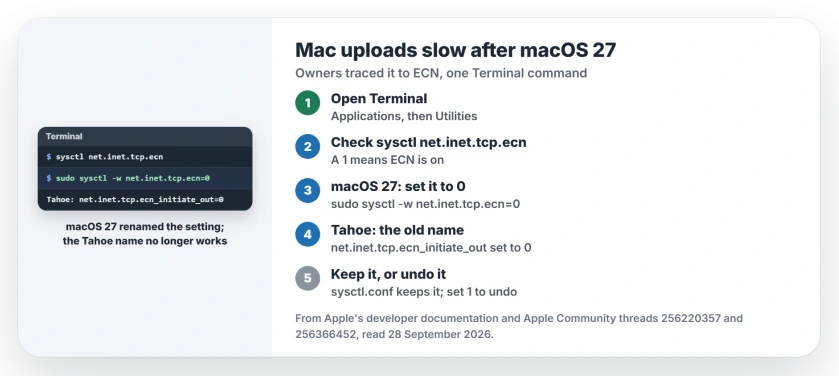
Status: macOS 27 and macOS Tahoe 26, checked 28 September 2026. Turning ECN off in Terminal fixed slow transfers for owners on both. On macOS 27 the setting has a new name.
1. Check the setting first
ECN lets a connection signal congestion instead of dropping data. Apple documents an option in its networking framework that "disables negotiation of Explicit Congestion Notification markings".
To see where your Mac stands, open Terminal from Applications, then Utilities, and type sysctl net.inet.tcp.ecn. A 1 at the end means it is on, which one owner found is the macOS 27 default.
2. Turn it off on macOS 27
In Terminal, type sudo sysctl -w net.inet.tcp.ecn=0 and press Return, then enter your Mac password, which Terminal does not show as you type. It takes effect straight away, with no restart.
The owner who found it timed a 2 GB upload before and after. It went "from 311 s (52 Mbit/s) to 32 s (552 Mbit/s)". Run your own speed test again to compare.
3. On macOS Tahoe, use the old name
If your Mac is still on Tahoe, the setting there is net.inet.tcp.ecn_initiate_out. Type sudo sysctl -w net.inet.tcp.ecn_initiate_out=0 instead.
Two owners confirmed it. One wrote that it "solved the issue right away", and another that it "restored the average download speed". On macOS 27 that name returns an unknown oid error.
4. Keep it after a restart, or undo it
A setting changed this way lasts until the Mac restarts, in our understanding of sysctl.
Owners kept it through restarts by adding one line to a system file that macOS reads when it starts up: echo "net.inet.tcp.ecn=0" | sudo tee -a /etc/sysctl.conf.
To undo it, type sudo sysctl -w net.inet.tcp.ecn=1 and remove that line from /etc/sysctl.conf. I would give it a day. Then make it permanent.
5. Or fix it at the router
One owner fixed every Apple device at once by changing a setting on their Fritzbox 6660 router. That fix is user-reported, and they did not name the setting.
Check your router's manual for ECN, traffic shaping or acceleration options, and change one at a time.
Other slow network problems
If upload is slow but download is fine on a Windows PC, the upload speed page starts with the link rate. And if a Mac on macOS 27 will not reach an older Mac's shared folders, the file sharing page covers what still works.
A MacBook that loses its charge overnight since macOS 27 is a separate fault, and the overnight drain page covers the outdated apps one owner removed.
Downloads capped near 100 Mbps on a wired gigabit Mac are a separate fault; the Ethernet speed page starts with the Hardware tab reading.
Why did uploads slow down after macOS 27?
Owners traced it to ECN, which macOS 27 appears to use on every connection. Turning it off with net.inet.tcp.ecn=0 brought one owner's upload speed back.
Why does ecn_initiate_out say unknown oid?
That setting was removed in macOS 27. The macOS 27 command is sudo sysctl -w net.inet.tcp.ecn=0.
Does turning off ECN break anything?
Connections still work without it; they only stop asking for congestion marks. That reading is ours, and one command turns it back on.
Does this fix slow uploads on an iPhone?
There is no ECN switch on iPhone. The first owner found that a VPN app "seems to improve upload performance" there as a stopgap.
The Short Version
- ECN slowed uploads after the update.
- macOS 27: net.inet.tcp.ecn set to 0.
- Tahoe: net.inet.tcp.ecn_initiate_out set to 0.
- It works at once, no restart.
- Add it to sysctl.conf to keep it.
- Set it back to 1 to undo.
Where to Next
Run a speed test now, then turn ECN off in Terminal and run it again. If the upload number jumps, you have found your fault.
If nothing changes, leave a comment with both speed results and your Mac model, and I will look at what else the owners tried.

Isaac Smith is the founder and editor of PC Glance, a website that covers computers, laptops, and technology. He is a tech enthusiast and a computer geek who loves to share his insights and help his readers make smart choices when buying tech gadgets or laptops. He is always curious and updated about the latest tech trends.