
You type a command in Terminal and zsh stops with bad CPU type in executable. A script that calls the same tool may fail with error 86 instead.
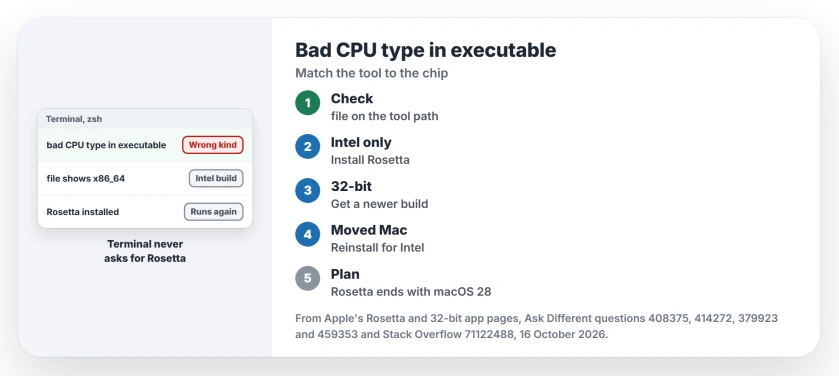
I treat it as a mismatch between the program and your Mac's processor. Which way round it runs decides your fix.
The main Ask Different question has 209,594 views, and a Stack Overflow copy about node adds another 86,414.
Three ways a program can be the wrong kind
The first is an Intel-only tool on an Apple silicon Mac that has no Rosetta. Apps ask you to install Rosetta.
Terminal does not. The accepted answer says so: "In Terminal, there is no automatic detection for missing Rosetta to run older architecture command line tools."
The second is a 32-bit tool. Apple's 32-bit page is blunt: "Starting with macOS Catalina 10.15, 32-bit apps are no longer compatible with macOS."
The third runs the other way. A tool built only for Apple silicon gets carried onto an Intel Mac by Migration Assistant, and the same error appears.
Ours: none. I don't own a Mac, which leaves Apple's Rosetta and 32-bit pages and the owners who got their tools running as my sources.
Status: Apple's Rosetta page (published 21 September 2026) and owner fixes on M1 to M4 Macs, checked 16 October 2026.
Ask the file what it was built for
Find the tool's path, then ask macOS what is inside it. Swap node for your own tool's name.
which node
file $(which node)
One owner's check on a Monterey Mac printed this for a system tool:
/usr/bin/mandoc: Mach-O 64-bit executable x86_64x86_64 means an Intel build. arm64 means Apple silicon, and a universal binary carries both.
Intel tool on Apple silicon? Install Rosetta
Apple's Rosetta page gives one Terminal command, and it needs an internet connection.
softwareupdate --install-rosettaYou may have to type A to accept the license. A 2024 owner on an M3 Pro did, and that fixed their failing node hook. The accepted Stack Overflow answer gives the same fix, and later replies confirm it on M2 and M4 Pro Macs.
Apple says Rosetta "works automatically in the background". You never open it yourself. To force one command through it, prefix it with arch -x86_64.
Does your arch -x86_64 zsh still fail? One owner had two copies of zsh, one from Homebrew. Removing that one fixed it, and "then the arch command worked for me".
Rosetta gone after macOS 27?
Did your tool work before the upgrade? Check Rosetta first. Owners reported macOS 27 removed it, and our page on printers after macOS 27 has their accounts. The same command puts it back.
Plan past it, though. In macOS 28, Apple keeps Rosetta for some older games and nothing else, according to the same page.
macOS 27 can list what still depends on it. In System Settings, go to General, then About, and use the Details button beside Intel-based Apps.
A 32-bit tool needs a newer build
pdftk is the classic case, and your copy may be an old download. One answer explains its old installer: "The package only contains a 32bit binary which won't run on Catalina or Big Sur."
Owners fixed it with a newer pdftk installer from the same developer, and one wrote, "I can confirm this still works on macOS 26.2 on my M4 MBP". Another route is the pdftk-java package from Homebrew.
For nmap, get your copy from nmap.org. That asker installed the current release there, and another reader replied, "Installing the latest version worked for me as well."
Moved from Apple silicon to an Intel Mac?
Then the error runs the other way for you. An owner who migrated to an Intel Mac got bad CPU type for php. The accepted answer: install php again for the new processor, Homebrew included.
Can you skip Rosetta altogether?
Often, yes, if your tool has a native build. Apple's advice is to replace an Intel-based app with its Universal or Apple silicon version. For node, a commenter noted, "As of 16.0 Node supports M1 without any special setup."
Even Apple slipped once. On Monterey, man pages failed with this error because mandoc shipped as Intel code, and macOS 12.1 fixed it.
Did the Rosetta install fail?
In 2020 one owner saw a Package Authoring Error during the install. The answer pointed out the command also reported that Rosetta finished installing.
To check, open Activity Monitor and turn on the Architecture column. Any process marked Intel means Rosetta is working.
If Terminal refuses a command for a different reason, our page on Operation not permitted covers the privacy side.
The Short Version
- bad CPU type means the program and your Mac's processor do not match.
- file on the tool's path shows x86_64, arm64 or both.
- Intel-only on Apple silicon: run softwareupdate --install-rosetta.
- 32-bit tools need a newer build; Apple dropped them in Catalina.
- Rosetta goes from macOS 28, so swap Intel-only tools while you can.
Where to Next
Which tool threw the error on your Mac, and did Rosetta or a new build fix it? Leave me a comment. I keep the tool list on this page current.

Isaac Smith is the founder and editor of PC Glance, a website that covers computers, laptops, and technology. He is a tech enthusiast and a computer geek who loves to share his insights and help his readers make smart choices when buying tech gadgets or laptops. He is always curious and updated about the latest tech trends.