
Gemini missing from Chrome's sidebar can mean a hidden button, a floating chat or an ineligible profile. If it worked in this account before, check the visibility setting first; that can restore access without changing the profile.
Restore a hidden button or dock the chat
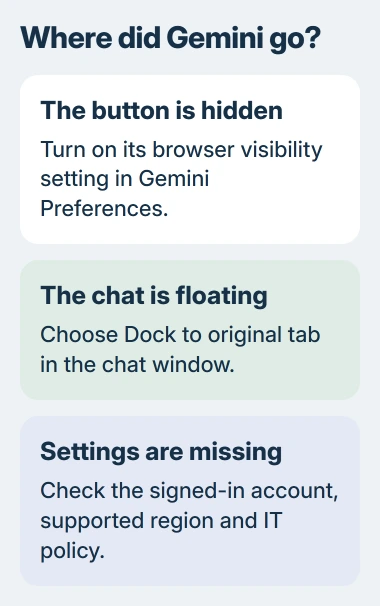
Open Settings > AI innovations > Gemini in Chrome. In Preferences, enable Show Gemini at the top of the browser. Google says the browser's top area also offers Pin Gemini in its right-click menu.
If the chat is already floating outside the browser, select Dock to original tab in the chat window. This returns the conversation to its tab without changing account eligibility.
Status: Google Chrome requirements and an owner report checked November 3, 2026. Google's current age threshold is 13 or the local minimum; availability still varies by region and account.
Click the restored button to confirm the side panel opens. The right-click Ask Gemini entry is a separate surface, so its presence alone does not confirm the toolbar button is visible.
Check the Chrome profile when settings are absent
Google's current Gemini requirements cover signed-in Chrome on Windows, Mac and Chromebook Plus, with supported device language and region. Incognito sessions do not qualify.
Check the profile icon and open a normal window in the intended account. Being signed into a Google webpage is not the same as signing into the Chrome profile.
Google states that access is rolling out gradually. A supported country and an updated browser therefore do not guarantee that the setting has reached every account.
Resolve an account-age restriction
One owner reported that age verification restored the button in December 2025, after Google emailed about being unable to confirm adulthood. That account's outcome does not establish the age rule for all current accounts.
Today's personal-account threshold is 13 or the local minimum. For an eligible account needing confirmation, follow Google's age-verification process; the toolbar setting cannot verify account details.
Supervised access may also be controlled through Family Link. A child should ask the parent managing the account to check that permission.
Ask IT about a work or school account
Organization accounts have additional requirements. Google's administrator troubleshooting page lists browser policies that can disable Gemini even on a supported computer.
Ask IT whether Gemini in Chrome is enabled for the account and whether GeminiSettings blocks it. Administrators can inspect the applied policy; changing personal browser preferences cannot override an enforced organizational restriction.
The work or school requirements include an adult account and administrator-enabled access. Provide IT with the Chrome version, account type and whether the Gemini settings page appears.
Update Chrome before trying broader resets
On Windows and Mac, use More > Help > About Google Chrome to check for an update. This route is documented by Google, including Relaunch when an installed update needs a browser restart.
On Chromebook Plus, Chrome updates with ChromeOS. Connect to Wi-Fi and select the bottom-right time display, then open system Settings > About ChromeOS > Check for updates. Select Restart when prompted to finish.
After updating, check the same signed-in profile again. If Chrome was recently used while traveling, restart it in the supported region; Google's troubleshooting also recommends disconnecting a VPN that obscures that location.
If experimental flags were changed, note their values, then open chrome://flags and choose Reset all. Relaunch afterward, as Google's flag instructions describe.
Resetting those experiments is separate from a full Chrome settings reset, which also changes site permissions and other preferences. Neither operation overrides an account's eligibility.
If an eligible, updated personal profile still lacks access, use Help > Report an issue. Include the device, Chrome version and whether Gemini worked previously. There is no guaranteed local fix for rollout availability.
The Short Version
Restore a hidden button or dock a floating chat first. Missing settings call for an account, region and policy check. Age verification helped one owner, while managed accounts need their administrator's approval.

Isaac Smith is the founder and editor of PC Glance, a website that covers computers, laptops, and technology. He is a tech enthusiast and a computer geek who loves to share his insights and help his readers make smart choices when buying tech gadgets or laptops. He is always curious and updated about the latest tech trends.