Bing Image Creator shows "You can't submit any more prompts" when it thinks you're going too fast: a burst of requests, or earlier creations it still counts as running.
Stop pressing Create or Refresh. Wait a few minutes, then check your creations.
Copilot Designer was the 2024 name for the same image tool, so fixes people shared under that name still apply. A block that lasts all day points to something else: the daily cap of 200 prompts, which refills the next day.
In this guide
What the line under the message means
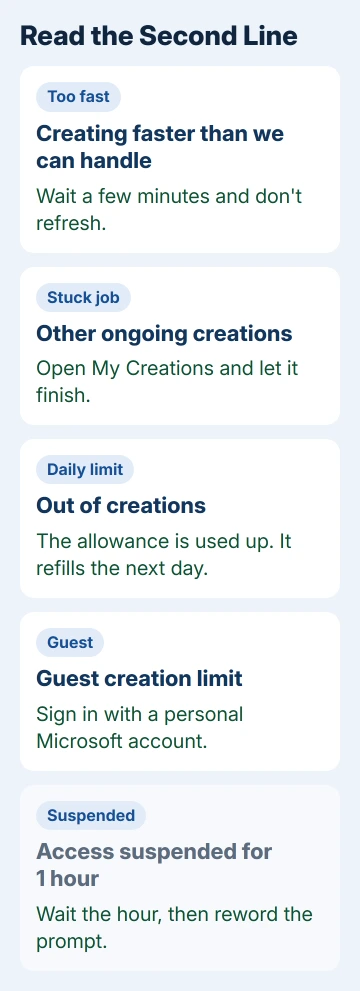
The page puts a second line under the heading, and that line tells you which limit you hit. On today's page it reads "You're creating images faster than we can handle. Please wait a moment before trying again."
In early 2024 the heading came with a different line: "Please wait until your other ongoing creations are complete before trying to create again." It showed up even with nothing running, which puzzled the owner who asked about it.
Two look-alike messages need different fixes. "You've used all your image creations" means the daily allowance is gone, and "Guest limits reset daily" appears when you're creating without signing in.
1. Stop resubmitting and wait five minutes
The answer that owner accepted put it down to impatience. Flipping between Explore Ideas and your creations, scrolling the recent list or hitting Refresh can stack up the same prompt behind the scenes.
So enter a prompt once, then switch to another tab or step away for a few minutes. When you come back, the creation should be waiting, or a click on the creations button brings it up. As that answer put it, "Don't use Refresh."
I'd give it five minutes before touching anything. If the same message still appears on a fresh prompt after that, check My Creations next.
2. Open My Creations and look for a stuck job
Select My Creations at the top of the Image Creator page to see your recent results. The 2024 version of the message asked you to wait until ongoing creations finish, so give any that are still coming time to complete.
Then submit your next prompt once. If nothing looks unfinished and the message stays put, the daily cap in the next step is the likelier reason.
3. Count today's prompts against the daily cap
Image Creator takes up to 200 prompts in a 24-hour period, and every click on Edit image counts as one. Once you've used them, they come back the next day, and nothing you change in the browser speeds that up.
The Image Creator FAQ explains the speeds too. The first 15 creations each day run fast. Later ones run at standard speed, which is slower but not blocked, and Rewards points can buy more fast ones.
Copilot Pro didn't help one subscriber in 2024: they had boosts (fast creations) left and saw the block for hours. Microsoft Support told them to wait 24 hours and try again, and for a spent daily cap that's the only real fix.
4. Sign in to lift the guest limit
Guests get a small daily allowance, and the page asks them to sign in to keep creating. Select Sign in and use your own Microsoft account, not one from work or school; those don't work with Image Creator.
If you don't have a personal account yet, creating a Microsoft account takes a few minutes and gives you the full daily allowance from the next prompt on.
5. Check for a content suspension
A different block looks similar at a glance. If a prompt gets flagged under the content policy, the page can show "Access suspended for 1 hour", and more violations may get your access suspended automatically.
Wait out the hour, then reword the prompt so it can't be read as breaking the rules. If you're sure a prompt was flagged by mistake, the page offers a way to report it.
What didn't help other owners
Clearing cookies, browsing history and even search history changed nothing for the owner who asked. A Copilot Pro subscriber spent hours with chat support, cleared the cache and let support take control of the PC, with the same result.
Their block followed the account to an Android phone as well, which tells you the limit sits on Microsoft's side, tied to your account, not your browser. That's why waiting works and cleaning up the browser doesn't.
Try Copilot while you wait
Copilot can also create images from a text prompt, so a quick picture may still be possible there. It shares your account, though, and one owner saw the same message in Copilot chat, so don't count on it during a full daily block.
If Copilot itself opens to a blank page, that's its own issue. Start with Copilot not working, which begins with a sign-out test.
When the block lasts more than a day
Use the Feedback link on the Image Creator page and include the exact message, the time it started and whether you're signed in. A support specialist on Microsoft's forum pointed owners to that route.
Copilot Pro subscribers who are blocked for days should also contact Microsoft Support about the subscription itself, with the dates the block appeared.
The Short Version
Give the page five minutes without clicking Create or Refresh, then check My Creations for a stuck job. A block that lasts all day can mean the 200 daily prompts are used up; they return the next day. Guests should sign in first.
Checked November 19, 2026.