MSN hasn't shut comments off across the site. They moved into a slim floating bar of icons that appears as you scroll a story, so the old comment box under the article is gone. Open any article, scroll a little and click the speech bubble.
What happens next tells you the rest. If the bubble is missing on every story, look at your sign-in or MSN region; if it's missing on one story, comments are off there. A rejected comment or a block notice is MSN's moderation at work.
In this guide
1. Look for the speech bubble next to the story
The comment box under MSN articles went away in March 2023. Reactions, sharing and comments now live in a small floating bar that appears as you scroll, beside the story or along the bottom. The speech bubble in that bar is your way in.
Click it and the comments open in their own panel, where you can read and post. One owner who thought comments were gone in 2023 found them this way. A forum moderator gave the same directions to another reader in August 2026.
On the msn.com website, the comment icon sits at the bottom of the story instead. If you find it and the comment panel opens, you're done. The rest of this guide is for when it doesn't, or when posting fails.
2. Try a second story before you change anything
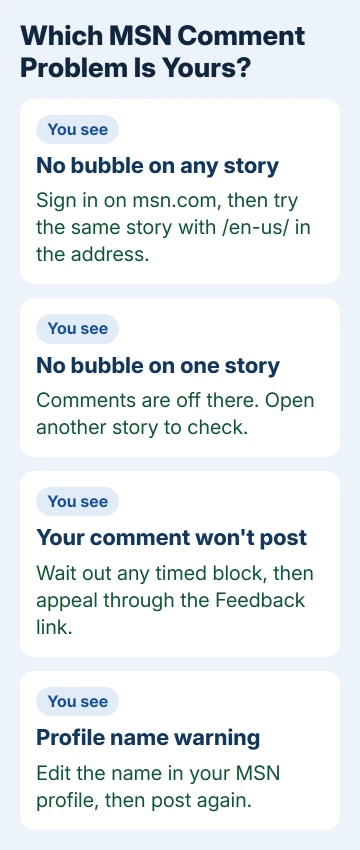
MSN can switch comments off on a single article, often a controversial or high-risk one, and the page doesn't always say so. A Microsoft moderator gave exactly that answer in February 2026 to an owner who saw no sign-in option on a story.
Open something unrelated, like a weather or sports story. If the bubble shows up there, your browser and account are fine and that one article simply has comments turned off. Nothing on your end needs fixing.
3. Check which MSN region you're reading
Whether you see comments can depend on your MSN region, which shows in the address right after msn.com, such as /en-gb/ or /en-in/. Try swapping it for /en-us/ on the same story, a test a moderator suggested in August 2026.
If comments appear under /en-us/, the edition you normally read is the reason. You can keep reading your usual edition and switch the address only when you want to join a discussion.
4. Make sure MSN itself sees you signed in
Posting only works when you're signed in on msn.com, so your initials or picture should sit in the page's top-right corner. A sign-in button there means MSN sees you as a guest; use the Microsoft account you have for Outlook or Xbox.
Being signed in to Windows isn't always enough. Several owners in 2026 were signed in there and on other Microsoft sites and still got a "session expired" message or a join-the-community screen that kept coming back after they signed in.
On Android, reinstalling the MSN app and clearing its data didn't break that loop for the owners who tried. If you can't sign in at all, our guide to signing in to a Microsoft account covers the basics.
On a computer, I'd run a quick test first. Press Ctrl+Shift+N in Edge for an InPrivate window, sign in to msn.com there and try a comment. If it posts, something stored in your normal browser profile is getting in the way.
That's when a fresh Edge profile is the fix to try. Back in 2022, one owner whose commenting broke turned off sync, signed out, removed their Edge profile and created a new one. Comments came back, but they lost their local history.
Export your favorites before you remove anything. In Edge, select your profile picture on the toolbar and choose Set up a new profile; the Edge profile guide covers switching and removing profiles.
5. Change your profile name if MSN rejects it
A notice that your profile name doesn't meet the guidelines stops you from commenting until you change the name. The notice spells it out: "To reinstate your commenting ability, edit your profile name."
The first time it happened, one owner renamed their profile and could comment again right away. Months later the same owner was blocked again and renaming didn't clear it, so for a repeat block, use the appeal in the next section.
To reach your MSN profile, click your initials at the top of the comment panel. Change the name there, keep it plain, then try posting on a story you know takes comments.
6. Comment rejected or account blocked? Appeal through Feedback
If a comment is refused for breaking the community guidelines, or a message says you're "blocked for 72 hours", that's MSN's moderation. Owners in 2026 had harmless comments rejected too, so it isn't always about what you wrote.
Wait out a timed block first. If it lasts longer than the stated time, use the Feedback link at the bottom right of an MSN page and ask for a review. Include the article link, the exact message and the date it started.
Volunteers on Microsoft's Q&A forum can't see or change MSN accounts, and owners say appeals aren't always answered. Feedback is still the only route that reaches the MSN team, so keep your request short and specific.
Finding your own comments and replies
MSN no longer keeps your past comments on an easy-to-find page. To read them and their replies, open the comments on any story and click your initials at the top of that panel; an owner shared that route in October 2026.
Late in 2025 some owners also lost the card on the MSN feed that summed up reactions and replies to their comments. Nothing they tried brought it back, so the initials route is the one to rely on.
When none of this brings comments back
Send MSN feedback from the page where comments are missing. Say which region and browser you use, whether the bubble appears on any story, and whether you're signed in.
If your Microsoft account itself is the problem, with errors on Outlook or Xbox too, sort that out first: when a Microsoft account won't sign in, the error message points to the fix.
The Short Version
Scroll a story and click the speech bubble in the floating bar. No bubble on one story means comments are off there; none anywhere points to sign-in or region. Wait out a timed block, then appeal through MSN's Feedback link.
Checked November 19, 2026.