Microsoft is retiring the Edge sidebar app list, which is why Bing Image Creator won't show up there anymore. New apps can't be added to the sidebar at all now, so the old trick of adding Image Creator from the + button no longer works.
Image Creator itself still works. Open it in a normal tab, turn that page into an app, or ask Copilot in Edge's side pane to draw the picture. Work and school logins can't use Image Creator at all, though.
In this guide
What changed in the Edge sidebar
The sidebar used to hold a column of small apps along the right edge of Edge, and Image Creator joined it in 2023. In 2026 the Edge sidebar support page turned into a retirement notice.
It puts the change plainly: "New apps can no longer be added to the sidebar." Apps you pinned earlier get removed in a later update. Copilot isn't affected, and the side pane it opens in stays.
No final date has been set. The removal is rolling out gradually, starting with personal Microsoft accounts, so depending on your Edge version you may still see apps you pinned long ago, or no app column at all.
Apps that are still pinned keep working for now. They disappear once the update that removes them reaches your copy of Edge, and nothing you click brings back an app you hadn't pinned before.
No setting, not even an IT group policy, brings the app list back; a Microsoft moderator said as much in June 2026 to an owner who relied on it every day. The three routes that follow take its place.
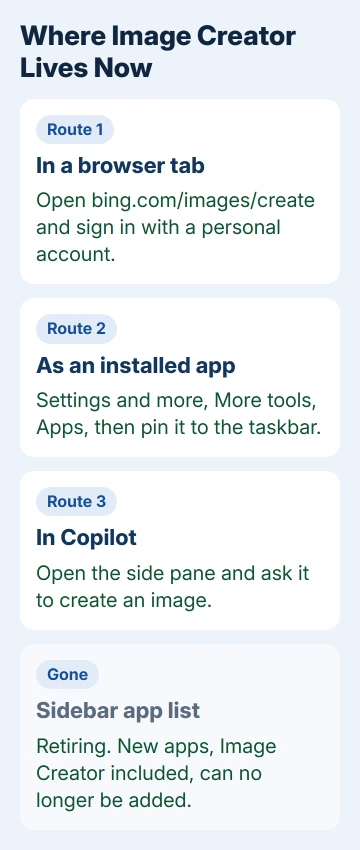
1. Open Image Creator in a normal tab
Go to bing.com/images/create in any browser. Choose Sign in in the page's top corner, log in with your own Microsoft account, then describe the picture in the box and select Generate.
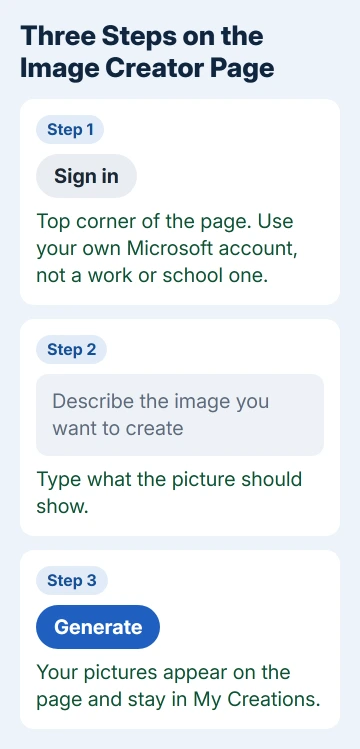
Each day brings 15 fast creations. Once they run out, pictures keep coming at standard speed, or quicker if you trade in Microsoft Rewards points. The fast count refills the next day.
The page also lets you choose between two image models, MAI-Image-2.6-Flash and MAI-Image-2e, and upload a photo to change; edits always run on the Flash model. Everything you make lands in My Creations at the top.
On a phone you don't need Edge at all. Image Creator sits inside the Bing app as a mini app, with a Sign in & Create button that works the same way.
2. Turn the page into an app for one-click access
With Image Creator open in Edge, go to Settings and more (the three dots) > More tools > Apps and choose Install this site as an app. It then opens in its own window, like any other program.
To keep it one click away, open edge://apps, select Details on the Image Creator card and choose Pin to taskbar or Pin to Start. The same card has Uninstall if you change your mind.
A pinned tab is the lighter option. Right-click the Image Creator tab and choose Pin tab, and it stays as a small icon at the left end of your tabs, ready whenever you open Edge.
3. Ask Copilot in the side pane instead
Copilot stayed when the app list went, and it makes pictures too. Select the Copilot button near the top right of Edge to open the side pane, then type a request such as Create an image of a lighthouse at dusk.
Copilot's image generation works from a plain description, and the more detail you give about style and mood, the closer the result gets to what you had in mind. Expect a short wait while it draws.
I'd use Copilot for quick one-off pictures and the Image Creator page when you want to pick a model or keep a history of your creations in one place.
4. Using a work or school login?
Image Creator isn't available to work or school accounts, the kind Microsoft calls Entra ID. One owner asked in 2023 whether that was why Image Creator never showed up for their enterprise account, and this rule would explain it.
Switch to a personal Microsoft account instead. A separate Edge profile keeps it apart from the work one: select your profile picture, then Set up a new profile and choose Personal.
Check your company's rules before you add a personal account to a work laptop. Some employers block it, and the profile option may be missing on a managed PC.
5. Older fixes that don't work anymore
The 2023 answer that still gets passed around, opening Image Creator and adding it with Add current page in the sidebar's customize menu, depends on adding a new app. That's exactly what Edge no longer allows.
Other Edge features have gone too. Edge Collections went in the same clean-up, and Drop was retired in August 2026, which is why Edge Drop is missing on every PC now.
If Image Creator itself won't load
When bing.com/images/create won't open or won't create anything, the sidebar isn't the problem. Sign out and back in with your personal account, try another browser, and read any limit message on the page; daily limits reset the next day.
To tell the Edge team what you think of the change, use Settings and more > Help and feedback > Send feedback. A moderator pointed owners to that same route.
The Short Version
Image Creator left the Edge sidebar because the app list is retiring and new apps can't be added. Use bing.com/images/create in a tab, turn it into an app, or ask Copilot in the side pane. Work and school logins are shut out.
Checked November 19, 2026.