
You click a PDF link and Chrome drops the file into Downloads instead of showing it. Or it downloads and pops open in Acrobat, with no Save As box and no choice. You never changed a setting, as far as you know.
I would first check which kind you have, because the two sit in different places in Chrome's settings.
That second kind has a Super User question from June 2020 with 44,690 views, and the fix two owners confirmed there sits under Downloads, not PDFs.
Two kinds of PDF download
In the first, the PDF lands in Downloads and nothing opens, because Chrome's viewer is off for PDFs. You switched it off, an organization did, or the site you are on forces it.
In the second, the PDF downloads and opens straight away in another app. The Save As box never shows. That means PDFs are on Chrome's list of file types to open automatically.
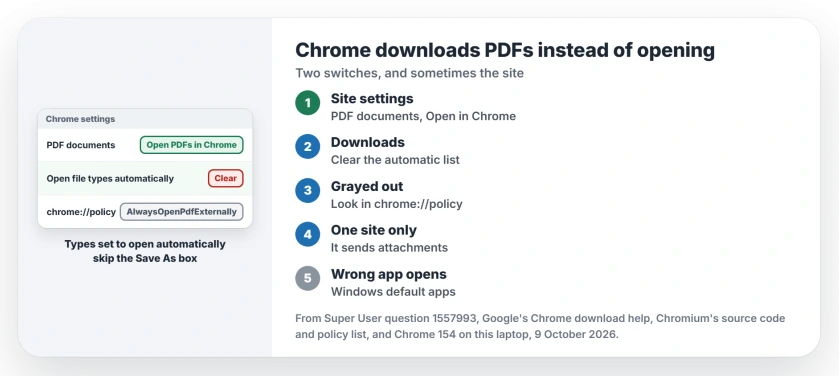
Status: Chrome 154.0.8037.98 on this Windows 11 laptop, checked 9 October 2026. Google documents both switches; owners on Super User confirmed the Downloads one.
Ours: Chrome saves the PDF switch in a profile only once someone flips it, and no Chrome profile on this laptop had it set.
None had a file type set to open automatically either, and no Chrome policy existed. The setting labels here come from this Chrome's English language file.
1. Set PDF documents back to Open PDFs in Chrome
Open Chrome's menu, then Settings, Privacy and security, Site settings. Scroll to Additional content settings, open PDF documents and choose Open PDFs in Chrome.
Google says it plainly on its help page about downloads: "You can choose whether PDFs download to your device or open in Chrome when you go to a site".
Chrome's source code is just as plain about the other choice, in a comment that says "The preference promises that PDFs are downloaded rather than opened in Chrome". No site gets past it.
2. Clear the types Chrome opens automatically
The Super User asker missed this one. They had already set the PDF switch back. They had turned on Ask where to save each file before downloading. PDFs still downloaded without a box.
Open Settings, then Downloads. Does Open certain file types automatically after downloading show a Clear button? Click it. Owners report this fixed it, and one wrote that turning it off "solved the issue for me".
How did PDFs get on that list? At some point you clicked Always open files of this type on a downloaded PDF's menu, or Always open with system viewer. Google's help page has you untick the first from your recent downloads.
The missing Save As box has a reason too: Chrome's download code says "Don't prompt for file types that are marked for opening automatically". So your ask where to save switch is skipped for them.
I would clear this list even if only PDFs misbehave. It can hold other file types too, each one skipping the box the same way.
3. Grayed out? Check for a policy
Is the PDF documents choice locked? Then an organization has set it. Type chrome://policy in the address bar and look for AlwaysOpenPdfExternally.
Google's policy description says that when it is on, Chrome "treats PDF files as a download, and lets users open PDFs with the default application". It adds that "users can't change it" once it is set.
At work or school, ask whoever runs your PC, but at home, a policy you never set deserves a closer look. Our page on a full virus scan covers the offline one.
Only one site does it
Then that site sends its PDFs as attachments. Chrome's download code checks for that first. Such a file is saved before anything else gets a say, whatever your settings.
Open the file from Downloads, or drag it into an open Chrome window. I would leave Chrome's settings alone for this one. Nothing on your side is broken.
The PDF opens, but in the wrong app
That is a Windows setting, not a Chrome one, and our default apps page shows how to pick the app for .pdf files.
The Short Version
- Saved and not opened: Site settings, PDF documents, Open PDFs in Chrome.
- Downloads and opens in Acrobat with no Save As box: Settings, Downloads, Clear.
- Choice grayed out: chrome://policy and AlwaysOpenPdfExternally.
- One site only: it sends attachments, so open the file from Downloads.
Where to Next
Which switch was set in your Chrome? Leave a comment, and say whether you remember setting it.

Isaac Smith is the founder and editor of PC Glance, a website that covers computers, laptops, and technology. He is a tech enthusiast and a computer geek who loves to share his insights and help his readers make smart choices when buying tech gadgets or laptops. He is always curious and updated about the latest tech trends.