
Your iPhone says Slow Charger and you want the wattage that set it off. Apple publishes no such number, and I went looking.
What it does say plainly is what the message means, and it is a good deal less serious than it sounds.
Then I will give you the figures Apple does publish, which get you close enough to act on.
Apple's own answer, two taps from the message
The words sit in orange at Settings > Battery, under the battery graph, with a circled information button beside them. The charging part of the graph is drawn orange instead of green for the same stretch.
Apple's page on iPhone charge speeds states it directly:
"With iOS 18 and later, if a higher-wattage charger could improve your charging experience, iOS will display a Slow Charger message on the Lock Screen. You will also see this message when you open Settings and tap Battery. This doesn't mean that there's anything wrong with your iPhone or charger. You can tap the Info button to get more information."
Apple says only that the button gives "more information", without saying where it goes. Tapping it is still the fastest way to read Apple's own wording on the phone in your hand.
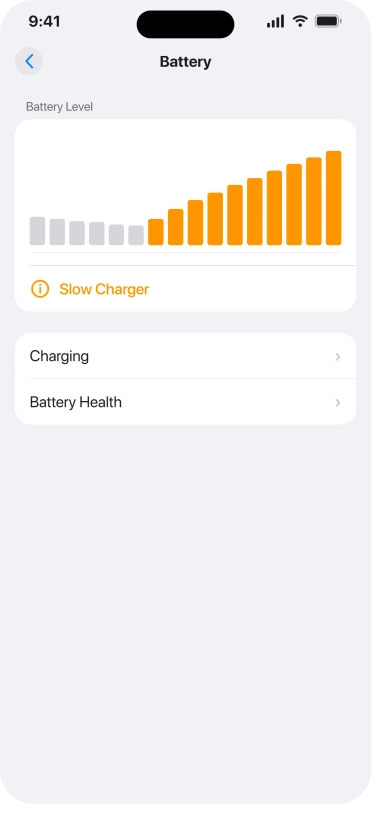
One wrinkle: Apple's iOS 26 user guide places the message in Settings > Battery and does not mention the Lock Screen at all. If you only ever see it in Settings, you are not missing a setting.
Apple has never published the number, and the one you have seen answers something else
Apple describes the trigger twice, and both times it is a comparison rather than a threshold.
The charge-speeds page says the message appears "if a higher-wattage charger could improve your charging experience".
The iOS 26 user guide says it "appears when your iPhone supports fast charging but the connected charger isn't capable of delivering optimal power".
Neither one names a number. Apple has had two years and more than one revision of those pages to name one.
The figures people arrive with, seven and a half watts wired and ten watts wireless, are genuinely Apple's. They answer a different question. On the charge-speeds page they introduce a list:
"Charging your iPhone might take longer than you expect if you use: A wired charger that provides 7.5W or less. A wireless charger that provides less than 10W, like a Qi1-certified charger."
Charging taking longer and the message appearing are two separate claims, and Apple never joins them.
In the iOS 26 user guide the two even sit in one short section a sentence apart, and Apple still defines the message by comparison while leaving those wattages attached to how long a charge takes.
Independent accounts point in opposite directions as well.
AppleInsider's June 2025 hands-on with the iOS 26 developer beta found Apple's own 5W charger raised no warning, and the writer read that as either a very low threshold or an unfinished feature.
By November 2025, on shipping iOS 26, a MacRumors poster described the warning appearing on a 5W charger. Two observations on two builds settle nothing.
Our reading, which Apple does not state anywhere, is that the message compares what your iPhone can accept against what actually arrived, so the bar it measures against moves with the phone.
Why a genuine 20W Apple adapter still says it
This is the loudest complaint in the whole topic, and it comes from people who already went out and bought a better charger.
An Apple Community thread from February 2025 reads: "SLOW CHARGER WARNING? WHEN IM USING ORIGINAL CHARGER 20 watts and I bought new 3 charger of IOS in different watts (20,30,45) but i still getting this warning and I can't fix it."
Similar posts run on r/iphone through 2025 and 2026.
Apple's own numbers explain how that happens. Its fast charging page says you need "a 20W or higher power adapter to fast charge your iPhone 12 and later".
The same page says an iPhone 17, 17 Pro or 17 Pro Max reaches "up to 50 percent battery in around 20 minutes with a 40W adapter or higher".
Read those two together carefully, because the obvious conclusion is the wrong one.
Apple's 20W line covers iPhone 12 and later, so a 20W brick does fast charge an iPhone 17 by Apple's own definition.
The 40W figure is about hitting Apple's quoted twenty minutes, not about qualifying as fast at all.
What a 20W adapter does on a newer phone is leave a lot of the available speed unused, and twenty watts is the number most people reach for when they go out to fix this.
Apple never sets its per-generation fast-charge figures alongside the Slow Charger message, so joining those two is our inference.
It does fit what people report, which is that the warning survives buying a better charger.
If that is what you are plugged into, you can stop shopping. I would leave it be and let the phone charge.
Apple tells you which cable to use, then never blames the cable
Apple's charge-speeds page does specify one: "For faster wired charging, use a USB-C Power Delivery charger and a USB-C cable for iPhone 15 models and later (or a USB-C to Lightning cable for iPhone 14 models and earlier)."
What it never does is put the cable on the list of things that slow a charge down. That list runs to adapters, hubs, car ports, attached accessories, heavy app use and heat.
A cable that is plugged in and quietly underperforming is not on it.
Owners get there by themselves anyway.
One iPhone 14 Pro owner on Reddit held the adapter constant and swapped cords: "I notice that when I plug some cords into my 20w charger it'll say 'slow charger' but with others it'll say 'fast charger.'" Another, on r/applehelp about a month ago, went the other way: "I have plugged my IPhone 14 into multiple different models of charging cables and it keeps saying slow charger."
One caution on that first quote. Apple documents no "Fast Charger" message anywhere, and we could not confirm one exists, so the owner may be describing the warning simply not appearing.
What the test still shows is the message changing while the adapter stayed the same.
Ours: if your adapter is known good, swap the cable before you buy anything.
A cable that cannot hold a stable power negotiation will cap the charge no matter what the brick can supply, and trying a different one is free.
What Apple does document as capping your charge power
All of these come from the charge-speeds page, and any of them can be the real reason:
- Plugging a wired accessory in while charging wirelessly. Apple: "To comply with regulatory standards, if you connect USB-C or Lightning accessories (like headphones) while wirelessly charging your iPhone, the system limits charging to 7.5W."
- Sharing an adapter. "If your wired charger has more than one port, like the 35W Dual USB-C Port Power Adapter, or if you charge with a computer or USB hub with other connected devices, the maximum power output might be reduced."
- Charging in the car. "Charge ports in USB hubs or cars might charge slower than a dedicated USB-C charger."
- Using a USB-A brick. "With a USB-A charger, iPhone 15 models and later will charge at a maximum of 7.5W."
- Pass-through accessories that reserve power for their own ports.
- Apple's own MagSafe Battery Pack, which Apple notes in a footnote "will show a Slow Charger message".
The battery pack is the one to remember. Apple sold an accessory that sets off Apple's own warning, which tells you how little the message is meant to alarm anybody.
Owners report the same from third-party MagSafe power banks and from the wireless pads built into cars.
Status: two years after iOS 18 introduced this message, and as of iOS 26.6, Apple has still never published the threshold that sets it off.
When it is only a label, and when it is a symptom
Keep these apart, because they need different responses.
If the message is showing and your phone still charges in roughly the time it always did, nothing is being asked of you. It is a label on a slower power source.
If the message is showing and the charge itself has genuinely collapsed, that is a separate problem that happens to raise the same flag.
One owner reported a full charge taking "nearly 5-6 hours" on an original 20W adapter and Apple cable that had been fine until recently. Another found their phone would not pass 60 percent overnight.
At that point you are troubleshooting charging, not a message, and our list for an iPhone that will not charge properly is the better page to work down.
An Apple Watch that charges slowly has its own rules, and the Apple Watch fast charging page covers the cable and adapter Apple names.
Three charging messages that mean different things
iOS 26 can show you more than one thing about a charger, and they are easy to run together.
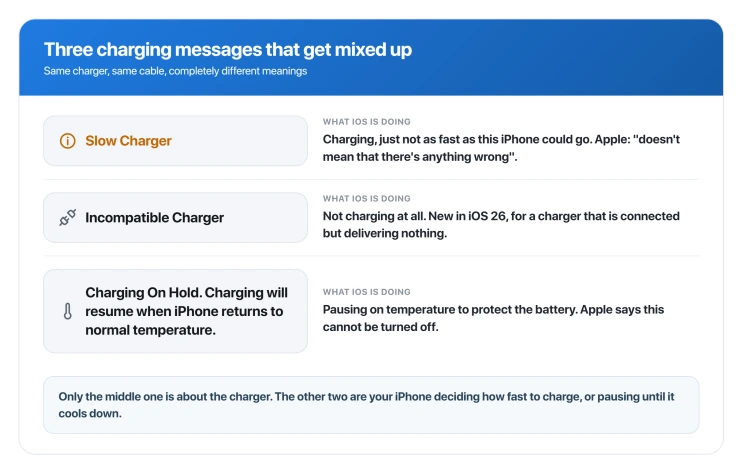
Slow Charger means it is charging, just not as fast as the phone could go.
Incompatible Charger is new in iOS 26.
Apple: "if iOS detects a charger that's connected but isn't charging, you'll see an Incompatible Charger message when you open Settings and tap Battery." Connected and not charging is a different situation entirely.
Charging On Hold is temperature, hot or cold. Apple documents both, and notes that "in very cold environments, charging may be slower or temporarily disabled".
Its iOS 26 guide gives the wording as "Charging On Hold. Charging will resume when iPhone returns to normal temperature", says to charge between 32 and 95 degrees Fahrenheit, and adds that these protections "work automatically and can't be turned off".
If your phone runs hot for other reasons too, why an iPhone overheats after an update covers that side.
Can you turn the Slow Charger message off?
No, and nothing we found suggests a hidden way to.
On iPhone 15 and later, Settings > Battery > Charging carries a Charge Limit you can set between 80 and 100 percent in five percent steps, Optimized Battery Charging, and in the United States Clean Energy Charging.
On iPhone 14 and earlier the route is Settings > Battery > Battery Health & Charging, and there is no Charge Limit at all.
None of those controls is this message, and Apple's page inventorying the whole Battery screen does not list one for it either.
Notice how Apple behaves when something genuinely cannot be switched off: on the thermal page it says so outright. For the Slow Charger message it says nothing about switching it off at all.
People have asked publicly, including a MacRumors forum thread in November 2025 asking for a way to disable it, and no answer came back.
Is a slow charger bad for my iPhone battery?
Apple's position is that the message does not indicate a problem with the iPhone or the charger. Ours, and Apple does not say this: a slower charge puts less heat through the phone, and heat is what Apple's own charging protections are built around, so a low-wattage charge is not the thing to worry about. The battery-health question is a different one, and our page on what drains an iPhone battery on iOS 26 deals with capacity rather than charge speed.
Why does my iPhone say Slow Charger with a MagSafe power bank?
Because a battery pack delivers less power than a wall adapter. Apple documents that its own MagSafe Battery Pack shows this message, and owners report the same from third-party MagSafe banks. The pack is behaving exactly as Apple describes, and the message is not a sign it is failing.
Why does it say Slow Charger in the car?
Apple documents that charge ports in cars and USB hubs can charge more slowly than a dedicated USB-C charger. Built-in wireless pads in cars are frequently reported as triggering it too. A car port is a genuinely slower power source, so the message is accurate rather than faulty.
What wattage stops the Slow Charger message?
There is no honest answer to that, because Apple has never published the trigger. What Apple does publish is the fast-charge requirement per generation: 20W or higher on iPhone 12 and newer, and 40W or higher to hit its quoted twenty-minute figure on the iPhone 17, 17 Pro and 17 Pro Max. Meeting the figure for your own model is as close to a target as exists.
The Short Version
- Apple's own line is that the message "doesn't mean that there's anything wrong with your iPhone or charger", and the information button next to it opens that page on your phone.
- No wattage threshold has ever been published. Apple gives 7.5W and 10W as the figures for when charging takes longer, never as the point where the message fires.
- The message compares your charger against what your phone can accept, so a newer iPhone raises the bar. That reading is ours, not Apple's.
- A 20W adapter fast charges an iPhone 12 by Apple's own definition, while an iPhone 17 Pro wants 40W or higher for Apple's quoted speed.
- Swap the cable before buying another adapter. One owner flipped the message back and forth using different cords on the same 20W brick.
- Wired accessories during wireless charging are capped at 7.5W by regulation, and shared adapters, hubs, car ports and USB-A bricks are all documented as reducing power.
- Apple's own MagSafe Battery Pack triggers the message, which tells you how little it is meant to alarm you.
- There is no switch to turn it off, and Apple does not discuss one.
- None of that applies if the charge itself has collapsed. A message plus a phone that now takes five or six hours is a fault, not a label, and it belongs on the not-charging page.
Where to Next
Apple's own line is that the message does not mean anything is wrong with your iPhone or your charger, and I would take that at face value.
If you want it to charge faster, the figures Apple does publish get you close enough to choose a better adapter.
If you are getting the message on a charger that should be fast enough, tell me the wattage in the comments and I will help you work out where it is being throttled.

Isaac Smith is the founder and editor of PC Glance, a website that covers computers, laptops, and technology. He is a tech enthusiast and a computer geek who loves to share his insights and help his readers make smart choices when buying tech gadgets or laptops. He is always curious and updated about the latest tech trends.