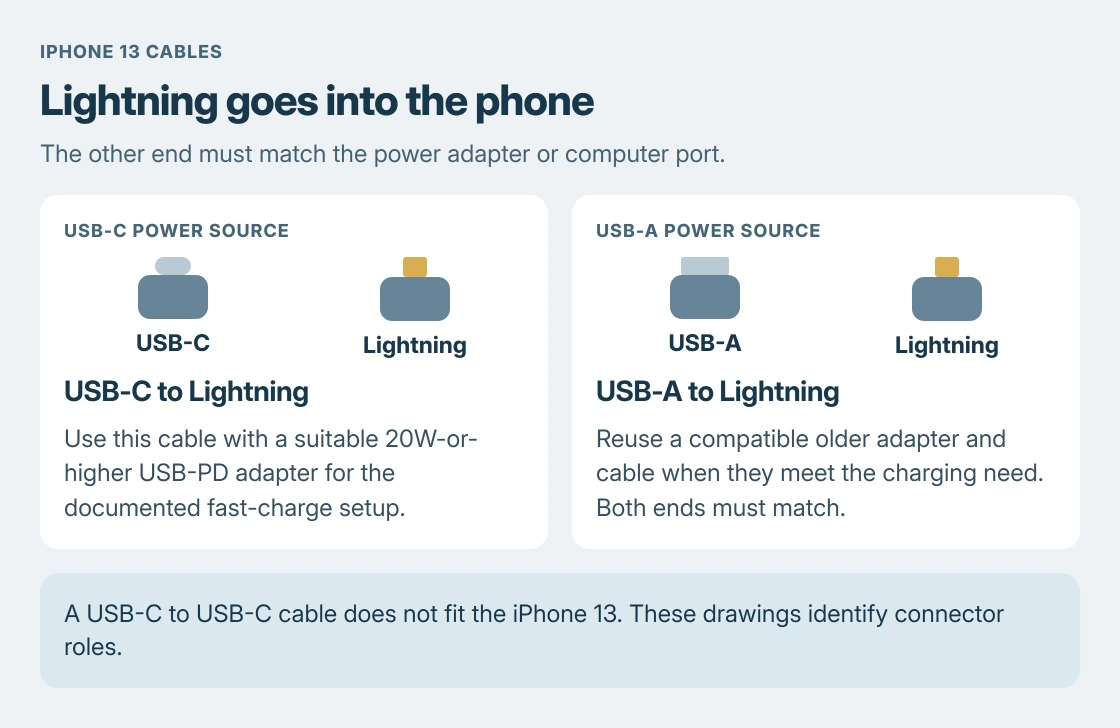
The iPhone 13 charger type is Lightning at the phone end. For a new wired setup, pair a USB-C to Lightning cable with a compatible USB-C power adapter rated 20W or higher. An existing USB-A to Lightning setup can also charge the phone.
In this guide
Match the phone connector before choosing the adapter
Apple says the iPhone 13 has a Lightning connector in its technical specifications. USB-C describes the other end of the supplied cable, which connects to the adapter or a computer.
A USB-C to USB-C cable therefore does not fit the iPhone 13's charging socket. Read both connector names on a replacement cable's packaging rather than buying from the USB-C label alone.
Before ordering for an unfamiliar handset, check its exact iPhone model in About instead of relying on its appearance.
Status: iPhone 13 connector, included cable and charging specifications verified with Apple's pages on 24 October 2026. No chargers or charging times were tested.
Apple documents a USB-C to Lightning cable in the original box, with the power adapter sold separately. A used or refurbished phone's package can differ, so check the seller's included-accessory list.
For the generation's age, the iPhone 13 introduction dates explain its original debut and the later green version.
Choose a USB-C adapter for the fast-charge setup
For the standard iPhone 13, Apple's specification gives up to 50% charge in 30 minutes with a 20W adapter or higher. That is a conditional test result, not a guaranteed time for every battery and temperature.
Apple's fast-charge instructions allow a comparable third-party USB Power Delivery (USB-PD) adapter. Choose the USB-C output and a USB-C to Lightning cable for this wired setup.
Check the adapter's actual output specification. A multiport charger's headline wattage can describe its total output, so read what the intended USB-C port supplies with the other devices connected.
A higher number on the adapter does not establish a matching increase in this phone's charging speed. Buying a large laptop adapter solely to exceed the iPhone 13's documented setup is not a speed guarantee.
Keep a compatible USB-A setup if it meets the need
Apple states that existing USB-A to Lightning cables and power adapters are compatible with this iPhone. A working older setup does not need replacement just because the original boxed cable has a USB-C plug.
The cable must match the adapter: USB-A to Lightning for its rectangular USB-A socket, or USB-C to Lightning for its smaller USB-C socket. Neither adapter shape changes the connector on the phone.
If no wall adapter is available, the alternative phone charging options help identify a usable power source. Match the cable to that source and confirm the phone shows that charging has started.
Treat wireless charging and charging faults separately
The standard iPhone 13 specification lists MagSafe up to 15W and ordinary Qi up to 7.5W. A wireless pad still needs its own compatible power source; the Lightning cable is unnecessary between the pad and the phone.
Use the pad manufacturer's instructions for its adapter and placement. Do not infer another iPhone model's wireless limit from these figures, or assume a pad's advertised maximum is what this phone receives.
A Slow Charger notice answers a different question from which plug fits. The charging-message explanation covers that warning and its limits.
If a matched, known-working cable and adapter cannot charge the phone, use Apple's charging troubleshooting or arrange service. Stop using damaged accessories. A higher-wattage adapter cannot repair a damaged socket.
The Short Version
Lightning goes into the iPhone 13. Match USB-C or USB-A at the power source. For the documented fast-charge setup, use USB-C to Lightning and a suitable 20W-or-higher USB-PD adapter. Compatible older USB-A setups still charge it.
 If you have any business, I can build it online