
The exact iPhone model is in Settings > General > About, beside Model Name. To get its hardware model number, tap the value beside Model Number; you'll see a code starting with A.
That code helps identify an iPhone SE generation or a regional version. If the screen won't work, check the phone's physical markings or its entry on another device signed into your Apple Account.
Read Model Name rather than the phone's nickname
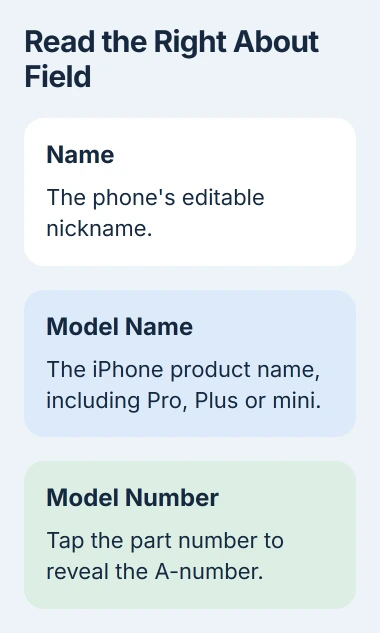
Unlock the iPhone and open Settings, then General, then About. Look for Model Name. Copy the full name, including words such as mini, Plus, Pro or Pro Max when they're present.
The Name row is your phone's nickname, which can be changed. Even if that nickname includes a model number, use Model Name to identify the phone.
Check iOS Version separately. That tells you which software the phone runs, not which generation it belongs to. An iPhone running iOS 27 isn't automatically an iPhone 27.
If you're checking before buying a case, record the complete model name first. Two phones with similar names can have different sizes or camera arrangements, and leaving out Pro or Plus changes which product you're describing.
For software troubleshooting, note both the phone model and its iOS version. Some steps differ on an older model or a phone running an earlier version of iOS.
Tap Model Number to reveal the A-number
At first, Model Number shows the part number. Tap it once to see the hardware model number instead: A followed by digits.
Apple's model-number instructions explain this tap in About. Skip it and you'll copy the part number, even though you're looking at the right row.
Write down the full A-number. If you're helping someone remotely, ask them to read that field rather than sending the whole About screen, which also shows details unique to their phone.
For example, A2595 is one regional model number for the iPhone SE (3rd generation). Other regions use different A-numbers for that same generation. An unfamiliar code doesn't automatically mean a different generation or a fake phone.
Match the code to an entry in the official iPhone model catalog. Check that entry's heading and model numbers together, then copy the full model name it gives.
The catalog's introduction year tells you when the model came out. Your phone may have been made or bought later, so that year isn't necessarily when you purchased it.
Use physical markings when Settings is unavailable
If your phone won't start or you can't use its screen, take off the case and look in good light. The model number isn't printed in the same place on every generation, so check the location for your type of iPhone.
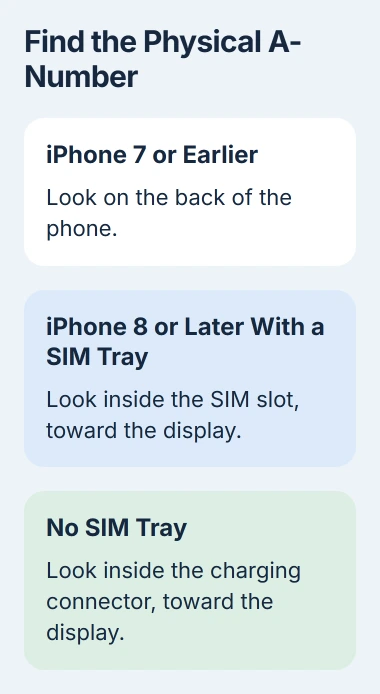
For an iPhone 7 or earlier, look on the back for the model number. Copy the entire A-code; camera shape and a Home button alone won't identify every generation.
On tray-equipped iPhone 8 and later models, the model number is inside the tray opening. It's on the upper side of the slot, toward the display. Look in the phone's opening, not just at the removable tray.
Put the SIM-eject tool in the tray's eject hole and push straight inward. If the tray won't come out normally, stop and ask your carrier or Apple for help rather than forcing it.
For an iPhone without a SIM tray, look inside its USB-C or Lightning connector. The number is on the upper side, toward the display, and may need bright overhead light to read.
If the marking is too small or worn to read, try the account route instead.
The No SIM guide covers an unreadable SIM or a tray problem after you put it back in. That's a cellular connection problem, separate from checking which phone model you have.
Check a device entry you already have access to
Use another iPhone or iPad that shares this phone's Apple Account. In Settings, tap your account name, scroll through the devices and select the iPhone you're identifying.
Check the device information in that account entry. If it lists several older iPhones, compare their details with your records so you don't pick the wrong phone because its name looks familiar.
A Mac using that account works too. Open System Settings, click the account name, scroll through its devices and select the iPhone. You can read that entry even when the phone's screen isn't working.
Leave Remove from Account alone while checking the model. It changes the phone's access to account services; it won't refresh or reveal the model information.
The original box or purchase record can also help if you know it belongs to this phone. Read its full product name, including the SE generation or words such as Pro and Pro Max.
I'd trust the phone's own About fields over a loose box from a drawer. Packaging can be mixed up, especially when a household has owned several similar iPhones.
Keep the model number separate from the IMEI
Many phones share the same A-number because they're the same hardware model. A serial number identifies your individual phone; the IMEI identifies it on cellular networks. Each number has a different purpose.
If your carrier asks for the IMEI, giving them the A-number won't help. The IMEI lookup instructions show where to find it, including ways to check when you can't use the phone.
To choose a case or find instructions for your model, start with the complete model name. If you need to check hardware differences between regions, match the A-number to the catalog entry too.
If the number printed on the phone, the details in Settings and your purchase record don't match, ask Apple to check the phone with you. Share those details with support privately instead of posting the full numbers publicly.
The Short Version
Use About's Model Name field, then tap Model Number to get the A-code. If the screen won't work, check the physical marking or an existing account entry. Model, software version and individual identifiers tell you different things.
Checked November 4, 2026.

Isaac Smith is the founder and editor of PC Glance, a website that covers computers, laptops, and technology. He is a tech enthusiast and a computer geek who loves to share his insights and help his readers make smart choices when buying tech gadgets or laptops. He is always curious and updated about the latest tech trends.