
A call comes in and you are suddenly talking to somebody. The phone picked up before you touched it. If that has happened in a meeting, or somewhere private, I get why it feels less like a bug and more like a breach.
One setting gets named for this everywhere. Go and switch it off first.
But be ready for it not to be the answer. For at least one owner it was not, and four other things on your phone can pick up a call without asking you.
1. Auto-Answer Calls, the setting every page names
Start here. It is the cause most of the time and it takes fifteen seconds.
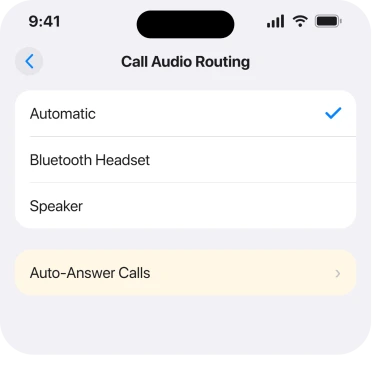
Apple's route, from its auto-answer page, is Settings, Accessibility, Touch, Call Audio Routing, then Auto-Answer Calls. Switch it off.
Note where it lives. Accessibility, then Touch, not Phone and not Sounds, buried three levels into a menu nobody opens. That is why you ended up searching instead of finding it.
Apple's own description: "iPhone can also automatically answer calls after a length of time you set." So it is a timer, and turning the switch off stops the countdown.
2. If that switch was already off, or turning it off changed nothing
Second. No other page prepares you for this part.
On a community thread from 13 August, an owner on an iPhone 16 Pro Max put it like this.
"iPhone 16 Pro Max is still answering calls automatically, after I have followed all instructions to disable it and it hasn't worked. I'm so frustrated, I want to answer the calls or not, the phone should not have that choice. Where's my privacy."
A member gave them exactly rung 1. Four days later, on 17 August, the owner came back: "did not work. The calls are still being answered automatically."
That thread has no solution in it. So if rung 1 has already failed for you, you are not doing it wrong, and the rest of this page is about what else can lift a call.
And if your problem is the reverse, a ringing call you cannot answer at all, that is a different fault entirely, and our page on not being able to answer covers it.
3. Something on your head or wrist answered it
The commonest cause once the setting is ruled out. Easy to miss, because the phone was in your pocket.
Paired audio devices and an Apple Watch can accept a call without the iPhone being touched. AirPods answer to a squeeze or a double tap. Car systems answer on a steering wheel button.
A Watch answers on the green button, or on a wrist movement you never thought of as an input.
Apple says nothing about any of these causing an unwanted answer, so treat every one as something to test rather than something documented.
Apple documents none of this as a cause, so the test below is ours rather than vendor-documented. Turn Bluetooth off at Settings, Bluetooth. Then have somebody ring you and leave the phone alone.
If it stops picking up, the phone was never the problem. The setting you want is on the accessory, not in iOS.
4. A hearing device, which Apple treats differently on purpose
Narrower. It produces something that looks exactly like a fault.
Apple documents a rule specific to hearing aids: "During a call, you can switch the audio routing from your hearing aid to the iPhone speaker by removing the hearing aid from your ear."
Read what that implies. A hearing device is wired into call routing far deeper than an ordinary headset is.
So if one is paired, check its own controls and its app first. Keep hunting through iOS settings afterwards, not before.
5. Call Audio Routing set to something you did not expect
Same screen as rung 1, so check it while you are there.
Sitting with Auto-Answer Calls is a default audio destination. Apple: "You can automatically direct the audio of phone or FaceTime calls to the iPhone speaker, a Bluetooth headset, or your hearing device."
That does not answer a call on its own. It decides where a call goes the instant something else answers. That is how a call you never accepted ends up live on a speaker across the room.
Set it to Automatic unless you have a reason not to. Then a call cannot jump somewhere you are not.
6. Something you built, or something Siri heard
Last. This is the rung for people who have ruled out everything else.
Three things on an iPhone can accept a call with no hands and no tap. All three are easy to forget you set up.
- Siri. A stray "answer" picked up from a radio or another room is enough. Try turning off Listen for Siri at Settings, Apple Intelligence & Siri for a day.
- A Shortcuts automation. Open Shortcuts, tap Automation, and read the list properly. Do not skim it. One you built months ago is still running.
- Back Tap. At Settings, Accessibility, Touch, Back Tap, a double or triple tap on the back runs whatever is assigned. A phone knocking about in a bag taps itself.
If your phone also opens apps on its own, that is the same family of causes rather than a second fault, and our page on an iPhone opening apps by itself works through them properly.
What does not help
- Looking in Settings, Apps, Phone. Auto-Answer Calls lives under Accessibility, Touch.
- Turning Silence Unknown Callers on. That sends calls to voicemail, it does not stop one being answered.
- Resetting all settings. No reply on the thread reports it working, and it costs you every preference.
- Blaming the caller. Nothing at their end can make your phone pick up. It is always something at yours.
- Assuming rung 1 must work. One owner ran it and reported four days later that it had not.
Status: iOS 26.6.1, checked 18 August 2026. The Auto-Answer route and the hearing device rule are Apple's wording. The failure in rung 2 is one owner's report, and that thread has no fix in it.
Why is my iPhone answering calls automatically?
Usually Auto-Answer Calls, at Settings, Accessibility, Touch, Call Audio Routing. If that switch is already off, the likelier cause is a paired accessory, an Apple Watch or a car system accepting the call instead of the phone.
Where is Auto-Answer Calls on iPhone?
Settings, Accessibility, Touch, Call Audio Routing, then Auto-Answer Calls. It is not in the Phone settings, which is why it is so hard to find when you go looking.
Can AirPods answer a call on their own?
They can answer to a squeeze or a tap, and a car or an Apple Watch can accept a call too. Turning Bluetooth off and having somebody ring you is the fastest way to prove which device picked up.
What if turning off Auto-Answer does not stop it?
You are not alone, and there is no published fix. Work through Bluetooth accessories, Siri, Shortcuts automations and Back Tap, then report it to Apple through the Feedback Assistant.
The Short Version
- Auto-Answer Calls is at Settings, Accessibility, Touch, Call Audio Routing, not in Phone settings.
- Apple describes it as a timer, so switching it off stops the countdown.
- One owner turned it off and reported four days later that calls were still being answered.
- AirPods, an Apple Watch and a car system can all accept a call the phone never touched.
- Turning Bluetooth off and taking a test call tells you which device is doing it.
- Siri, a forgotten Shortcuts automation and Back Tap can each lift a call hands-free.
Where to Next
The uncomfortable part of this is the privacy, not the inconvenience. A phone that answers on its own can put a whole room on a call without anyone deciding to. That is a fair thing to be angry about.
So the order runs from the setting Apple owns to the accessories it does not. Once that switch is off, everything left is something else on the network around your phone.
Find the culprit and I would like you to name it, especially if it turns out to be an accessory rather than the phone. One owner is still stuck on this with no answer. A real result would help them more than another list of settings.

Isaac Smith is the founder and editor of PC Glance, a website that covers computers, laptops, and technology. He is a tech enthusiast and a computer geek who loves to share his insights and help his readers make smart choices when buying tech gadgets or laptops. He is always curious and updated about the latest tech trends.