An iPhone that drops into Sleep Focus in the evening is usually following your sleep schedule's Wind Down. Sleep Focus starts when Wind Down starts, and that can be up to three hours before the bedtime you set.
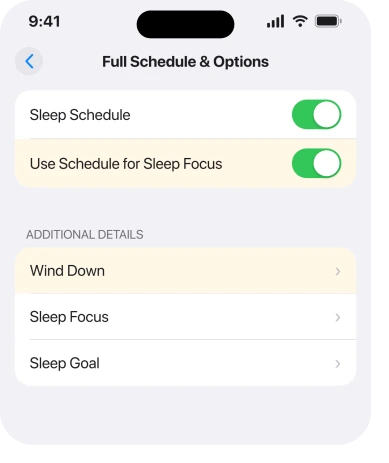
The schedule lives in the Health app, not in Settings, which is why hunting through Focus settings rarely finds it. To stop the Focus without losing your alarm, turn off Use Schedule for Sleep Focus there.
In this guide
1. Wind Down starts it before bedtime
Apple's sleep guide says a Wind Down period can begin anywhere from 15 minutes to three hours before bedtime, and Sleep Focus begins with it.
So a midnight bedtime with three hours of Wind Down switches Sleep Focus on at 9 p.m. Nothing is broken; the phone is following a time the schedule doesn't put in front of you.
Open Health, tap Browse, tap Sleep, then Sleep again, scroll to Your Schedule and tap Full Schedule & Options. Check Wind Down there, not the bedtime, and shorten it if it starts too early.
2. A second schedule covers the wrong days
Health can hold more than one sleep schedule, for example one for weekdays and another for weekends. Each has its own days, and only the days shown with solid circles belong to it.
A weekend schedule that also has Friday ticked starts Sleep Focus on Friday night. Open each schedule on the same screen and check its days and times.
Stop it without losing your alarm
On the Full Schedule & Options screen, turn off Use Schedule for Sleep Focus. Your sleep schedules stay in effect, so the alarm still rings and sleep tracking still records, but Sleep Focus no longer turns on by itself.
I'd use this switch before anything else. Deleting the whole schedule is the wrong first move, because it takes the alarm with it.
Switching Sleep off in Control Center never lasts. It only holds until the schedule's next bedtime or wake-up, so the Focus is back the following evening.
If you'd rather keep a wake-up alarm and drop the schedule, set the alarm in the Clock app, because Clock alarms don't turn on Sleep Focus. If the alarm itself misbehaves, our page on a silent alarm covers it.
3. Another device turns it on
Focus settings travel between your Apple devices while Share Across Devices is switched on. An Apple Watch, iPad or Mac that switches to Sleep can then put your iPhone into Sleep Focus too.
Turn off Share Across Devices in Settings > Focus and watch the next evening. If the early Focus stops, the schedule to fix is on the other device.
4. A Lock Screen linked to Sleep
A Lock Screen can carry a Focus, and moving to that Lock Screen switches the Focus on with it. It's easy to change Lock Screens by accident with a swipe.
Wake the iPhone with the side button and hold your finger down on the Lock Screen until Customize appears. Swipe through the wallpapers, and where one shows Sleep near the bottom, tap that label and deselect Sleep.
If your wallpaper has also been changing on its own, that's the same link seen from the other side, and our page on the wallpaper changing itself goes through it.
5. A schedule or automation outside the Health app
A Focus can also start at a set time, at a place, or when you open a particular app. In Settings > Focus > Sleep, look under Set a Schedule: anything there besides the sleep schedule from Health is an extra trigger you can delete.
Shortcuts can turn a Focus on as well. Open the Shortcuts app and tap Automation to list every shortcut with a trigger, such as Charger, Time of Day or Sleep, and remove the trigger from any that switches on Sleep.
Some automations run without asking, so you'd never see them fire. That's how a Sleep Focus can come on when the phone goes on charge, or at odd times through the day.
6. A glitch that only a fresh start clears
When everything checks out and it still fires, delete the Focus and set it up again. In Settings > Focus, tap Sleep, then Delete Focus at the very bottom, and add Sleep back with the plus button on the Focus screen.
That's how one owner on Apple's forum finally stopped it in August, after the Health switch didn't hold. Your alarm and sleep tracking live in Health, so they survive the reset.
What iOS 27 changed
Very little. Wind Down, Use Schedule for Sleep Focus, Share Across Devices and the Control Center behavior work the same as on iOS 26, and the 27.0.1 and 27.2 updates list no Focus changes.
The Health route on iOS 27 is Browse, Sleep, then Sleep again.
Right after 27.2, a few owners reported the opposite problem: Sleep Focus didn't come on at bedtime.
One fixed it by deleting every sleep schedule, restarting the iPhone and creating the schedules again. Another's came right on its own the next night.
What does not help
- Hunting in Settings > Focus for the bedtime. The schedule is in Health.
- Switching it off in Control Center. It returns at the next scheduled time.
- Deleting the sleep schedule to stop the Focus. Use Schedule for Sleep Focus does that and keeps your alarm.
- Assuming it fires at your bedtime. Wind Down can start it up to three hours earlier.
If what's left after a night of Focus is a Messages badge with nothing unread, that clears a different way. When it's the Driving Focus that won't behave, that one fails in its own way.
Why does my iPhone Sleep Focus turn on by itself?
Usually because Wind Down starts it, and Wind Down can begin up to three hours before bedtime. A second schedule, another device, a linked Lock Screen or an automation can also switch it on.
How do I stop Sleep Focus without deleting my alarm?
Turn off Use Schedule for Sleep Focus in Health, under Sleep and Full Schedule & Options. The schedule and its alarm keep working, and the Focus stays off.
Why does Sleep Focus come back after I turn it off?
Control Center only overrides the schedule until its next bedtime or wake-up. It returns every evening until you change the schedule or that switch.
Where is the Sleep Focus schedule on iPhone?
In the Health app, not Settings. Open Health, tap Browse, then Sleep, then Sleep again, and scroll to Your Schedule. Settings > Focus > Sleep only decides what the Focus does once it's on.
The Short Version
- Wind Down starts Sleep Focus, up to three hours before bedtime.
- The schedule is in Health, not Settings.
- Use Schedule for Sleep Focus stops the Focus and keeps the alarm.
- Control Center only switches it off until the next scheduled time.
- Check other schedules, Share Across Devices, Lock Screens and Shortcuts automations.
- Still firing? Delete the Sleep Focus and set it up again.
Checked November 8, 2026.