
Driving Focus fired on none of your last three journeys. Or it came on, then quietly dropped out at a red light.
A safety feature that works sometimes is worse than one you never had, and I get why that is annoying rather than merely inconvenient.
Before you change a setting, one thing decides most of this.
Driving Focus has four different ways of switching itself on, and only one of them watches for movement. If yours is set to a different one, it is behaving exactly as told.
1. Look at which of the four modes you actually chose
Start here. It takes twenty seconds and it explains most of these.
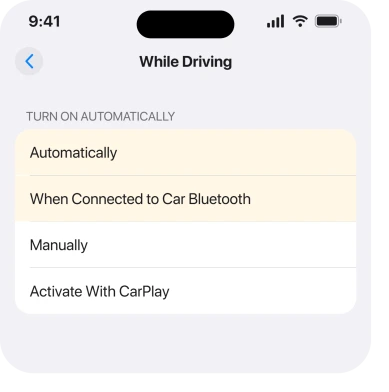
Apple's route, from its Driving Focus page: Settings, tap Focus, tap Driving, then tap While Driving under Turn on Automatically.
Four options sit there, and Apple describes each one:
- "Automatically: Driving will be activated based on detected motion."
- "When Connected to Car Bluetooth: Driving will be activated when your iPhone is connected to car Bluetooth devices."
- "Manually: Driving can be activated manually from Control Center."
- "Activate With CarPlay: Driving will be activated automatically when your iPhone is connected to CarPlay."
Read those again with your own car in mind.
Set to Car Bluetooth in a car you never pair to? It will never fire. Set to Activate With CarPlay in a car without CarPlay? Same. Set to Manually? It is waiting for you.
2. Understand what Automatic is actually doing
Second. The disappointment tends to live right here, even when the setting is correct.
I want to be precise here, because the word matters. Apple's own term for Automatic is detected motion. Not GPS, not a car, not a journey. Motion.
That is why owners report it starting late, or in the wrong place, or dropping out. It is inferring driving from how the phone is moving, and a phone sitting still in a cupholder at a junction is not obviously moving.
Apple publishes no accuracy claim and no trigger threshold. No speed, no duration, nothing. Know that before you spend an evening chasing settings.
If reliability matters more to you than coverage, rung 3 is your answer rather than this one.
3. Switch to Car Bluetooth, which is a real trigger rather than a guess
Now the fix, and it is the one to use if your car pairs at all.
A Bluetooth connection is a fact, and that is why I would point most people here. Your phone either paired with the car or it did not. Nothing to infer.
Set While Driving to When Connected to Car Bluetooth. It fires the moment the car turns on, every time, with no motion guessing involved.
There is a real catch worth hearing: it only works in the car you pair with. Somebody else's car, a hire car, a bike, or walking on foot will not trigger it, and Automatic at least tries in those cases.
Pick reliability or coverage. No single mode gives you both.
4. Check whether something else is turning it off
Narrower, and it explains a Focus that starts then stops.
Focus settings travel between your devices. So an iPad or a Mac deciding you are not driving can end the Focus on your phone.
Turn it off at Settings, Focus, then Share Across Devices. Drive once and see whether the drop-outs stop.
Check your schedules too. A Focus with a time window can hand over to another Focus mid-journey, and neither one announces it.
5. Confirm it is running, because the tell is easy to miss
Small, and it stops you fixing something that was never broken.
Apple: "When the Driving Focus is on, the Driving icon appears in the status bar and on the Lock Screen, and your status is automatically displayed in the Messages app."
Three places to look, then. The status bar one is tiny.
Some owners conclude Driving Focus is dead when it is running perfectly and simply letting more through than they expected. Which is rung 6.
6. It may be on and letting calls through on purpose
Last, because it is the one that looks most like a failure and is not.
Apple is specific about calls: "Incoming calls are allowed only when iPhone is connected to CarPlay, a car Bluetooth system, or a hands-free accessory."
Read that carefully. Connected to CarPlay or car Bluetooth, calls come through, deliberately.
A hands-free call is the safer option Apple is steering you towards, and a ringing phone in a CarPlay car does not mean the Focus failed. Check the status bar icon first.
To silence those too, open Settings, Focus, Driving, and tighten Allowed Notifications, then People.
Our page on Focus silencing calls it should not covers the same controls from the opposite direction.
And if your problem is a Focus switching itself ON uninvited, that is the mirror image of this page, covered on our page about Sleep Focus firing early.
What does not help
- Turning Driving Focus off and on. It does not change which trigger mode is selected.
- Deleting and rebuilding the Focus. You lose your allowed people and land on the same four modes.
- Updating iOS. Owners report this across several versions with no change.
- Assuming Automatic uses GPS. Apple's word is detected motion, which is a different thing.
- Treating a ringing phone as proof it failed. In a CarPlay car, calls are allowed by design.
Status: iOS 26.6.1, checked 18 August 2026. All four trigger modes and the call rule are Apple's wording. Apple publishes no accuracy figure for motion detection, and no owner has confirmed a fix.
Why does Driving Focus not turn on automatically?
Usually because While Driving is set to Car Bluetooth, CarPlay or Manually rather than Automatically.
Check Settings, Focus, Driving, then While Driving. If it is on Automatically, Apple's trigger is detected motion, which is inherently approximate.
Which Driving Focus setting is the most reliable?
When Connected to Car Bluetooth, because a pairing either happened or it did not. It only covers the car you pair with, so you trade coverage for reliability.
Why do calls still come through in Driving Focus?
Apple allows incoming calls when your iPhone is connected to CarPlay, a car Bluetooth system, or a hands-free accessory. That is deliberate, not a fault, and you can tighten it under Allowed Notifications.
How do I know Driving Focus is actually on?
Apple says the Driving icon appears in the status bar and on the Lock Screen, and your status shows in Messages. Check the status bar before deciding it failed.
The Short Version
- Driving Focus has four separate trigger modes and only one watches for movement.
- Apple describes Automatic as detected motion, and publishes no accuracy claim for it.
- Car Bluetooth is the reliable trigger, at the cost of only covering your own car.
- Share Across Devices lets another device end the Focus mid-journey.
- The Driving icon in the status bar tells you whether it is running.
- Calls are allowed through on purpose when you are connected to CarPlay or car Bluetooth.
Where to Next
The trap in this feature is that it looks like one switch and is really four different products sharing a name. A motion guess, a Bluetooth trigger, a CarPlay trigger and a manual button all end up labelled Driving.
Once you know that, "it does not turn on" stops being a fault and becomes a question about which of the four you picked, which you can answer in twenty seconds.
One thing would genuinely help me here. Yours on Car Bluetooth and still missing journeys? What car, and what head unit?
That pairing is the only part of this Apple leaves completely undocumented, and a few real examples beat another settings list.

Isaac Smith is the founder and editor of PC Glance, a website that covers computers, laptops, and technology. He is a tech enthusiast and a computer geek who loves to share his insights and help his readers make smart choices when buying tech gadgets or laptops. He is always curious and updated about the latest tech trends.