
There is a red one on the Messages icon and you have read everything. You scroll the whole list, open every thread, and the badge sits there like a splinter.
It is a small thing that is somehow impossible to ignore, and I have a proper order to work through with you.
Almost every fix here is user-reported rather than documented, because Apple never connects that badge to any of this, and the two that owners confirmed most often are rungs 2 and 3.
1. The message is real, it is just somewhere you do not look
Start here, because the badge is rarely lying. There is an unread message. It is filed out of sight.
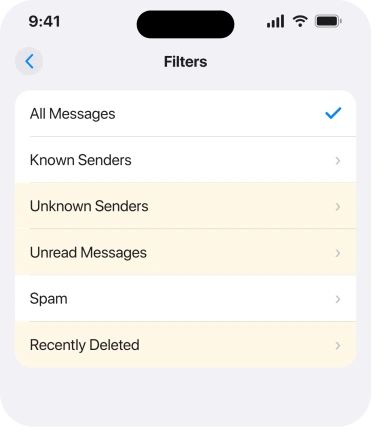
Messages has filters. An unread message inside one of them still counts toward the badge, and it never appears in your main list.
Open Messages and tap the Filters button at the top left. Work through each one: Unknown Senders, Spam, and Recently Deleted.
Apple documents who lands in that first filter, on its page about conversations from unknown senders, and its definition is why the filter fills without you noticing: an unknown sender is "anyone you haven't previously interacted with in Messages or someone who isn't in your contacts."
That is every bank. Every delivery firm. Every verification code you never replied to. Our page on messages that vanished after iOS 26 covers that filter in full.
2. Ask Siri to read your unread messages
Cheapest fix on the page, and an owner confirmed it found a message they never could.
Activate Siri and say read my unread messages.
On a community thread about this exact badge, one owner tried it after everything else had failed and reported back: "asking Siri to read my iMessages did it. It found an unread message back in September…read it and removed the badge!!!"
Siri walks the same list your eyes were skipping. It is thirty seconds and it costs nothing, which is why it sits this high.
3. Recently Deleted is holding an unread message
This is the one that keeps working when nothing else does, and it is completely counter-intuitive.
A message you deleted while it was still unread stays unread. It sits in Recently Deleted, invisible to your scrolling. And it keeps counting.
The owner who worked this out described the fix as recovering them first: "go to your deleted messages area, select the messages that are unread…recover those messages, and then delete them again. It works every time when everything else I've tried has failed." In their case the culprits were automated security texts.
So: Messages, Filters, Recently Deleted, select the unread ones, Recover, read them in the main list, then delete them again.
4. Mark everything as read, in every filter
The thorough version, and it is what you do when the badge is stubborn rather than mysterious.
One owner on the same thread listed the filters to sweep: All Messages, Known Senders, Unknown Senders, Unread Messages and Recently Deleted. Marking everything read in one leaves the others untouched.
In each filter, tap Edit or the three dots, then Select Messages, then Read All.
5. If you just moved to this phone, expect it to take a while
Narrower, and it explains the badge that appeared the week you got the phone.
An owner who hit this after importing from an old device gave both the method and the timing: "Simply deep scroll your messages till the eternal end of messages. Then click 'select messages'…press read all and wait patiently. My 4076 msgs took approx 70secs to clear all."
Seventy seconds on four thousand messages. So tap Read All and wait. Do not decide it failed after five seconds.
6. The badge toggle, and why it is last
Because it is the advice everybody gives and the owner it was given to reported it not working.
An Apple Community Specialist recommended turning badges off, restarting, then turning them back on. The person who asked tried it and the badge came back.
If you want to try it anyway: Settings, Notifications, Messages, turn Badges off, restart the phone, turn Badges back on. Putting it last rather than first is ours, and it is based on that outcome.
It sometimes clears a stuck count. It does nothing at all if there is a genuine unread message sitting in a filter, which is why rungs 1 to 5 come first.
What does not help
- Reset All Settings. It clears Wi-Fi passwords, wallpaper and permissions, and an unread message survives all of it.
- Deleting whole conversations. A deleted unread message keeps counting, which is rung 3. You would be making it harder to find.
- Turning iMessage off and on. It re-registers the service and does not touch the read state of a message. If your messages are also arriving late, that is a different problem.
- Reinstalling Messages. You cannot, it is a built-in app.
- Scrolling the main list again. If it were there you would have found it. The badge is pointing at a filter.
Status: iOS 26.6, checked 17 August 2026. Apple documents the Unknown Senders filter and its definition. Every fix on this page is user-reported, and the badge toggle is reported as failing.
Why does my iPhone show unread messages when there are none?
Because there is one, filed where you do not scroll. Check Filters in Messages for Unknown Senders, Spam and Recently Deleted. A message you deleted while it was unread stays unread and keeps counting toward the badge.
How do I clear a stuck unread badge on iPhone?
Ask Siri to read your unread messages first, which one owner reported finding a message from months earlier. If that fails, recover the unread messages from Recently Deleted, read them, then delete them again.
Does turning badges off and on fix it?
Rarely. An Apple Community Specialist suggested exactly that and the owner who tried it reported the badge returning. It can clear a stuck count, but it does nothing when a real unread message is sitting in a filter.
The Short Version
- The badge is usually right. The message is in a filter you never open.
- Tap Filters in Messages and check Unknown Senders, Spam and Recently Deleted.
- Ask Siri to read your unread messages. One owner found a message from three months earlier that way.
- A message deleted while unread stays unread. Recover it, read it, delete it again.
- Mark as read inside every filter, not just the main list.
- After moving to a new phone, Read All can take over a minute on a few thousand messages.
- The badges toggle is the advice everybody gives and it failed for the owner who tried it.
Where to Next
The useful shift here is to stop treating the badge as broken. It is counting something real, and iOS has three or four places a message can sit where your thumb will never take you.
Work through the filters, then let Siri sweep, then go into Recently Deleted. That order finds it for most people without changing a single setting.
If you have been through all six and the number is still there, tell me what it is counting, because a badge stuck on one behaves differently from a badge stuck on forty.

Isaac Smith is the founder and editor of PC Glance, a website that covers computers, laptops, and technology. He is a tech enthusiast and a computer geek who loves to share his insights and help his readers make smart choices when buying tech gadgets or laptops. He is always curious and updated about the latest tech trends.