
Someone thanks you for a message you have not seen yet. You pull the phone out and there it is on the Lock Screen, timestamped eleven minutes ago.
That is a worrying thing to discover when you rely on your phone for anything time sensitive, and I would like to sort it out with you.
Your notifications are almost certainly not lost. They are being held, and iOS has more than one place that holds them. We will go through those places, commonest first.
1. A Focus is running, and Apple says it delays them
Start here, because most late notifications end here.
Apple, on notification settings: "When you use Focus, it delays the delivery of notifications on iPhone to prevent interruptions."
Delays. Not silences, not hides. The alert is set aside and handed over later, which is exactly the pattern you are seeing.
Keep that sentence in your pocket.
The top answer on one community thread about late notifications tells the person asking that "iOS itself does not include any settings that can intentionally delay or accelerate the delivery of notifications", and points them at their Wi-Fi.
Apple's own guide page says the opposite in plain words, so do not let anybody talk you out of checking your Focus first.
Open Control Center and look at the Focus button. Does it name anything? Then that is your answer for now.
The awkward part is how many ways a Focus can start. A schedule you set once and forgot, connecting to your car, or opening a particular app. Turn it off and watch for a day.
If it comes back on its own, go to Settings, Focus, tap the one that keeps arriving, and read its Set a Schedule section.
Our page on a Focus that stops calls getting through covers the schedules that re-arm themselves, and the same hunt applies here.
2. Scheduled Summary is collecting them for later
This one is doing precisely what you asked, which is why nobody suspects it.
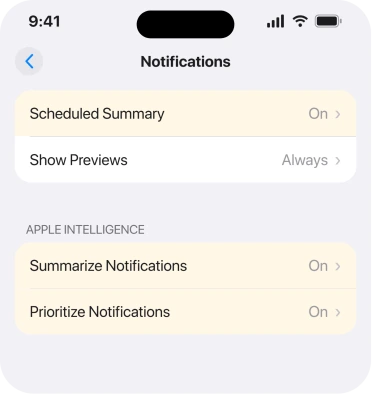
Apple's own description: "To minimize interruptions from notifications throughout the day, you can schedule a notification summary that includes notifications for several apps at once."
Several apps at once, at a time you picked. So an app in your summary stays quiet when its notification arrives. It waits for the next slot.
Check it at Settings, Notifications, Scheduled Summary. Two things matter there: whether it is on, and which apps you put in it.
The app list is the part people get wrong. Tap A to Z and read it properly. Anything switched on there is queued rather than delivered.
If it is only your reminders that turn up late, that is a different mechanism and our page on Reminders alerting late is the closer fit.
3. Prioritize Notifications is reading each one before deciding
Now we are into iOS 26 territory, and this is the one that produces the badge-first, banner-later pattern.
Apple: "Your iPhone can also determine which notifications have priority over others." And: "Priority notifications appear at the top of the stack, so you can catch up on what you may have missed."
Read that as a process, not a feature. Something looks at the notification, works out where it belongs, then places it. That work happens on your phone, and it happens between the alert arriving and you seeing it.
Apple never publishes a delivery time for that step, so the connection to your delay is ours, drawn from the mechanism Apple does describe. It is reasoning, not documentation, and I would rather say so than dress it up.
What is not reasoning is the switch. Go to Settings, Notifications, Prioritize Notifications, and turn it off.
There is a faster route that almost nobody knows, and it works from the Lock Screen. Apple: "Turn off all Priority Notifications: Swipe left, tap Options, then tap Turn Off Prioritization."
One swipe, on the notification that just annoyed you.
4. Notification summaries are rewriting them first
Same family, separate switch, and turning one off leaves the other running.
Apple: "Notifications are summarized so you can scan them for key details, such as when a group chat is particularly active."
Summarising is more work than sorting. So if step 3 helped a little, this is the other half.
Turn it off at Settings, Notifications, Summarize Notifications. Or keep it and trim the list instead. Tap Choose Notifications to Summarize and leave only the chatty apps switched on.
Check one thing before you spend time here. Apple: "Apple Intelligence is not available on all iPhone models or in all languages or regions." If your phone does not run it, skip steps 3 and 4 entirely, because neither one is your problem.
5. Reduce Interruptions is silencing what it judges unimportant
A Focus with an opinion, and it is easy to switch on by accident from Control Center.
Apple: "The Reduce Interruptions Focus understands the content of your notifications and shows you the most important ones, but silences notifications that are less important."
Silences. So an alert you never saw may not have been late. It may have been judged.
That matters if you think alerts are late when some never came. Look in Settings, Focus for Reduce Interruptions, then delete it or take it off any schedule.
6. Low Power Mode has quietly changed how apps fetch
Deeper down the list because it hits some apps and not others.
Low Power Mode turns off Background App Refresh and switches email fetch off, and Apple documents both. An app that collects its own updates in the background is then waiting for you to open it.
The tell is which apps are late. Messages and calls stay on time. Email, banking apps and delivery trackers fall behind.
Check the battery icon. Yellow means the mode is running, and our page on Auto-Lock greying out explains why it can switch itself on without you.
7. It is one app, not your phone
Rule this in early if only one app is affected, because everything before it is a phone-wide setting.
Go to Settings, Notifications, and tap the app. Confirm Allow Notifications is on, then look at Time Sensitive Notifications, which is what lets an app break through a Focus at all.
Then open the app's own settings, since plenty of chat and delivery apps carry a second notification switch of their own.
This is a real pattern, not a hypothetical.
One poster on a community thread about notification delay pinned theirs to a single work app: "I am constantly using DUO Mobile at work to bounce between servers and the delay(13 seconds) was becoming unbearable." Thirteen seconds, one named app, and their next move was to raise it with the app's developer rather than Apple. If your delay follows one app around, that is the right instinct.
If it is one contact rather than one app, that is a different fault entirely and it has its own answer.
What does not help
- Reset All Settings. It clears Wi-Fi passwords, wallpaper and permissions, and it does not touch a Focus schedule you built.
- Turning Wi-Fi off and on. Cellular delivery hits the same queue.
- Reinstalling the app. It returns to the same phone-wide settings.
- Restarting, including a force restart. Fine as a first move, but a Focus or a summary starts again the moment the phone is back. On one community thread a force restart was the suggested fix, and the poster who tried it reported the delay surviving three separate iOS versions.
- Turning Allow Notifications off and on for every app. It is a long job and it changes nothing that a Focus or a summary is doing.
Status: iOS 26.6, checked 17 August 2026. Apple documents Focus delaying delivery and Scheduled Summary holding alerts. Linking Prioritize Notifications to the delay is our reasoning.
Why are my iPhone notifications delayed on iOS 26?
Usually a Focus. Apple states that Focus "delays the delivery of notifications on iPhone to prevent interruptions", so alerts are held and handed over later. Scheduled Summary does the same thing on a timetable you set yourself.
Does Apple Intelligence slow down notifications?
Apple describes iPhone reading notifications to sort and summarise them, and that work happens between arrival and display. Apple publishes no timing for it, so treat any delay as likely rather than proven. Both features have their own off switch under Settings, Notifications.
Why do I get the badge before the notification appears?
The badge is a count and needs no processing, while a banner can be sorted or summarised before it is shown. If you see a number appear and the banner follow it, turn off Prioritize Notifications and Summarize Notifications and see whether the gap closes.
The Short Version
- Check the Focus button in Control Center first, because Apple says a Focus delays delivery rather than hiding it.
- Scheduled Summary queues every app you switched on in its A to Z list.
- Prioritize Notifications and Summarize Notifications are separate switches and you may need both off.
- From the Lock Screen you can swipe left, tap Options, then Turn Off Prioritization.
- Reduce Interruptions silences rather than delays, so some of those alerts never arrived.
- Low Power Mode holds back email and background apps, but never push messages or calls.
- If only one app is late, look at its Time Sensitive setting before changing anything phone-wide.
Where to Next
There is no single delay setting on an iPhone, which is why this feels so hard to pin down. There are five things that hold notifications, and they can all be running at once.
Work down them in order and stop when the gap closes. Plenty of readers never get past the Focus button.
On a Mac plugged into a dock, notifications can stop entirely rather than arriving late.
Where one alert will not clear rather than everything arriving late, an imminent threat alert behaves differently.
If you have turned off every switch here and messages still land minutes late, tell me which apps are affected and which are fine, because that split points straight at the cause.
If an app shows nothing at all until you open it, rather than showing late, re-allowing its notifications is the fix owners used.

Isaac Smith is the founder and editor of PC Glance, a website that covers computers, laptops, and technology. He is a tech enthusiast and a computer geek who loves to share his insights and help his readers make smart choices when buying tech gadgets or laptops. He is always curious and updated about the latest tech trends.