
Your husband is sitting across the room with his iPhone in his hand, and yours insists he is not using iMessage. I know how maddening it is to be argued with by a device that is plainly wrong.
Let me tell you what that alert is actually reacting to, because it is not what it says.
Start at the top. The first one covers most of these. It takes about a minute.
1. You picked their phone number, and their iMessage lives on their email
Most of these are this one. The alert never hints at it.
Tap Choose Someone Else. iOS offers whatever sits on that person's contact card. Pick their mobile number, and your iPhone checks whether iMessage is registered to that number.
Plenty of people send iMessages from their Apple Account email, and their number was never registered at all.
So the check fails, and the alert then says they are not using iMessage. That is not what happened.
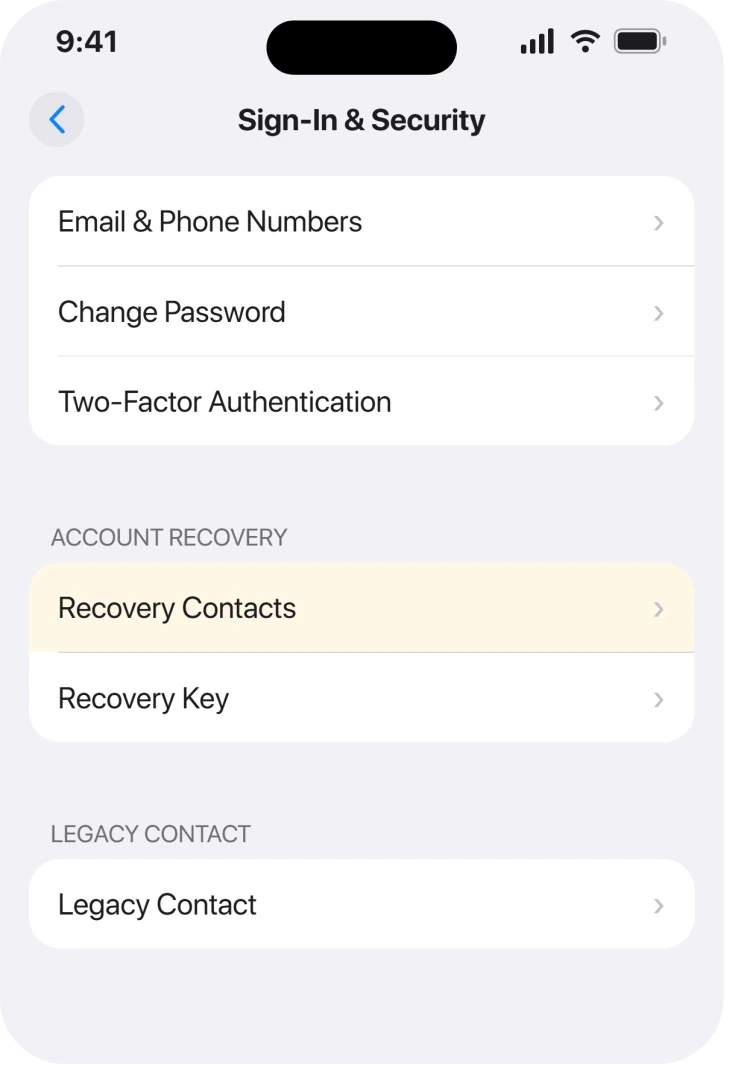
Go back into Settings, tap your name, tap Sign-In & Security, then Recovery Contacts. Add them again, and this time choose their email address rather than their phone number.
Owners report this is the difference, and a Level 10 member spelled the mechanism out for somebody staring at the same alert: "It's possible that they use their Apple ID to send iMessages, while you may have added the recovery contact using their phone number. There's a chance that iMessage isn't activated for their phone number on their device."
Their card holds two emails? Use the one their Apple Account runs on.
2. One forgotten device on your account can block the whole thing
Now a requirement almost nobody knows about. Nothing here concerns the other person.
Apple's recovery contact page puts it in the before-you-start list: "All of your Apple devices must be running iOS 15, iPadOS 15, or macOS Monterey 12 or later. You might be prompted to remove any devices with older software from your account that you aren't using."
Read that again, because it says all of your devices rather than the one in your hand.
An iPad in a drawer on iPadOS 14, an old iPhone you passed to a child, a Mac you have not opened since 2020. Any one of them is enough.
Open Settings, tap your name, and scroll to the device list at the bottom. Tap anything you no longer use and choose Remove from Account.
That costs you nothing, because the device can sign back in later.
It is also the fix people never reach, because they are busy troubleshooting the other person's phone.
3. Their device has to clear the same bar
The same version floor applies at their end. The alert never says which end failed.
Apple: "Your recovery contact must have an Apple device running iOS 15, iPadOS 15, or macOS Monterey 12 or later."
An iPhone 6s on iOS 12 will not do it. It can send messages all day and still fail here.
Ask them to open Settings, tap General, then About. Have them read you the Software Version line.
If it starts with 14 or lower, that is your answer, and retrying will not change it.
4. Add them from a Mac, because the Mac tells you more
This one fixes nothing by itself. It tells you what is broken, which here matters more.
The iPhone's alert is vague.
An owner on r/applehelp caught the difference: "Apple's error message on the iPhone is completely useless, but when I tried the same process on my MacBook, it gave me a slightly better hint: it claimed I wasn't using iMessage (even though I was)."
On a Mac the route is the Apple menu, System Settings, your name, Sign-In & Security, then Recovery Contacts.
So if all you get is "There was a problem adding your recovery contact. Try again later", borrow a Mac, because two minutes there tells you more than an hour on the phone.
5. Check that iMessage is genuinely activated at both ends
Narrower now. Do this before you blame the pairing.
Turned on and activated are two different states. A phone can show the iMessage switch green while still stuck part way through registering with Apple, so it looks fine and fails every check.
Both of you should open Settings, tap Apps, then Messages. Look under the iMessage switch.
If it says Waiting for activation, that is your real problem. iMessage refusing to activate is the page for it.
Apple states the requirement in one line: "You and your recovery contact must have iMessage turned on."
One more limit. Apple says "You can add up to five recovery contacts for your account." Already at five? The sixth will not go in.
6. Age and two-factor, the two silent disqualifiers
Two more documented conditions. Each one refuses without explaining.
Apple: "You and your recovery contact must be over the age of 13 (age varies by country or region)." So a child account in your Family Sharing group is out.
That catches parents, because family looks like the easy case and turns out to be the one that trips.
The other is two-factor authentication on your own account. Apple notes most accounts already use it, so this one is rare. An older account that never switched over cannot use recovery contacts at all, though.
If verification codes are part of what is failing for you, codes that never arrive covers that separately.
7. If they are outside Family Sharing, the invitation is still sitting there
Last. Nothing is broken here. Nothing has been added either.
Apple: "If you select someone in your Family Sharing group, they're added automatically. If you choose someone else, they need to accept the invitation in the Messages app."
That invitation is a real message landing in their Messages app, and it is easy to swipe past.
So tell them to open Messages, because Settings will show them nothing.
Ours, and marked as ours: we would have them check the filtered and unknown-sender lists too. Apple never says the invitation can land there. We have not seen it confirmed either. So check it, but do not count it as a cause.
Once they accept, Apple says "you'll see a message that they've been added as your account recovery contact."
What does not help
- Turning off MMS Messaging. This is doing the rounds as the fix. The owner who posted it on r/applehelp reported success. The first three replies underneath are "Not working for me", "Not working for me.." and "Doesn't work". It costs nothing to try and it is not the answer.
- Retrying the same contact detail. If it failed on their phone number once, it will fail again. Change the detail rather than the number of attempts.
- Deleting and recreating their contact card. The check never reads the card. It only takes the number or email you tapped.
- Waiting, despite what the alert says. "Try again later" is boilerplate on this screen rather than a diagnosis of a busy server.
If an email says your recovery contact was removed when you changed nothing, the removal email page shows how to check it in Settings.
Status: checked 19 August 2026 on iOS 26.6.1. Apple documents the requirements but never says which one failed, so every alert here is generic. Rungs 1 and 2 cover most reports.
Why does the alert say my recovery contact must use iMessage when they already do?
Because iOS checks the exact detail you tapped. Choose their mobile number, and if their iMessage is registered to their Apple Account email instead, the check fails on the number while iMessage works fine on their phone. Add them again by email.
What does "There was a problem adding your recovery contact" mean?
It is a generic failure and names no cause. Owners report the same attempt on a Mac produces a more specific message, so the fastest way to turn that alert into information is to try it once in System Settings.
Can an old iPad stop me adding a recovery contact?
Yes. Apple requires every device on your account to run iOS 15, iPadOS 15 or macOS Monterey 12 or later, not just the one in your hand. Remove an unused old device from your account list and that requirement clears.
Do recovery contacts get access to my account?
No. Apple states they "won't have any access to your account, only the ability to give you a code". It also says "to protect your privacy, Apple doesn't know who your recovery contacts are".
That last part matters, because it makes remembering who you chose your job rather than Apple's.
The Short Version
- Add them by email address, not by phone number. That is the commonest fix.
- Every device on your own account must be on iOS 15 or later, including ones you never use.
- Their device has to clear the same version floor.
- A Mac gives a more specific error than the iPhone does.
- Both of you need iMessage activated, not merely switched on.
- Under 13 will not work, and neither will an account without two-factor.
- Outside Family Sharing, they have to accept an invitation in Messages.
Where to Next
What actually matters is this. That alert is not describing your problem. It names iMessage because that was the last check to fail, and what actually failed is usually a detail you tapped or a device you forgot you owned.
If you get through this and it was none of the seven, tell me what it turned out to be. This screen gives out so little that every real answer is worth having, and I will put yours on the page.

Isaac Smith is the founder and editor of PC Glance, a website that covers computers, laptops, and technology. He is a tech enthusiast and a computer geek who loves to share his insights and help his readers make smart choices when buying tech gadgets or laptops. He is always curious and updated about the latest tech trends.