
The two buttons that have sat in the bottom corners of your Lock Screen for years are simply not there any more.
It is a small thing that turns out to matter at two in the morning when you want a torch, and I know how annoying it is to lose a button you used daily. Nothing broke. Those buttons became editable, and something you did moved them.
Give this five minutes and they will be back where you want them.
What actually changed
Those corners used to be fixed. Apple made them controls, the same kind of thing that lives in Control Center, which means they can be swapped out or removed entirely.
Apple says so on its custom Lock Screen page: "Swap the controls (like the flashlight): Tap on one of the controls, then tap" the minus badge.
So an empty corner is not a missing feature. It is a control somebody removed, and the somebody is usually you, mid-way through customising a wallpaper.
That also explains why this so often happens the same day you changed your Lock Screen picture. Building a new Lock Screen starts you from a fresh set of controls rather than carrying yours across.
Putting them back
Wake the phone but do not unlock past the Lock Screen. Press and hold on an empty part of it until the screens shrink, then tap Customize.
Choose Lock Screen, not Home Screen.
Tap the empty corner where the button used to be. A controls gallery opens.
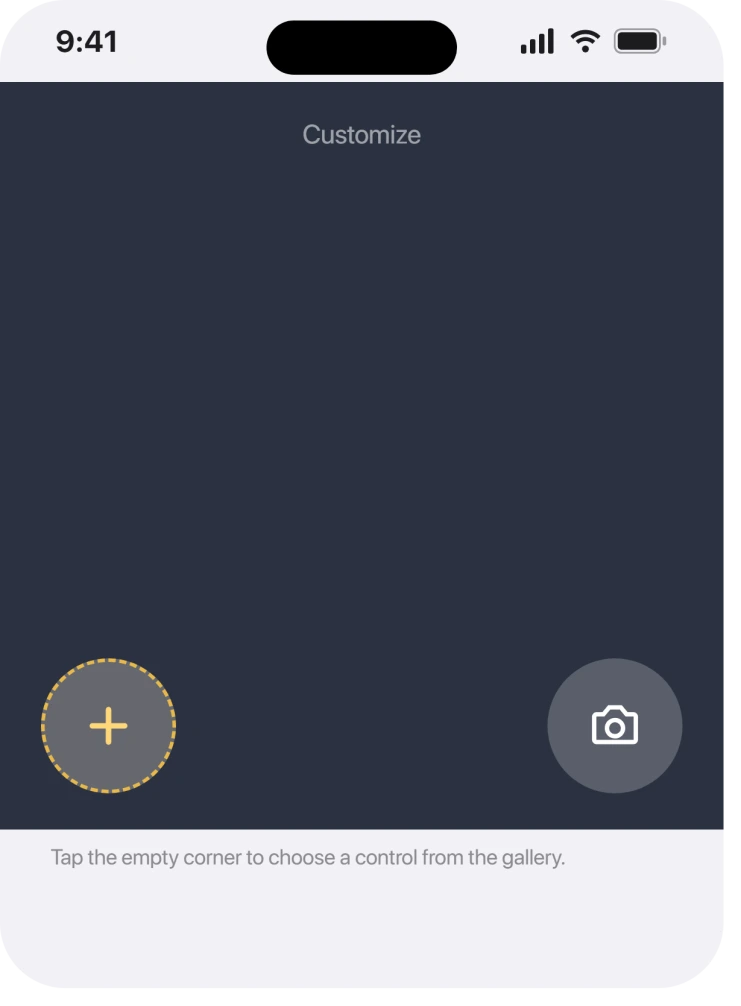
Search for Flashlight, or Camera, and tap it. Then tap Done at the top right.
Both corners work the same way, and you can put something else there instead if you would rather have Voice Memos or the Phone app.
If your Control Center is missing controls too, Live Activities not showing covers the neighbouring surface.
If the corner will not accept anything
Some readers find the corner does nothing when tapped. That is usually the wrong Lock Screen.
If you have several Lock Screens saved, editing one leaves the others alone. Swipe between them in the customise view and check the one you actually use, which is normally the one paired with your usual Focus.
We could not find a single owner report confirming a fix for this, which is worth saying rather than inventing one.
On the Apple Community thread about the flashlight icon vanishing, the only suggestion offered was to check Control Center settings, and nobody came back to say it worked.
When the whole Lock Screen is locked down
There is a separate case where you can see the buttons and nothing happens, or where quite a lot of the Lock Screen is missing at once.
Apple describes the setting that governs this: "You can make some commonly used features (such as Control Center, widgets, and media playback controls) available on the Lock Screen for easy access when iPhone is locked."
The route is Settings, then Face ID & Passcode or Touch ID & Passcode. Apple: "Turn on options below Allow Access When Locked."
A work or school phone can hold those off through a profile, in which case nothing you do on the Lock Screen will stick. Check Settings, General, VPN & Device Management if that sounds like yours.
The same profile can dim other controls too, and Talk to Siri greyed out is the commonest partner to it.
The flashlight that is there and refuses to light
Worth separating, because it looks like the same problem and is not.
Apple's flash checks start with testing the LED in Control Center. Remove an accessory that blocks the flash, then restart and retest.
Apple's temperature guidance confirms that heat can disable the flash temporarily. Let the phone cool before retesting. This corrects the earlier claim that Apple did not document it.
What does not help
- Restarting the iPhone. A removed control stays removed. There is nothing to reload.
- Resetting all settings. It may restore a default Lock Screen and it wipes every other preference you have set.
- Updating iOS. This is a customisation, not a bug, so an update has nothing to repair.
- Looking in Control Center settings. Lock Screen controls and Control Center are edited in different places, despite being the same kind of control.
Status: Lock Screen controls and LED failure are separate. Corrected 23 October 2026: Apple documents temporary flash shutdown when the iPhone gets too warm.
Why did the flashlight disappear from my iPhone Lock Screen?
Because the Lock Screen corners hold editable controls rather than fixed buttons. Apple documents swapping them, so an empty corner means the control was removed, which most often happens while building or changing a Lock Screen.
How do I get the camera icon back on my Lock Screen?
Press and hold the Lock Screen, tap Customize, choose Lock Screen, then tap the empty corner. Search the controls gallery for Camera, tap it, and tap Done. The same route restores the flashlight.
Why does changing my wallpaper remove the buttons?
Creating a new Lock Screen starts from a fresh set of controls rather than copying the ones you had. Editing an existing Lock Screen keeps yours, which is why the loss so often lines up with a wallpaper change.
Can I put something other than the flashlight there?
Yes. The gallery holds the same controls Control Center offers, so you can put Voice Memos, the Phone app or a shortcut in either corner instead.
The Short Version
- The corners hold controls now, not fixed buttons.
- Press and hold the Lock Screen, tap Customize, then tap the empty corner.
- Building a new Lock Screen gives you fresh controls rather than your old ones.
- Several saved Lock Screens means editing the wrong one changes nothing.
- Allow Access When Locked governs the wider Lock Screen, not these two.
- A visible button with no light needs a Control Center LED test; heat can temporarily disable the flash.
Where to Next
The reason I would not reset anything over this is that it is a customisation you can undo in about thirty seconds once somebody points at the right screen.
If your corner genuinely will not take a control back, tell me which iPhone and whether the phone is managed by an employer. That combination is the one case with no local fix, and it is worth naming properly.

Isaac Smith is the founder and editor of PC Glance, a website that covers computers, laptops, and technology. He is a tech enthusiast and a computer geek who loves to share his insights and help his readers make smart choices when buying tech gadgets or laptops. He is always curious and updated about the latest tech trends.